Finding a reliable wireless printer that fits a busy home or small office can be a challenge. This guide highlights top picks that balance performance, connectivity, and value. Each model supports wireless printing and essential multifunction features, helping you print, scan, copy, or fax with ease. The selections below cover inkjet options with color clarity, duplex printing, and user-friendly apps for cloud printing.
Summary of chosen products:
| Product | Brand | Key Benefits | Highlights |
|---|---|---|---|
| Brother Work Smart 1360 MFC-J1360DW | Brother | All-in-one, automatic duplex, cloud app printing | Color display, 20-sheet ADF, 150-sheet tray |
| HP DeskJet 2855e | HP | Best for home use, instant ink trial | Color print, scan, copy, 60-page tray |
| HP OfficeJet Pro 8125e | HP | Home-office ready, AI-enabled printing | ADJ, duplex, strong app support |
| Canon PIXMA TR4720 | Canon | Compact 4-in-1 with fax | Auto document feeder, wireless, versatile |
| HP Smart Tank 5101 | HP | Low-cost high-volume printing | Two years of ink, borderless prints |
Brother Work Smart 1360 MFC-J1360DW Review

The Brother MFC-J1360DW is a compact all-in-one designed for home offices needing versatile color printing. It offers automatic two-sided printing, a 20-page ADF, and a 150-page paper tray. A 1.8” color display simplifies setup and everyday tasks, with cloud app connections that let users print from and scan to Google Drive, Dropbox, Box, OneDrive, and more. Print speeds reach up to 16 ppm black and 9 ppm color, making it a solid choice for mixed-document workflows in small spaces. This model uses LC501 ink.
HP DeskJet 2855e Wireless All-in-One

The DeskJet 2855e provides essential color printing, copying, and scanning in a home environment with reliable wireless connectivity. It supports quick print speeds and includes an Instant Ink trial, which helps manage ongoing ink costs. The printer features a single-band Wi-Fi setup and a 60-page input tray, making it a practical option for families printing everyday documents, schoolwork, and recipes. It emphasizes user-friendly operation and compact design for small spaces.
HP OfficeJet Pro 8125e Wireless All-in-One

The OfficeJet Pro 8125e targets home offices with robust performance and AI-enabled printing for better document layouts. It supports wireless printing, scanning, copying, and an Automatic Document Feeder (ADF) for multi-page tasks. HP emphasizes reliable home-office workflow support and a strong companion app, helping users print from couches or desks with ease. The device is designed for steady color and black text output across a variety of documents.
HP Envy 6155e Wireless All-in-One

The Envy 6155e is well-suited for households needing everyday color documents and borderless photo printing. It delivers print speeds up to 7 ppm color and 10 ppm black, with AI-assisted formatting to optimize layouts. Features include color printing, scanning, copying, auto two-sided printing, and a 100-page input tray. It blends compact design with versatile functionality for family use, homework, and light creative projects.
HP DeskJet 2827e Wireless All-in-One

The DeskJet 2827e is designed for home use and quick daily tasks, including printing to-do lists, letters, and basic documents. It offers color printing, copying, scanning, and a 60-page input tray with HP AI features to optimize content. While not a premium model, its compact footprint and straightforward operation make it a practical choice for simple, everyday printing needs in a household or small apartment.
Canon PIXMA TR4720 All-in-One

The Canon PIXMA TR4720 is a versatile 4-in-1 with built-in fax and a compact footprint. It supports wireless printing and features an Auto Document Feeder for multi-page tasks. The TR4720 is designed for home use, offering flexible connectivity and reliable ink management, suitable for students and households needing document handling beyond basic printing.
HP Smart Tank 5101 Wireless All-in-One
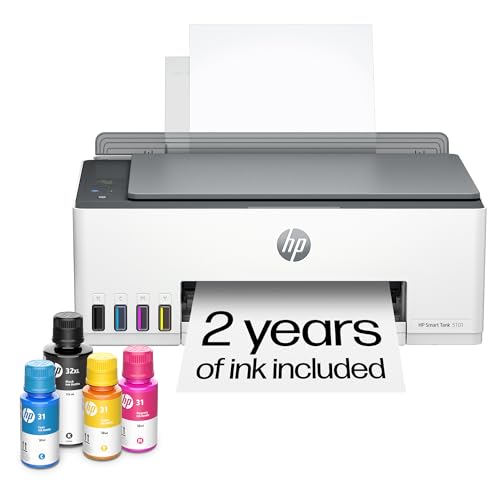
The HP Smart Tank 5101 emphasizes high-volume, low-cost printing with a refillable ink system. It includes two years of ink upfront and supports printing, copying, and scanning with borderless options. This model is ideal for families or small offices that print frequently and want predictable running costs, leveraging self-healing Wi-Fi and straightforward wireless operation on 2.4 GHz networks.
Buying Guide: Key Purchase Considerations
- Printing volume and ink strategy: For high-volume printing, consider refillable or long-lasting ink options (like HP Smart Tank) to reduce ongoing costs.
- Multifunction needs: If you require scanning, copying, and fax, ensure the model supports a reliable ADF and easy cloud integration.
- Connectivity and apps: Look for printers with robust mobile and cloud app support (Google Drive, Dropbox, OneDrive, etc.) and straightforward wireless setup.
- Duplex printing: Automatic two-sided printing saves paper and is beneficial for reports and homework packets.
- Paper handling: Check the tray size and optional ADF capacity to match typical document sizes and volumes in your household or small office.
- Print quality and speed: Balance the need for fast output with color accuracy for documents and photos, especially if you print graphics or images.
- Cost of ownership: Consider upfront price, ink/toner costs, and yield to estimate long-term value.