Finding a dependable wireless booster helps eliminate dead zones, improve streaming quality, and support more devices at home. This article highlights five top options and explains what to look for when choosing a booster, including coverage area, speed, device support, and ease of setup. Each product section includes a quick summary of features to help you compare at a glance.
| Product | Brand | Coverage | Max Speed | Key Benefit |
|---|---|---|---|---|
| TP-Link AC1200 WiFi Extender RE315 | TP-Link | Up to 1500 sq ft | 1.2 Gbps total | Excellent budget pick with OneMesh |
| TP-Link AX3000 WiFi 6 Range Extender RE715X | TP-Link | Up to 2400 sq ft | ~2400 Mbps | WiFi 6 with EasyMesh support |
| TP-Link AC1900 WiFi Range Extender RE550 | TP-Link | Up to 2100 sq ft | ~1300 Mbps 5 GHz / 600 Mbps 2.4 GHz | EasyMesh compatible and Gigabit Ethernet |
| GEYILO WiFi Extender | GEYILO | Up to 12,880 sq ft | Up to 1200 Mbps | Very long-range with many devices |
| NEMAKIN 2025 Fastest WiFi Extender | NEMAKIN | Up to 10,000 sq ft | Depends on model, up to 1000+ Mbps | High-capacity for large homes |
Note: The products listed are selected for broad coverage and multi-device support. Real-world results vary with home layout, walls, and interference. Always place boosters midway between your router and the areas you want to cover for best performance.
TP-Link AC1200 WiFi Extender RE315

Features include stronger Wi-Fi in every corner with adaptive path selection and One-Touch Connection for simple setup. The dual-band design delivers up to 867 Mbps on 5 GHz and 300 Mbps on 2.4 GHz, supporting a total bandwidth of 1.2 Gbps. External antennas help maximize coverage and reliability, extending the network to multiple rooms and devices. Ideal for eliminating dead zones in typical homes with mid-range device counts.
WiFi Extender Signal Booster (Zelikovitz)

This dual-band booster supports up to 1200 Mbps total speed and connects with up to 36 devices. The design emphasizes long-range performance to minimize buffering and dropouts, making it suitable for larger homes or spaces with walls that impede signal. The model emphasizes broad coverage and reliable performance for streaming, gaming, and video calls while maintaining compatibility with standard routers.
TP-Link AX3000 WiFi 6 Range Extender RE715X

This TP-Link model brings Wi‑Fi 6 capabilities, increasing efficiency and capacity for many devices. It provides dual-band performance with total bandwidth up to around 2400 Mbps and supports EasyMesh for seamless whole-home coverage. Three external antennas and Beamforming enhance coverage in larger homes and spaces with multiple walls, keeping gaming and streaming steady across rooms.
TP-Link AC1900 WiFi Range Extender RE550

RE550 offers dual-band performance with up to 1300 Mbps on the 5 GHz band and 600 Mbps on the 2.4 GHz band, delivering broad coverage up to 2100 square feet. It includes a Gigabit Ethernet port for a wired backhaul to a router or a main device, and it works with most routers. Its EasyMesh compatibility enables effortless multi-unit expansion for larger homes.
Xilkoze 2026 WiFi Extenders Signal Booster
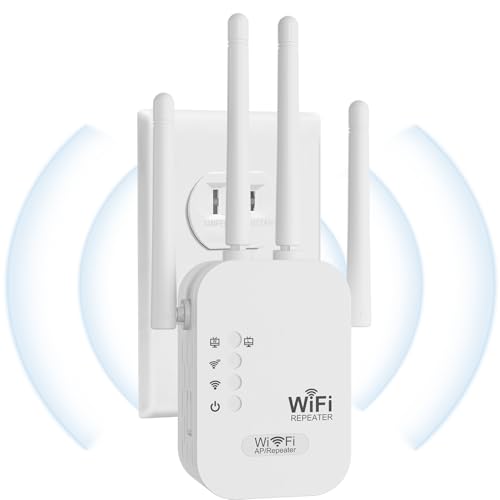
This extender advertises a very wide coverage area, reportedly up to 9789 square feet, and supports up to 32 or more devices with 2 external antennas. The model emphasizes stable 2.4 GHz performance at 300 Mbps alongside a practical long-range 5 GHz channel. It is positioned as a reliable option for large homes or offices where outlets and walls create coverage challenges.
TGDLLF WiFi Extender

Designed to cover up to 5000 square feet with dual-band operation and up to 45 connected devices, this extender emphasizes broad coverage for large homes. It supports a 2.4 GHz band with robust throughput and is compatible with most standard routers, providing a straightforward setup for expanding wireless reach across multiple rooms and floors.
Buying Guide: Key Purchase Considerations
- Coverage needs: Measure your home’s square footage and identify the furthest room from your router. Choose a booster rated for that area, keeping in mind walls and floors can reduce signal.
- Speed and band support: If you have multiple devices streaming 4K video, gaming, or videoconferencing, look for dual-band or tri-band options with speeds matching or exceeding your internet plan.
- Wi‑Fi standard: Wi‑Fi 6 devices benefit from newer extenders that handle more devices with less congestion. If you mainly have older devices, a solid Wi‑Fi 5 extender can still be effective.
- Ports and backhaul: A Gigabit Ethernet port on the extender enables a wired backhaul to improve stability. Consider this if your router is far away or if you run devices that require steady connections.
- Mesh and compatibility: Some extenders support Mesh or EasyMesh for seamless roaming between units. This can simplify setup in larger homes with multiple boosters.
- Ease of setup: Look for One-Touch or WPS-based pairing for quick setup. A user-friendly app can also help with configuration, monitoring, and firmware updates.
- Security: Choose devices with current security features and regular firmware updates to mitigate vulnerabilities and ensure ongoing protection for connected devices.
- Power placement and interference: Avoid placing boosters behind furniture or near microwaves and cordless phones. Positioning near the edge of the router’s coverage area typically yields best results.
For households with longer-range requirements, models with external antennas and higher power handling tend to perform better across larger spaces. Budget-friendly options can still provide solid performance for smaller homes or apartments, especially when paired with a capable router.