Finding the right Windows tablet can be challenging with so many options that blend laptop-like power and tablet versatility. This article highlights five standout Windows tablets that appeal to students, professionals, and casual users alike. Each selection balances performance, memory, storage, and portability, with practical features to support productivity, creativity, and everyday tasks. Explore models designed to run full Windows apps, connect easily to keyboards and styluses, and handle multitasking on the go.
Summary Table
- Microsoft Surface Pro 2-in-1 Laptop/Tablet (2025) — 12″ display, Snapdragon X Plus, 16GB RAM, 256GB
- Fusion5 Built in USA 10.1” Windows 11 Pro Tablet PC FWIN232 PRO N5 — 12GB RAM, 256GB SSD
- Tylvx 2-in-1 Tablet Win 11 — 10.1″ display, 12GB RAM, 256GB SSD, includes stylus
- Fusion5 Built in USA 10.1” Windows 11 Pro Rugged Tablet PC — 12GB RAM, 512GB SSD
- QAZIPO 2-in-1 Laptop/Tablet (2025) — 12” 2K display, N95 processor, 12GB RAM, 512GB SSD
Microsoft Surface Pro 2-in-1 Laptop/Tablet (2025)

The Microsoft Surface Pro 2-in-1 blends laptop performance with tablet flexibility. Marketed as a Copilot+ PC, it emphasizes AI-assisted tasks, writing, and smart multitasking while prioritizing data privacy. The device uses a 12-inch touchscreen and a Snapdragon X Plus 8-core architecture, supporting rapid app switching and smooth navigation. When used with a keyboard, it converts into a full laptop experience, but its built-in kickstand makes it comfortable as a tablet for on-the-go work, note-taking, or media consumption.
Key features include built-in AI tools for productivity, robust security to protect work data, and a versatile 2-in-1 design that adapts to work or travel needs. This model is aimed at users who want Windows power with mobile convenience and advanced smart features for writing, summarizing, and multitasking with privacy in mind.
Fusion5 Built in USA 10.1” Windows 11 Pro Tablet PC FWIN232 PRO N5
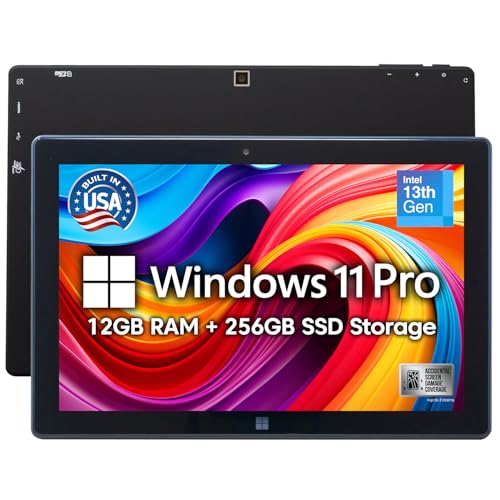
Designed and assembled in the United States, this Fusion5 model emphasizes reliability and local support. It packs 12GB of RAM and 256GB SSD storage, with an additional microSD slot for expanded capacity. The 10.1-inch display keeps the device highly portable, making it suitable for fieldwork, note-taking, and light creative tasks. The inclusion of a two-year full warranty plus accidental damage coverage provides added peace of mind for students and professionals who frequently travel or work in environments where drops and spills can occur.
The device runs Windows 11 Pro, ensuring compatibility with a wide range of business and productivity software. The rugged yet compact form factor makes it a practical choice for those who need a dependable Windows tablet for everyday tasks and on-site work without sacrificing performance.
Tylvx 2-in-1 Tablet Win 11 10.1″
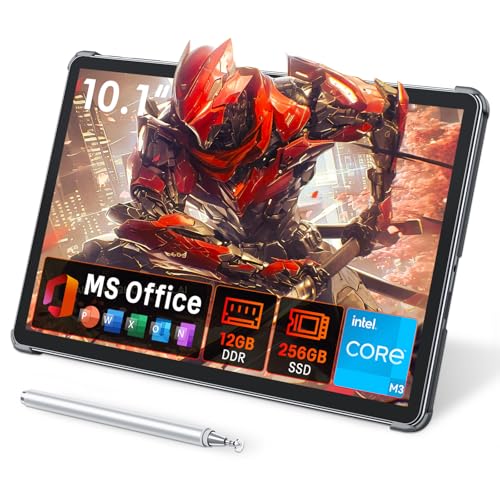
The Tylvx 2-in-1 tablet offers a compact 10.1-inch display and a strong 12GB RAM/256GB SSD configuration, delivering a robust performance profile for its size. It includes a precision Stylus Pen, enabling natural drawing and handwriting for creative tasks, note-taking, and design work. The device supports Windows 11 and emphasizes a smooth workflow across multitasking scenarios, making it well-suited for students, remote workers, and casual creators who value portability without sacrificing speed.
In addition to stylus support, the 2-in-1 form factor allows quick transitions between tablet mode for reading or sketching and laptop mode for productivity. The metal chassis provides a premium feel while maintaining light weight for everyday carry. This model balances performance and portability for users who want a capable Windows tablet at a compact size.
Fusion5 Built in USA 10.1” Windows 11 Pro Rugged Tablet PC

This rugged Fusion5 model is designed for demanding environments. It emphasizes durability with rugged, shockproof, and dustproof construction, ideal for outdoor work, industrial sites, or classrooms. It includes 12GB RAM and 512GB SSD storage, which supports multitasking and large file management. The two-year warranty plus accidental damage coverage enhances reliability for users facing challenging conditions, ensuring continued productivity even after minor incidents. It runs Windows 11 Pro, aligning with business software requirements and enterprise workflows.
Users benefit from the large storage capacity, dependable performance, and rugged build that withstands frequent travel or tough work settings. The device is positioned as a practical choice for field technicians, construction sites, and education professionals who need a sturdy, capable Windows tablet with substantial offline storage.
QAZIPO 2-in-1 Laptop/Tablet (2025)

The QAZIPO 2-in-1 combines a 12-inch 2K IPS touchscreen with a capable Intel N95 processor, delivering solid multitasking performance for home, school, and light work tasks. It ships with 12GB of RAM and a 512GB SSD, offering ample memory and fast storage for applications, documents, and media. The 2-in-1 design, with the included keyboard, suits users who want a detachable laptop experience that can switch to a tablet for note-taking, drawing, or reading. The device targets students and professionals seeking versatile Windows portability with robust specifications in a mid-sized form factor.
Additional Options For Depth
Other models in the market offer similar configurations, including higher RAM, larger screens, or specialized features like stylus support, enhanced battery life, or premium materials. When evaluating options, users should consider screen size versus portability, processor performance, RAM capacity, storage expansion, and accessory ecosystems (keyboards, pens, docks). Identifying primary use cases—note-taking, design work, multimedia, or travel—helps narrow choices to a device that balances performance with practical everyday use.
Buying Guide: Key Purchase Considerations And Comparisons
- Performance and multitasking: Look for at least 8–12GB RAM and a solid-state drive. For heavy design or software use, higher RAM (16GB or more) and fast storage improve responsiveness and multitasking ability.
- Display size and quality: 10–12.5 inch screens are ultra-portable; 12–13 inch displays offer more workspace. Consider resolution (full HD or higher) and touch responsiveness for handwriting or drawing.
- 2-in-1 versatility: A tablet-laptop hybrid is ideal if you switch between note-taking and document work. A built-in kickstand and a compatible keyboard (often sold separately) enhance productivity.
- Processor and OS: Windows 11 compatibility matters for software compatibility. For maximum future-proofing, prioritize devices with modern processors and robust AI features where available.
- Storage expansion: MicroSD or external drives are important if you store large media files or project libraries. Look for models with 256GB or more SSD and expandable options.
- Durability and form factor: Ruggedized models are better for fieldwork or industrial use. Consider weight, battery life, and chassis materials for daily carry.
- Warranty and support: A two-year warranty and accidental damage protection add value for frequent travelers and students who may drop devices or encounter spills.
- Accessory ecosystem: Ensure compatibility with styluses, keyboards, docks, and protective cases to maximize productivity with Windows applications and creative tools.
- Price-to-performance: Balance the device’s price with its specs and expected usage. A mid-range configuration often meets most users’ needs without paying for features they won’t use.
Across these selections, users gain access to Windows ecosystems, compatibility with common software suites, and the flexibility of a portable, touch-friendly interface. The best choice depends on individual priorities such as portability, screen size, RAM, storage, and whether ruggedness or AI-assisted features are a priority. This guide emphasizes practical decision-making to match devices with real-world tasks and environments.