Finding the best USB stick depends on what you value most—speed, capacity, durability, or smart backup features. This guide highlights five well-rounded options suited to different buyers, from power users needing fast transfers to travelers seeking reliable photo backups. Each pick is explained with who it’s best for, why it stands out, and a practical limitation to consider.
| Product | ||
|---|---|---|
| Samsung BAR Plus 128GB | 128GB | Fast transfers and rugged durability |
| ThePhotoStick Omni 128GB | 128GB | Automatic backup across devices |
| GARMESE 128GB USB 3.0 | 128GB | Reliable multi-device storage |
| 64GB | Budget-friendly everyday use | |
| SamData 32GB USB 2.0 (2 Pack) | 32GB each | Cost-effective multi-pack for schools or teams |
Samsung BAR Plus 128GB USB 3.1 Flash Drive
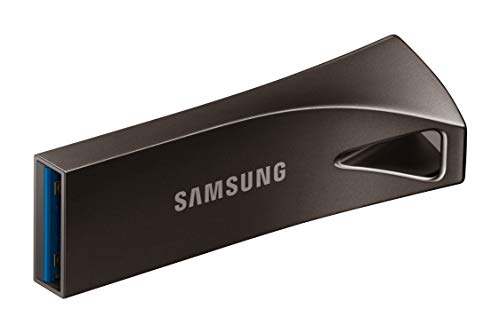
The Samsung BAR Plus 128GB offers high-speed read capabilities up to 300 MB/s and a rugged metal casing. It is best for users who need quick transfers of large files, such as 4K videos or photo libraries. The built-in keyring enhances portability, while a robust construction provides durability against daily wear and water exposure. A potential limitation is that speeds are most noticeable with USB 3.1 hosts; performance on older systems may be reduced.
ThePhotoStick Omni 128GB USB Drive

ThePhotoStick Omni 128GB is designed for automatic backup across devices. It is best for users who want a simple, one-device backup solution for photos and videos, including compatibility with iPhone, Android, Mac, and PC. It stores a large collection and reduces manual backup steps. A caveat is that the automatic search process may occasionally miss non-media files or require initial setup to optimize for different devices.
GARMESE 128GB USB 3.0 Flash Drive
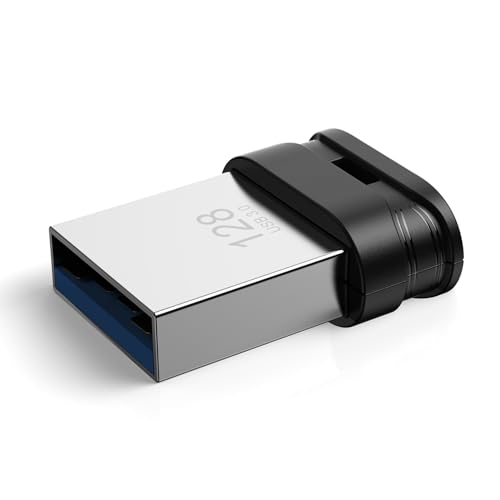
The GARMESE 128GB USB 3.0 drive emphasizes fast transfers and rugged design. It suits professionals who need reliable, on-the-go storage for large files, with broad compatibility across Windows, macOS, and Linux. For this model, a limitation is that capacity is fixed at 128GB; users with bigger libraries may require multiple sticks or larger options.
SamData 32GB USB 2.0 Flash Drives (2 Pack)

The SamData 32GB USB flash drives come in a two-pack and are ideal for students or teams needing affordable, everyday storage. They are plug-and-play with broad compatibility and a simple capless design to reduce cap loss. A limitation is the USB 2.0 interface, which means slower transfer speeds compared to USB 3.x options, especially for large files.
Maspen 64GB USB 2.0 Thumb Drives (2 Pack)

The Maspen 64GB set provides solid everyday storage with a 2.0 interface geared toward general use, school, or business tasks. It’s best for budget-conscious buyers who need multiple drives for distribution or backup. A limitation is slower USB 2.0 speeds compared to USB 3.x models, which can affect large data transfers.
Buying Guide
What capacity do you really need?
Choose capacity based on typical file sizes and future needs. For photo backups or documents, 64–128GB is common. For media libraries or 4K video, 256GB+ may be preferable. Consider multi-pack options if you distribute or share drives often.
What interface and speed matter?
USB 3.0/3.1 drives deliver faster transfers than USB 2.0. If you work with large files or copy libraries, prioritize USB 3.x. On older computers, USB 2.0 will still function, but transfers take longer.
Durability and design considerations
A metal or rugged housing can improve durability. A swivel or capless design protects connectors and reduces the chance of losing caps. If you travel or work outside, look for water- and shock-resistant builds.
Backup features and compatibility
Automatic backup sticks, like ThePhotoStick Omni, simplify data protection but may not suit all file types. Check cross-device compatibility (Windows, macOS, iOS, Android) to ensure smooth use with your devices.
Value for money
Bulk packs can reduce per-unit cost and are useful for schools or teams. If you only need a single drive, a premium option with higher speed and durability may offer better long-term value.
How to choose between USB 3.x and USB 2.0?
Use USB 3.x when speed is a priority. Choose USB 2.0 for lighter usage and budget-friendly needs where transfer speed is less critical.
FAQ
- What’s the best USB stick for high-speed transfers? Look for USB 3.1 or USB 3.2 drives with read speeds around 300 MB/s and above, such as premium metal-cased models.
- Are multi-pack drives good for schools? Yes, they reduce per-unit cost and simplify distribution of storage across students or staff.
- Do I need a rugged USB drive? If you travel often or work in challenging environments, a rugged or waterproof design helps protect data.
- Is automatic backup reliable? Automatic backup drives simplify protection, but verify device compatibility and supported file types for your workflow.
- Can USB drives work with iPhones or iPads? Some drives offer cross-device compatibility or companion apps; verify manufacturer compatibility with your iPhone or iPad before purchase.