The best digital pens combine precision, smooth writing, and broad compatibility to fit different workflows. This guide profiles five standout options and explains who each one is best for. Whether you’re a student, professional, artist, or casual note-taker, these picks help you choose a pen that matches your device and style. The top products are Lenovo Digital Pen 2, STAEDTLER Noris Jumbo Digital Stylus, OOCLCURFUL Stylus, SyncPen Digital Notebook Set, and XP-PEN StarG640. Use the quick table to compare core ideas at a glance.
| Product | Best For | Key Benefit |
|---|---|---|
| Lenovo Digital Pen 2 | Laptop users with Lenovo models | Extended battery life and dual side buttons |
| STAEDTLER Noris Jumbo Digital Stylus | EMR-compatible tablets and laptops | Battery-free, no pairing necessary |
| OOCLCURFUL Stylus | Direct drawing and handwriting on iPad and Android | No Bluetooth, quick power-on for fast use |
| SyncPen Digital Notebook Set | Note-takers who want real-time sync | Real-time handwriting to app syncing |
| XP-PEN StarG640 | Digital artists and students | Battery-free pen for smooth drawing |
Lenovo Digital Pen 2 (Laptop)

Best for Lenovo laptop users seeking a natural-feel stylus with two customizable side buttons. The Lenovo Digital Pen 2 offers 4,096 pressure levels and an elastomer tip that mimics a real pen, providing precise control for sketching and note-taking. Its extended battery life supports longer sessions on compatible models, making it a practical choice for students and professionals who rely on pen input throughout the day.
Who it’s best for: Users with IdeaPad or Yoga notebooks who want seamless integration and a familiar grip. Why selected: It combines a premium metal finish with a comfortable tip and long-lasting power, enabling all-day productivity without frequent recharging. Caution: Availability limited to specific Lenovo touch-screen models; verify compatibility with your device before purchasing.
STAEDTLER Noris Jumbo Digital Stylus
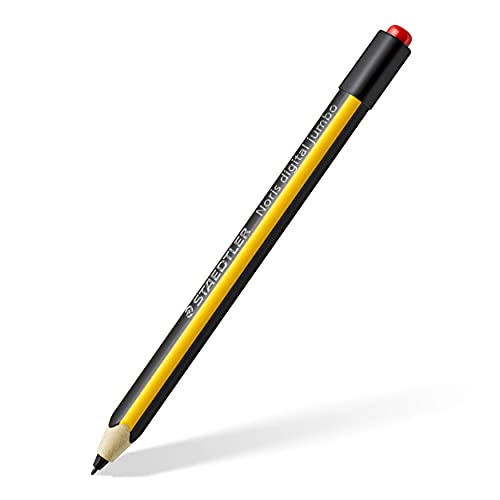
Best for users who want a battery-free stylus with a natural writing feel on EMR devices. The STAEDTLER Noris Jumbo uses electromagnetic resonance (EMR) technology to deliver a smooth 0.7mm point and 4,096 pressure levels without charging or pairing. It’s especially suitable for classrooms, offices, or on-the-go note-taking where a quick start matters more than advanced features.
Who it’s best for: Students, teachers, and professionals needing reliable palm-rejection and no-fuss usage. Why selected: Its battery-free design reduces maintenance and it provides a familiar hexagonal shape for comfortable handling. Caution: EMR compatibility varies by device; check your tablet or laptop’s support list before buying.
OOCLCURFUL Stylus for Touch Screens
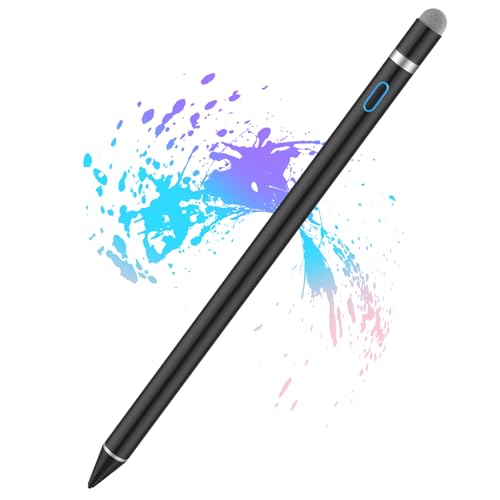
Best for iPhone, iPad, and Android users who want a quick, Bluetooth-free stylus for drawing and handwriting. This stylus emphasizes sensitivity and a precise 1.5mm tip to produce fine lines suitable for sketching or note-taking, with fast power-on and no Bluetooth requirement. It’s a practical pick for casual artists and students who prefer immediate usability without setup steps.
Who it’s best for: iPad or Android users seeking a simple, reliable stylus for everyday drawing. Why selected: The absence of Bluetooth simplifies use and reduces pairing hassles, while the 1.5mm tip supports clear handwriting and drawing. Caution: The stylus lacks Bluetooth and may not support pressure sensitivity on all devices; verify device compatibility for best results.
SyncPen Digital Notebook Set

Best for note-takers who want real-time syncing between paper and digital notes. The SyncPen set captures handwriting strokes as they occur in a traditional A5 notebook and syncs them to an app with AI handwriting recognition across 71+ languages. It’s ideal for students, researchers, and professionals who value a paper feel with digital backup and searchability.
Who it’s best for: People who maintain handwritten journals or lecture notes and need immediate digital copies. Why selected: Real-time sync and offline readability offer a robust workflow for cross-device access. Caution: Requires the SyncPen app for full functionality; ongoing subscription-free access is stated but features depend on app support.
XP-PEN StarG640 Drawing Tablet

Best for digital artists and students who want a compact, battery-free drawing experience. The StarG640 uses a battery-free PN01 stylus for smooth lines and immediate responsiveness, ideal for online teaching, sketching, and note-taking. It works with multiple operating systems and integrates well with common office apps for quick annotation and signing tasks.
Who it’s best for: Creators who need a reliable drawing tablet with a low-profile design. Why selected: Battery-free stylus reduces interruptions and charges, enabling extended drawing sessions. Caution: Small active area may limit large canvas work; consider a larger tablet if you focus on expansive artwork.
Buying Guide
What to consider when choosing a digital pen
- Device compatibility: Confirm the pen works with your laptop, tablet, or phone, including the exact models and OS versions you use.
- Power and charging: Decide between battery-free (always ready) and rechargeable options based on your daily use and charging convenience.
- Pressure sensitivity: Higher pressure levels typically yield more precise line variation for drawing and note-taking.
- Tip type and feel: Look for a tip size close to a real pen point (often 0.7–1.5 mm) for natural writing or drawing.
- Palm rejection and grip: If you rest your hand on the screen, palm rejection improves comfort and reduces stray marks.
- Form factor and grip: Consider weight, balance, and the shape (cylindrical vs hexagonal) for long sessions.
- Latency and precision: Quick response matters for fluid drawing and accurate handwriting recreation.
- Software support: Some pens pair with companion apps offering handwriting recognition, note organization, or cloud sync.
How to compare top options at a glance
- Best for Lenovo laptop users: Lenovo Digital Pen 2 for extended battery life and model-specific compatibility.
- Best battery-free option: STAEDTLER Noris Jumbo, with no charging or pairing required.
- Best for quick start on iPad/Android: OOCLCURFUL Stylus with fast power-on and simple use.
- Best for real-time digitization of notes: SyncPen with paper-to-app synchronization and AI recognition.
- Best compact drawing tablet: XP-PEN StarG640 with a battery-free stylus for uninterrupted drawing sessions.
Which pen should you choose?
Choose Lenovo Digital Pen 2 if you primarily use compatible Lenovo laptops and value dual side buttons plus longer battery life. Pick STAEDTLER Noris Jumbo if you want a battery-free experience with EMR precision and minimal setup. Opt for OOCLCURFUL if you need a simple, Bluetooth-free stylus ready to use on iOS or Android devices. Go with SyncPen for a notebook-to-app workflow that preserves handwriting with instant syncing. Select XP-PEN StarG640 if you’re after a compact, battery-free tablet for drawing and education tasks.
FAQ
- Q: Do these pens work without Bluetooth?
- A: Several options are Bluetooth-free or battery-free, but always verify device compatibility.
- Q: Are there palm-rejection features?
- A: Palm rejection is available on some EMR and advanced stylus models; check device support.
- Q: Can I use these pens for note-taking and drawing?
- A: Yes; most pens support both writing and drawing, with varying levels of pressure sensitivity.
- Q: Do any require drivers or pairing?
- A: Some require no drivers, others may need pairing; refer to each product’s compatibility details.