For calculus work, the right calculator can streamline limits, derivatives, integrals, and series. This guide highlights five solid choices that balance power, ease of use, and exam-friendly features. Whether you’re a high school student tackling AP Calculus, a college engineering major, or a math minor, these calculators are well-suited to different workflows and budgets. The top picks emphasize natural textbook displays, capable math engines, and reliable programming options for symbolic and numeric tasks. Use the quick comparison table below to see who each model is best for and why it stands out in calculus workflows.
| Product | Best For | Key Strength |
|---|---|---|
| Texas Instruments TI-84 Plus CE Color Graphing Calculator | AP Calculus, engineering students | Bright color display, preloaded apps, rechargeable |
| Casio fx-115ES Plus 2nd Edition | Scientific calculations, statistics, engineering basics | Natural Textbook Display, 280+ functions |
| Texas Instruments TI-84 Plus Graphics Calculator | Graphing-heavy calculus tasks with geometry | Multiple graphs, Cabri Jr. integration |
| Casio fx-9750GIII Graphing Calculator | STEM coursework, classroom use | Natural display, Python programming |
| Texas Instruments TI-Nspire CX II CAS | Advanced calculus, symbolic algebra | Color screen, student software bundle |
Texas Instruments TI-84 Plus CE Color Graphing Calculator
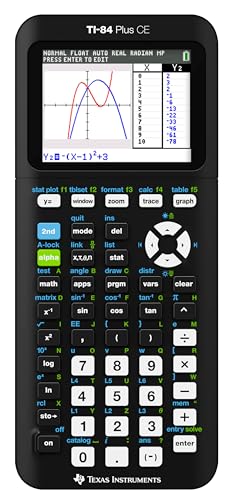
The TI-84 Plus CE Color is ideal for calculus students who need reliable graphing, a vivid display, and long battery life. The high-resolution, full-color backlit screen supports multi-function graphs, while horizontal and vertical split-screen options help compare functions side by side. This model is best for learners who perform rapid graphing, plotting, and numerical checks of limits or derivatives. A rechargeable battery and preloaded apps enhance daily use. A potential limitation is the learning curve for advanced functions beyond standard calculus tasks.
Casio fx-115ES Plus 2nd Edition

The Casio fx-115ES Plus 2nd Edition covers 280+ functions and features NATURAL TEXTBOOK DISPLAY℠, showing fractions and equations as in textbooks. It’s a strong pick for students who need a capable scientific calculator with solid calculus support, including integral and summation capabilities. It’s particularly suitable for quick, on-paper derivations and multi-step problem-solving. A limitation is that it’s not a full graphing calculator, so it can’t visually render complex graphs the way a graphing model can.
Texas Instruments TI-84 Plus Graphics Calculator

The TI-84 Plus Graphics blends standard calculus graphing with enhanced geometry tools, making it a fit for students who need to analyze functions, intersections, and area under curves. It comes preloaded with software and can handle multiple graphing tasks simultaneously, which helps when exploring multiple derivative or integral scenarios. This model is best for users who want robust graphing capabilities and an established, classroom-tested interface. A caution: it may be heavier and bulkier than simpler scientific calculators.
Texas Instruments TI-36X Pro Engineering/Scientific Calculator

The TI-36X Pro is designed for curricula that restrict graphing capabilities. It’s best for exams or coursework environments where algebraic manipulation and precise numerical results are needed without graphing. MultiView lets you compare calculations side-by-side, which is useful for checking derivative rules or integral approximations. Choose this if you must avoid graphing features while performing advanced math computations. A limitation is its lack of dedicated graphing tools for visualizing functions.
Texas Instruments TI-Nspire CX II CAS

The TI-Nspire CX II CAS targets advanced calculus and symbolic algebra with a color screen and a robust software bundle. Its CAS (Computer Algebra System) enables symbolic differentiation, integration, and algebraic manipulation, making it a strong choice for engineering and higher-level coursework. Best for users who need a powerful, all-in-one device. One limitation is the steeper learning curve and higher price point relative to non-CAS graphing models.
Buying Guide
What should you consider when selecting a calculus-capable calculator?
- Graphing needs: Do you need full graphing or primarily symbolic algebra? Graphing models excel for visualizing functions and area under curves, while non-graphing options stay compact and simple.
- Display quality: A color display, natural textbook display, or large screen helps interpret fractions, exponents, and layer calculations more clearly.
- Programmability: Some exams restrict programming. If allowed, programmability can automate derivative rules, integrals, and repetitive tasks.
- Exam compatibility: Check if your curriculum or exam requires a non-CAS device or a specific model series.
- Battery and portability: Rechargeable batteries are convenient; consider battery life if you’ll use the device extensively away from charging.
FAQ
- What is the best calculator for calculus in college?
– For symbolic calculus and advanced tasks, TI-Nspire CX II CAS is a strong option; for graphing with ease, TI-84 Plus CE is widely supported. - Do I need a CAS calculator for calculus class?
– CAS can simplify symbolic work, but some courses restrict CAS devices during exams. Check course requirements. - Which calculator is easiest to learn for calculus?
– Casio fx-115ES Plus has a natural textbook display and straightforward functions that aid initial learning. - Can I use a non-graphing calculator for calculus?
– Yes, for basic calculus like derivatives and integrals, but graphing helps with visual understanding of functions. - Are color displays worth it for calculus work?
– Color displays help distinguish multiple graphs and functions, improving clarity during problem solving. - Is a rechargeable calculator better than battery-powered?
– Rechargeable models reduce ongoing battery purchases and are more convenient for daily use.