Choosing the right laser color printer can streamline workflows, deliver crisp color documents, and fit busy office environments. This guide highlights top color laser printers, focusing on speed, connectivity, media handling, and ease of use. Each option is evaluated on professional output, reliability, and value for small teams or productive home offices.
Product Snapshot
| Product | Brand | Highlights | Key Benefit |
|---|---|---|---|
| HP Color LaserJet Pro MFP 3301sdw | HP | 26 ppm, all‑in‑one, TerraJet toner | Fast color copies and scans for busy teams |
| Brother HL-L3220CDW | Brother | 19 ppm, wireless, 250‑sheet tray | Solid home office color printer with mobile print |
| Brother MFC-L3720CDW | Brother | 19 ppm, auto duplex, 50‑page ADF | Versatile with document handling |
| Canon Color imageCLASS LBP646Cdw | Canon | 26 ppm, duplex, wireless | Compact color laser with fast output |
| HP Color Laserjet Pro 4301fdw | HP | 35 ppm color, fax, auto duplex | High‑speed color for demanding teams |
HP Color LaserJet Pro MFP 3301sdw – All‑In‑One Color Laser

The HP Color LaserJet Pro MFP 3301sdw combines printing, scanning, copying, and fax capabilities in a compact office‑ready design. Designed for small teams, it delivers professional‑quality color documents with reliable performance. It offers print speeds up to 26 pages per minute in black or color, supporting quick turnaround on color reports and presentations. The TerraJet toner system emphasizes vivid color for more impactful visuals. Uses Original HP 218A standard and 218X high‑yield cartridges for consistent results.
Key considerations for capex and maintenance include dealer support, cartridge availability, and cost per page. The 3301sdw can handle typical office tasks, while its duplex printing and ADF support streamline multi‑page jobs. For teams prioritizing color fidelity and integrated scanning, this model provides a balanced mix of speed, quality, and durability.
Brother HL-L3220CDW Color Laser Printer

The Brother HL-L3220CDW focuses on professional home and small office printing with a laser‑quality color output at 19 pages per minute. Wireless connectivity enables printing from laptops, smartphones, and tablets, with built‑in security features to protect sensitive documents. A 250‑sheet paper tray minimizes interruptions during longer print runs, while a flexible paper handling option accommodates envelopes and specialty media through a manual feed slot. This model emphasizes reliability and user‑friendly setup for everyday office tasks.
From a purchasing perspective, consider total cost of ownership, including toner yields and replacement cycles. The HL‑L3220CDW is well suited for teams needing reliable color documents, with straightforward wireless printing and adequate paper capacity for typical office workloads.
Brother MFC-L3720CDW Wireless Color Laser Printer

The Brother MFC-L3720CDW is a robust all‑in‑one color laser printer with a scanner, copier, and fax option. It delivers up to 19 color pages per minute and features dual‑band wireless networking (2.4 GHz/5 GHz), Wi‑Fi Direct, and USB 2.0 for flexible connectivity. The 50‑sheet auto document feeder and 250‑sheet paper tray support multi‑page jobs, while auto duplex printing reduces paper usage. This model suits busy offices that need efficient scanning and copying alongside color printing.
Key decision points include compatibility with your network environment and whether you need fax capability. If your team requires frequent multi‑page scans and copies, the MFC‑3720CDW offers a strong balance of speed, features, and expandability.
Canon Color ImageCLASS LBP646Cdw

The Canon Color imageCLASS LBP646Cdw emphasizes compact design with 26 pages per minute in color and monochrome, making it suitable for small offices and home offices that require color output without sacrificing space. It supports duplex printing, wireless setup, and straightforward mobile printing options. The device is designed to deliver fast color prints with reliable performance in a smaller footprint, which can be appealing for desks or shared spaces with limited room.
When evaluating, assess channel support, firmware stability, and the balance between print speed and color accuracy. The LBP646Cdw is attractive for teams prioritizing space efficiency and dependable color printing in a compact package.
HP Color LaserJet Pro MFP 4301fdw
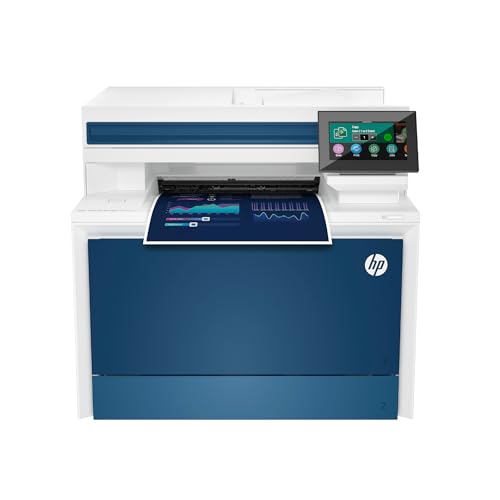
The HP Color LaserJet Pro 4301fdw is designed for faster color printing with heavy office workloads. It features a color print speed up to 35 pages per minute, along with scanning, copying, and fax capabilities. Auto duplex printing and an auto document feeder support efficient multi‑page tasks, while intelligent Wi‑Fi connectivity helps maintain a stable connection across devices. This model is well suited for teams that demand high‑volume color output and robust multi‑function capabilities.
Consider long‑term support, serviceability, and supply availability when choosing a higher‑speed model. The 4301fdw provides a strong option for expanding color output without adding significant hardware complexity.
Buying Guide: Color Laser Printer Considerations
- <strong print speed: For busy offices, color print speed matters. Look for models offering 19–35 pages per minute in color, depending on your workload.
- Multi‑function needs: If you require scanning, copying, and fax, prioritize MFP variants with reliable document feeders and duplex capabilities to save time and paper.
- Duplex printing: Automatic two‑sided printing reduces paper usage and cost per page, especially for reports and presentations.
- Paper handling: Assess input tray capacity and media versatility. A 250‑sheet tray is common; consider additional trays for larger jobs.
- Connectivity: Wireless, Ethernet, and USB options improve accessibility. Wi‑Fi Direct and mobile printing support boosts flexibility for mixed devices.
- Color fidelity: For marketing materials, color accuracy and consistency matter. Check toner formulation and print quality reviews.
- Cartridges and cost per page: Compare standard and high‑yield toner options. High yield cartridges reduce replacements and downtime.
- Footprint and noise: Space constraints matter in small offices. Assess the printer’s footprint and noise level for shared spaces.
- Security: Look for secure print features, user authentication, and firmware updates to protect sensitive documents.
- Maintenance and support: Availability of genuine toner, replacement parts, and local service support will influence long‑term reliability.
In evaluating these options, balance speed, color quality, and durability with total cost of ownership. For teams needing robust color output and multifunction capabilities, the HP and Canon models provide strong options. For compact spaces and straightforward color printing, Brother models offer reliable performance with practical connectivity. This selection aims to cover diverse office sizes and printing demands without focusing on a single feature set.