The current generation of e Ink tablets combines paper-like displays with powerful note-taking features, making them a compelling alternative to traditional tablets for reading, writing, and organization. This guide highlights five top options, detailing their strengths for students, professionals, and casual readers alike. Each profile includes a direct link to the product page, a quick-image reference, and the key specs you’ll care about when choosing your next e Ink device.
Overview at a glance:
| Product | Brand | Best For | Screen | Storage |
|---|---|---|---|---|
| BOOX Note Air 5 C | BOOX | Color ePaper notebooks and note-taking | 10.3″ Kaleido 3 | 64GB |
| BOOX Go Color 7 Gen II | BOOX | Color reading and light productivity | 7″ Kaleido 3 | 64GB |
| Penstar eNote 2 | Penstar | Paper-like writing with smart AI | 10.3″ 300 PPI | Base storage not listed |
Note: All devices use e Ink technology to deliver long battery life and glare-free reading experiences. Availability, storage options, and included accessories vary by model; check each listing for the latest details.
BOOX Note Air 5 Color E Ink Tablet

The BOOX Note Air 5 C combines a high-resolution 10.3″ Kaleido 3 display with 4,096-color rendering and an Android 15 operating system. It supports a wide range of document formats and ebook types, including PDFs, EPUBs, MOBIs, and DJVU, making it suitable for both reading and note-taking in one device. The tablet includes a BOOX stylus with 4,096 levels of pressure sensitivity and a capacitive touchscreen, enabling precise handwriting and sketching. A fingerprint-enabled power button, USB-C with OTG, and a microSD slot add practical connectivity and storage options. With 430 g weight and a CTM front light, it aims to balance portable reading with immersive color notes for mixed-media tasks.
Key specs at a glance:
- Screen: 10.3″ Kaleido 3 color, 2480 x 1860 B/W, 1240 x 930 color
- RAM/Storage: 6GB RAM, 64GB ROM
- Connectivity: Wi-Fi, BT 5.1
- OS: Android 15
- Ports: USB-C, microSD
BOOX Go Color 7 Gen II E Ink Tablet

The BOOX Go Color 7 Gen II offers a compact 7″ Kaleido 3 display with 4,096-color performance. It is designed for color document viewing and light note-taking on the go. The device runs on Android-based software and ships with an active stylus option, though the stylus itself is not included in the box. With 64GB of internal storage and dual wireless options, this model targets readers and students who prefer a smaller, portable color device for quick reference and hand-drawn annotations.
Highlights include:
- 7″ Kaleido 3 color display, 1680 x 1264 resolution
- Octa-core processor, 4GB RAM
- 64GB storage, Wi-Fi, Bluetooth 5.1
- Android 13
Penstar eNote 2 – The Whitest Paper Tablet
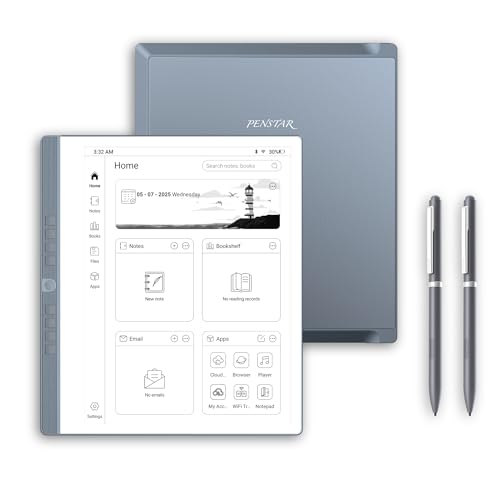
The Penstar eNote 2 emphasizes a true “paper-like” writing experience with a 10.3″ 300 PPI ePaper display and Penstar PureView technology. The pen-only mode minimizes distractions, closely mimicking the experience of writing on paper. The device also includes AI-powered features for smarter handwriting conversion, voice-to-text, and real-time translation to support business meetings and study sessions. The bundle typically provides a folio cover and two pens, enhancing the note-taking workflow right out of the box.
Notable capabilities:
- 300 PPI 10.3″ display
- Pen-only writing experience with realistic texture
- MyScript handwriting-to-text, voice-to-text with 52 languages
- AI tools for meeting summaries and organization
BOOX Note Air 4C 6G 64G Color E Ink Tablet

The Note Air 4C is a robust option in the Note Air family, featuring a 10.3″ Kaleido 3 display with strong color support and 4,096-level pen input. It runs Android 13 and provides a balance between color-accurate reading and writing. Its 64GB storage, 6GB RAM, and dual speakers create a multimedia-capable e note device, while front-lighting with CTM helps comfortable reading in varied lighting. The device supports most common document formats and third-party apps for productivity tasks.
Key takeaways:
- 10.3″ Kaleido 3 color screen
- Android 13, 6GB RAM, 64GB storage
- Front light with warm/cool CTM
- Supports third-party apps
iFLYTEK AINOTE 2 – 10.65″ E Ink Tablet

The iFLYTEK AINOTE 2 focuses on AI-powered voice transcription, handwriting conversion, and multilingual translation. The 10.65″ display emphasizes readability and smooth handwriting with low latency, making it suitable for professionals and students who rely on quick digitization of notes and ideas. The device supports multiple languages for transcription and translation, and its light, slim profile adds to portable daily use.
Key features include:
- 10.65″ high-refresh E Ink display
- AI voice notes, real-time transcription
- Handwriting-to-text in many languages
- Multilingual translation support
VIWOODS AiPaper 1300 Bundle (Optional Alternative)
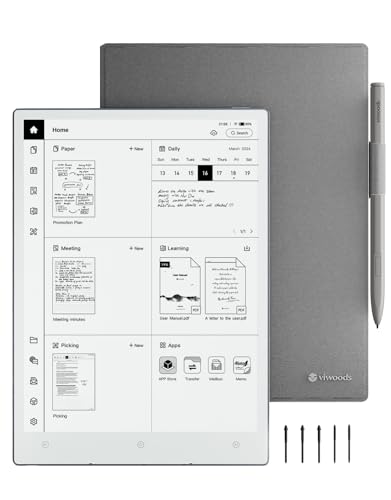
Although not among the top five, VIWOODS offers an AiPaper 1300 Mobius screen and a bundled set of accessories that emphasize a paper-like experience with high contrast and fast pen response. This option is included for readers who want an alternative AI-enabled eNote experience with enhanced screen technology and an expanded accessory kit. It emphasizes a realistic writing feel and efficient power usage.
Buying Guide: Key Considerations For Choosing The Best E Ink Tablet
Display quality and color support
Color-capable e Ink displays (such as Kaleido 3) enable colorful reading and lightweight note-taking, but for pure reading and handwriting, a high-contrast black-and-white screen can be more legible and battery-friendly. Consider your primary use: if you frequently annotate colored documents or diagrams, a color-capable model is valuable; otherwise, a B/W display often suffices for long-form reading and distraction-free note-taking.
Writing experience and stylus support
A strong stylus experience is critical for note-taking. Look for devices with high pressure sensitivity (4,096 levels is common) and a faithful pen-to-paper feel. Check whether the stylus is included or sold separately, and whether it supports palm rejection for comfortable writing sessions.
Operating system and app ecosystem
Android-based e Ink tablets open a broad range of apps and file formats, from PDFs to EPUBs and office suites. If you rely on specific apps or workflows (note conversion, AI features, or cloud services), ensure the device supports them and that app availability matches your needs.
Storage, memory, and expandability
64GB storage is common, with optional microSD expansion on some models. If you store large PDFs, notebooks, or color-heavy documents, higher storage or expandable options will reduce friction when managing materials.
Battery life and portability
e Ink devices are favored for long battery life. Weight and dimensions impact portability for daily carry. Consider whether you need a lighter, more compact unit for travel or a larger screen for extended reading sessions and detailed writing.
Connectivity and accessories
Wi-Fi and Bluetooth are standard; USB-C ports enable charging and accessory connections. Look for bundled folio covers, screen protectors, or additional stylus tips to extend device longevity and improve the writing feel over time.
Use-case scenarios
- <strongStudents: emphasize annotation, note organization, and portability for lectures.
- <strongProfessionals: prioritize transcription, AI-assisted note-taking, and fast searchability of documents.
- <strongCasual readers: long battery life, glare-free reading, and simple navigation are key.