Answering the demand for reliable audio and flattering lighting, this guide highlights top conference call gear that helps you sound clear and look professional. The selections focus on compact speakerphones for small to mid‑size rooms and versatile lighting for video calls, streams, and remote work. Suitable buyers include remote workers, small business teams, and creators who host meetings and video sessions from home or a shared workspace. Below is a quick buying table to compare the featured products at a glance.
| Product | Best For | Key Benefit |
|---|---|---|
| Anker PowerConf Speakerphone | Small offices, personal workspaces | 360° mic array with AI noise suppression |
| Yealink SP92 Conference Speaker | Small to medium meeting rooms | AI noise cancellation and full-duplex audio |
| Anker PowerConf S3 | Mobile desks, home offices | Compact 6-mic array with strong clarity |
| ALTSON Zoom Lighting for Computer | Video calls and streaming | Wide, even LED illumination with adjustable warmth |
| Dimmable Ring Light by Yarrashop | Video meetings, makeup, streaming | Personalized lighting with multiple modes |
Anker PowerConf Speakerphone

The Anker PowerConf Speakerphone is designed for personal workspaces and small offices that require a USB-C conference device with six microphones. It offers 360° voice pickup, enabling participants around the room to be heard clearly. Its AI-driven Voice Radar 3.0 technology reduces background noise, cancels echo, and helps recognize multiple speakers, improving meeting flow. The device adjusts voice levels to compensate for distance and volume differences, delivering a more natural sound for all participants.
Best for: individuals or small teams who need a reliable, easy-to-use speakerphone for virtual meetings and quick huddles. This model is preferable when you want robust noise suppression and 360° pickup in a single compact unit.
Caution: Performance depends on room acoustics; in highly echo-prone spaces, placement near the center of the table is recommended for optimal coverage.
Yealink SP92 Conference Speaker

The Yealink SP92 is a Teams-certified USB speakerphone suited for small to mid-sized conference rooms. It uses real-time AI noise cancellation to suppress distractions (such as keyboard taps and HVAC hum) for clearer speech. With 360° room coverage and a 13-foot (4-meter) pickup radius, it supports natural conversations among 4–8 participants. Additional features include full-duplex microphones and echo cancellation to preserve voice clarity during multi-person calls.
Best for: teams that prioritise high-quality audio and are working in rooms where multiple people speak from different spots. It’s a solid pick when you need reliable noise reduction and broad coverage in a compact package.
Caution: Larger rooms may experience slightly reduced pickup at the far edges; consider pairing with a dedicated room microphone for larger spaces.
Anker PowerConf S3 Speakerphone
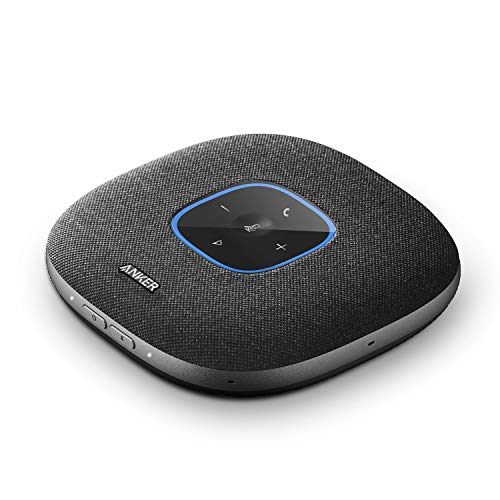
The Anker PowerConf S3 offers six microphones and a compact form factor designed for desk setups and home offices. Real-time voice optimization and background noise reduction are managed by a customized DSP algorithm to ensure clear audio transmission. The 360° mic array allows for full room coverage, so movement around the space doesn’t degrade sound quality. Automatic volume balancing compensates for differences in loudness and distance from the device.
Best for: users who need a portable, reliable speakerphone with strong noise handling and clear voice pickup in a tight workspace or hybrid home office. It’s especially suitable when desk-based flexibility matters more than room size.
Limitation: As a desk-centric device, it may not fully replace larger room audio solutions in bigger conference environments.
ALTSON Zoom Lighting for Computer

The ALTSON 10-inch Zoom Lighting setup provides full-screen LED lighting designed for video calls, streaming, and online meetings. It features a side-emitting design for bright, even illumination and a high color rendering index (CRI) of 95+, which helps skin tones and colors appear more natural on camera. The light offers three color temperatures (warm, natural, and cool) with 10 brightness levels, making it adaptable to various environments and times of day.
Best for: video presenters who need consistent and flattering illumination for calls or streams. It’s especially helpful when natural light is inconsistent or when you want to look more professional on camera.
Caution: As a makeup or content-creation light, it’s important to position the light to avoid glare on screens or harsh reflections on camera.
Dimmable Ring Light with Stand by Yarrashop

The Yarrashop ring light provides a 10.5-inch LED ring with adjustable color temperatures and brightness levels, designed for video conferencing, makeup, streaming, and content creation. The light offers 3 color temperatures (3000K–6500K) and 10 brightness levels, enabling users to tailor lighting to their skin tone and background. The adjustable stand height (roughly 23 to 31 inches) and flexible head (180° vertical, 360° horizontal) support a wide range of seating and camera positions.
Best for: individuals who want a versatile ring light that can adapt to different activities, from professional meetings to live streaming. It’s a strong choice when you need easy height adjustments and flexible lighting angles.
Caution: The larger stand can take up desk space; ensure the setup leaves room for a monitor or laptop and microphone equipment.
Buying Guide
What size conference space matters
For small offices or personal desks, a six-mic speakerphone with good noise suppression is often enough. In slightly larger rooms, consider models with broader pickup patterns and full-duplex capabilities to prevent talking over one another.
How to choose audio hardware
Look for 360° microphone arrays to capture voices from anywhere around the table. AI noise cancellation and echo suppression improve intelligibility in busy environments. Check compatibility with your preferred video conferencing platform and USB-C connections for future-proofing.
Lighting that flatters your on-camera presence
CRi values above 95 provide more natural skin tones. A light with adjustable color temperature and brightness helps you look consistent across different times of day and backgrounds. Position lights to reduce shadows and minimize glare on screens.
Portability vs. room suitability
Desk-centric devices are ideal for home offices and small desks. If you frequently move between spaces, consider compact speakerphones with USB-C and Bluetooth options for quick setup.
Power, connection, and compatibility
Prefer devices that offer USB-C, Bluetooth, or both. This ensures broad compatibility with laptops, desktops, tablets, and smartphones. Ensure your conferencing software supports the chosen hardware or certification (for example, Teams-certified devices).
Setup and maintenance considerations
Choose products with straightforward setup and clear indicators for mute, volume, and connection status. Regular software updates can improve noise reduction and microphone performance over time.
Comparison snapshot
- Best overall audio: Anker PowerConf Speakerphone for robust coverage and AI noise suppression.
- Best for 4–8 people: Yealink SP92 with 360° pickup and full-duplex audio.
- Best compact option: Anker PowerConf S3 for tight desk spaces.
- Best lighting value: ALTSON 10-inch Zoom Lighting for flexible color temperature and brightness.
- Best adjustable ring lighting: Yarrashop Dimmable Ring Light for personalized lighting scenarios.
FAQ
- What is the difference between AI noise cancellation and echo cancellation? – AI noise cancellation reduces background sounds like keyboard taps and HVAC hum, while echo cancellation prevents feedback from the speaker into the microphone for clearer voice pickup.
- Do I need a dedicated mic and a lighting setup? – For best video calls, a dedicated mic improves audio clarity, and proper lighting improves on-camera appearance. A combined setup often yields the best results.
- Is USB-C enough for future devices? – USB-C supports most modern computers and devices. If you plan to upgrade frequently, USB-C is a practical choice for compatibility and power.
- Should I choose a Teams-certified device? – If you use Microsoft Teams as your primary platform, a Teams-certified device often guarantees optimized performance and compatibility.
- Can lighting affect speech perception? – While lighting doesn’t affect audio, it improves perceived clarity by making you appear more professional and reducing eye strain during longer calls.
- What room setup maximizes audio quality? – Place the speakerphone at the center of the table and avoid placing it near walls or windows to minimize reflections and noise.