With growing needs for reliable wireless connectivity, picking the right USB Wi-Fi adapter matters. This guide highlights five top options that support modern standards, from reliable dual-band connections to Wi‑Fi 6 performance. Each pick is designed to improve speed, reduce buffering, and extend range for desktops and laptops alike. Below you’ll find quick product highlights, followed by in-depth sections and a practical buying guide to help you compare features and compatibility.
| Product | Brand | Key Benefit |
|---|---|---|
| AC600 USB WiFi Adapter (Archer T2U Plus) | TP-Link | Long-range dual-band performance |
| AC1300 USB WiFi Adapter (Archer T3U) | TP-Link | Strong dual-band with MU-MIMO |
| AX1800 USB WiFi 6 Adapter (TX20U Plus) | TP-Link | WiFi 6 with fast speeds and WPA3 |
| Nano AC600 USB WiFi Adapter (Archer T2U Nano) | TP-Link | Travel-friendly compact design |
| AX900 USB WiFi 6 Adapter | UGREEN | High-speed AX performance |
TP-Link AC600 USB WiFi Adapter for PC

The Archer T2U Plus provides long-range dual-band Wi-Fi with a compact form factor. It supports 802.11ac standards, delivering up to 200 Mbps on 2.4 GHz and 433 Mbps on 5 GHz for a combined experience that is noticeably smoother for web browsing, video streaming, and light gaming. The 5dBi antenna helps extend coverage in rooms with weak signals and the device is compatible with a broad set of Windows and MacOS versions. Wireless security options include WEP, WPA/WPA2, and WPA-PSK/WPA2-PSK for a well-protected connection.
Key features include long-range capabilities, dual-band operation, and a straightforward setup that fits desktops and laptops. While not the newest Wi‑Fi 6 option, it remains a solid, budget-friendly upgrade for homes that need more stable wireless access without pulling a new router or running Ethernet where it isn’t feasible.
TP-Link AC1300 USB WiFi Adapter (Archer T3U)

The Archer T3U delivers a robust 2.4 GHz/5 GHz dual-band experience with MU-MIMO, designed to support consistent, lag-free connections across multiple devices. Its USB 3.0 interface provides faster data transfer compared to older USB standards, and its compact design keeps it unobtrusive on laptops or desktops. This adapter is suitable for households with several streaming devices, consoles, or work-from-home setups that demand reliable wireless performance without complex configuration.
In practice, the T3U’s 802.11ac support offers improved throughput versus older adapters, making it a practical upgrade for users who want stronger coverage throughout a standard home without upgrading the router. It’s especially helpful for videoconferencing and online gaming where stable latency matters.
TP-Link WiFi 6 USB Adapter for Desktop PC (TX20U Plus)

The Archer TX20U Plus brings Wi‑Fi 6 (AX1800) to desktops with a dual-band design and a high-gain 5dBi antenna. It emphasizes faster throughput and reduced congestion, especially in networks with multiple devices. WPA3 support strengthens security, and the device ships with the latest driver compatibility for modern Windows versions. It’s designed for gamers, streamers, and power users who demand higher speeds, lower latency, and better performance in busy home networks.
Users should ensure their router also supports Wi‑Fi 6 to realize the full AX benefits. When paired with a compatible router, this adapter can significantly improve streaming quality, large file transfers, and online gaming thanks to improved efficiency and beamforming capabilities.
TP-Link Nano AC600 USB WiFi Adapter (Archer T2U Nano)
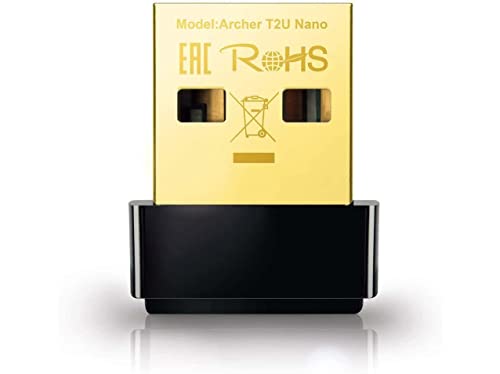
The Archer T2U Nano is a travel-friendly, nano-sized USB Wi‑Fi adapter that still provides dual-band capability. With 2.4 GHz and 5 GHz bands, it delivers flexible connectivity in a compact package, ideal for on-the-go setups, laptops used in multiple rooms, or guest devices where a full-size adapter would be impractical. It supports Windows operating systems and Mac environments up to a certain version range, depending on driver availability, and emphasizes a sleek, leave-in design for portability.
While it doesn’t feature advanced Wi‑Fi 6 tech, its portability and simplicity make it a popular choice for travelers or students who want a reliable upgrade without bulk. It pairs well with standard home routers that support modern wireless standards, ensuring stable browsing and streaming for typical daily tasks.
UGREEN AX900 USB WiFi 6 Adapter

The UGREEN AX900 USB WiFi 6 Adapter brings Wi‑Fi 6 capabilities to a desktop setup with dual-band performance. It delivers up to 600 Mbps on 5 GHz and 287 Mbps on 2.4 GHz, offering improved throughput in crowded networks and lower latency for real-time applications. The adapter includes built-in drivers for Windows 10/11, simplifying setup and avoiding driver searches. Note that MacOS and some Linux environments may have limited support, so compatibility should be verified for non-Windows systems.
AX900 is positioned for users who want a straightforward upgrade to modern Wi‑Fi without replacing an existing router. It’s especially useful for households with multiple devices streaming HD content, gaming, or video calls, where faster, more reliable connections can make a noticeable difference.
Buying Guide
Key purchase considerations help you choose the right wireless USB adapter for your needs. Consider these perspectives to compare options effectively:
- Wi‑Fi Standard and Speed: For speed and future-proofing, Wi‑Fi 6 (AX) adapters like TX20U Plus or the AX900 models outperform older AC adapters, especially in congested networks. If you’re price-conscious and primarily browse or stream, AC1300/AC600 options may suffice.
- Dual-Band Availability: Dual-band (2.4 GHz and 5 GHz) provides flexibility and helps avoid interference. Most models here support both, but the 5 GHz band generally offers better performance for high-bandwidth tasks.
- MU-MIMO and Beamforming: MU-MIMO and beamforming technologies improve multi-device performance by directing signals to individual devices. This matters in homes with several users streaming videos or gaming at once.
- USB Interface and Port Type: USB 3.0 ports deliver faster data transfer than USB 2.0. If your PC has USB 2.0, you’ll still gain improved wireless performance, but USB 3.0-capable devices are preferred for maximum throughput.
- Security Features: Look for WPA3 support where available. WPA2 remains common, but WPA3 provides enhanced protection for modern networks.
- Driver Availability and OS Compatibility: Windows users generally have broad driver support. Some adapters include built-in drivers for Windows 10/11, reducing setup time, while MacOS and Linux support can vary. Always verify compatibility with your operating system version.
- Physical Size and Antennas: Larger antennas can improve range, while nano or compact designs are ideal for travel or laptop use. If you need strong coverage across multiple rooms, prioritize models with external antennas or higher-gain designs.
- Usage Scenario: Gaming, video conferencing, or streaming can benefit from lower latency and smoother throughput. For simple web browsing, an entry-level adapter may be sufficient.
In summary, choose a model that aligns with your router capabilities and device usage. Wi‑Fi 6 adapters provide the best performance for busy households, while dual-band AC options offer a solid upgrade at a lower cost. Always confirm driver support and OS compatibility to ensure a smooth setup experience.