Finding the right wireless router modem combo can simplify your home network by combining a cable modem with a capable Wi‑Fi router. The models below cover DOCSIS 3.0 and 3.1 standards, Wi‑Fi 5 and Wi‑Fi 6 technology, and wide coverage for homes of various sizes. Each option is compatible with major U.S. providers and offers reliable performance for streaming, gaming, and videoconferencing. Compare features, connectivity, and suitability for your service plan before you buy.
Summary of chosen products
| Product | Brand | Wi‑Fi Type | Max Coverage | Notes |
|---|---|---|---|---|
| NETGEAR Nighthawk CAX30 | NETGEAR | Wi‑Fi 6 (AX2700) | Up to 2,000 sq. ft. | DOCSIS 3.1, dual‑band, 25 devices |
| Arris G18 Cable Modem Router | ARRIS | Wi‑Fi 6 | High throughputs | DOCSIS 3.1, trusted brand |
| Motorola MG8702 | Motorola | Wi‑Fi 5 (AC3200) | Whole‑home coverage | DOCSIS 3.1, Power Boost |
| NETGEAR Nighthawk C7000 | NETGEAR | Wi‑Fi 5 (AC1900) | Large homes | DOCSIS 3.0, rental saver |
| TP‑Link Archer AX21 | TP‑Link | Wi‑Fi 6 | Small to medium homes | AX1800, Open VPN support |
NETGEAR Nighthawk Modem Router Combo CAX30

The NETGEAR Nighthawk CAX30 combines a DOCSIS 3.1 modem with a Wi‑Fi 6 router. It supports major cable providers including Xfinity, Spectrum, and Cox. Coverage reaches up to 2,000 square feet with 25 devices connected simultaneously. It includes four Gigabit Ethernet ports and a USB 3.0 port for external storage or other wired devices. This model is designed to deliver high speeds for streaming, gaming, and smart‑home devices while reducing rental costs.
Arris G18 Cable Modem Router Combo

The Arris G18 delivers fast DOCSIS 3.1 performance with a built‑in Wi‑Fi 6 router. This combo is designed to handle high‑demand activities such as 4K streaming and online gaming across a wide area of your home. Arris is a well‑established brand in modem technology, and the G18 aims to provide strong coverage and reliable connections via dual‑band wireless networking.
Motorola MG8702 Cable Modem + Wi‑Fi Router
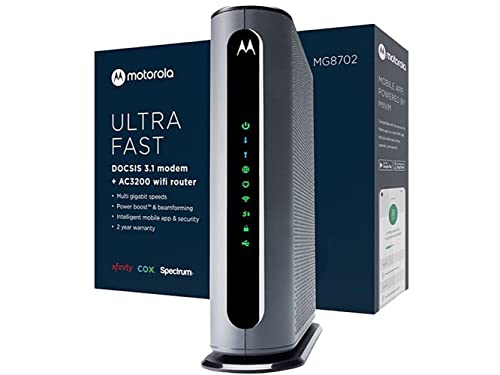
The Motorola MG8702 combines a DOCSIS 3.1 modem with an AC3200 Wi‑Fi router. It includes Power Boost and Range Boost features to maximize coverage and speed, delivering robust performance for homes with multiple devices. Ideal for users seeking high‑speed cable internet with integrated wireless distribution for a more streamlined setup.
NETGEAR Nighthawk C7000 Cable Modem Router

The NETGEAR Nighthawk C7000 is a Wi‑Fi 5 router and modem combo designed for cable plans up to 800 Mbps. It replaces separate devices, potentially saving rental costs. The device supports multiple devices across a sizable area and is a practical choice for households maintaining older service tiers or relying on providers with robust DOCSIS 3.0 support.
NETGEAR Nighthawk R6700AX (Router Only)

The NETGEAR Nighthawk R6700AX is a dedicated router option with Wi‑Fi 6 support. It covers up to about 1,500 square feet and supports 20 devices. Note that this is router only; a separate modem is required for internet service. It’s suitable for users who already have a modem or plan to pair with a separate cable modem from their provider.
NETGEAR Nighthawk Cable Modem and WiFi Router Combo C7000 (Renewed)

The C7000 family member provides an all‑in‑one solution for cable internet, featuring a DOCSIS 3.0 modem and AC1900 Wi‑Fi. It’s a renewed option for users seeking value with built‑in networking capabilities. Suitable for households with moderate internet usage and multiple wireless devices.
Buying Guide: Key Purchase Considerations
When selecting a wireless router modem combo, consider compatibility, speed, and coverage. DOCSIS 3.1 devices typically offer faster speeds and better future‑proofing for high‑speed plans, while DOCSIS 3.0 models may be adequate for standard plans. Wi‑Fi 6 (802.11ax) provides higher efficiency and capacity for many devices, beneficial in busy homes with streaming, gaming, and smart devices.
Provider compatibility is critical. Some models work with major providers like Xfinity, Spectrum, and Cox, but may not support certain bundled services or all plans. Always verify your current service tier and whether the device is approved for your provider. If you rent a modem from your ISP, owning a compatible modem/router can reduce ongoing costs over time.
Coverage area and device load matter. Larger homes or multi‑story layouts may require higher‑performance gear with wider coverage and more Ethernet ports. If you have many wired devices, look for a model with multiple Gigabit Ethernet ports and a USB port for storage or printers. For households with many smart devices, prioritize a system with robust concurrent device support and stable throughput.
Ease of setup and management also influences satisfaction. Some models offer simple mobile apps for activation, parental controls, guest networks, and quality‑of‑service settings. For tech users, more advanced options like VPN servers and beamforming can enhance network customization and security.
Price and budget are practical factors. While newer Wi‑Fi 6 routers tend to be pricier, they deliver long‑term value through better performance and device capacity. If your needs are modest or you have an older plan, a Wi‑Fi 5 solution may suffice. Consider potential rental savings when comparing total cost of ownership over time.
Future‑proofing should guide choices. If you plan to upgrade your internet plan or add smart home devices, favor DOCSIS 3.1 compatibility and Wi‑Fi 6. These features help ensure your network remains capable as speeds improve and devices multiply.
Summary for shoppers: choose a model that balances your plan’s speed, home size, and device count. Ensure provider compatibility and verify whether you need a modem, a router, or both in one device. Read user reviews for real‑world performance and reliability.