Choosing a wireless printer that pairs well with a laptop means balancing print speed, ease of use, and feature set. The following picks offer strong color printing, reliable wireless connections, and handy all-in-one capabilities for homework, documents, and photos. This guide highlights five top models with trusted performance for American households and remote work setups.
| Product | Brand | Key Benefit |
|---|---|---|
| HP Envy 6155e | HP | AI-enhanced printing with duplex and Instant Ink trial |
| Canon PIXMA TS6520 | Canon | Compact all-in-one with vivid color output |
| HP DeskJet 2855e | HP | Affordable, reliable home All‑in‑One with AI features |
| Canon PIXMA TR4720 | Canon | Wide connectivity with fax and auto document feeder |
| HP OfficeJet Pro 8125e | HP | Fast color printing for home offices with ADF |
HP Envy 6155e Wireless All‑in‑One
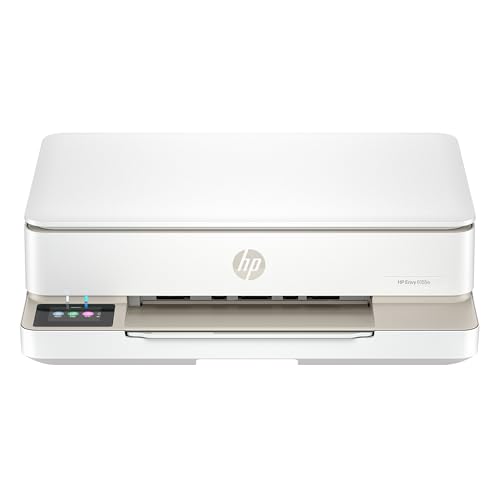
The Envy 6155e is designed for home use, delivering color documents and borderless photos with reliable wireless printing. It supports print speeds up to 7 ppm color and 10 ppm black. HP AI helps remove unwanted content for crisp, correctly formatted pages, reducing waste. Key capabilities include color printing, copying, scanning, auto duplex printing, and a 100‑sheet input tray, making it a strong all‑around choice for families and students.
Canon PIXMA TS6520 Wireless Color Printer

Canon’s TS6520 blends value with vibrant print quality. It’s a versatile all‑in‑one ideal for home offices and hybrid work. The 2‑cartridge hybrid ink system delivers sharp text and vivid color for documents and photos. Setup is straightforward, and the printer supports wireless printing from smartphones and computers for quick scanning and copying tasks without fuss.
HP DeskJet 2855e Wireless All‑in‑One

The DeskJet 2855e targets everyday home tasks with color printing, copying, and scanning in a compact model. It includes a 60‑sheet input tray and solid print speeds up to 5.5 ppm color and 7.5 ppm black. The printer focuses on user‑friendly operation and reliable wireless connectivity for simple tasks like grocery lists, forms, and homework sheets.
Canon PIXMA TR4720 All‑in‑One

Canon’s TR4720 offers dependable wireless multi‑function performance with an auto document feeder and built‑in fax. It supports print, copy, scan, and fax in a compact footprint. The printer emphasizes easy ink cartridge changes and straightforward setup, making it well suited for households that need occasional faxing alongside scanning and copying alongside printing.
HP OfficeJet Pro 8125e Wireless All‑in‑One

The OfficeJet Pro 8125e targets home offices needing professional‑quality color output. It delivers fast print speeds of up to 10 ppm color and 20 ppm black, with features like an auto‑document feeder and duplex printing. HP AI helps ensure clean, well‑formatted pages, supporting robust document workflows for reports, presentations, and marketing materials.
Buying Guide
- Print quality vs. speed: Consider what you print most—text documents or photos—and choose a printer with the right balance. Higher ppm and sharp text are key for office work; vibrant color is important for photos and marketing materials.
- All‑in‑one capabilities: If you need scanning, copying, or faxing, ensure the model supports these features with a straightforward user interface and reliable wireless setup.
- Connectivity options: Look for robust wireless options (Wi‑Fi, AirPrint or Mopria) and whether USB or Ethernet is needed for desk setups. Some models also offer mobile app benefits like cloud printing or AI enhancements.
- Ink strategy and running costs: cartridge sizes, runtime, and available Instant Ink or subscription plans can influence long‑term costs. Check the cost per page to compare efficiency.
- Paper handling and input capacity: For heavy workloads, consider larger input trays and duplex printing to save time and paper.
- Compact vs. feature set: If space is limited, compact designs with essential features can be ideal, but ensure you don’t sacrifice necessary functions like photo printing or scanning.
- Warranty and support: A reliable warranty and accessible support can reduce downtime for home offices and students.