The following selection targets Mac users seeking reliable, wireless all-in-one printers that can print, scan, copy, and occasionally fax with ease. The list emphasizes cloud connectivity, duplexing, mobile app support, and straightforward setup—ideal for homes and small offices using macOS or iOS devices. Each product section provides a concise overview of capabilities and how they align with Mac workflows.
| Product | Brand | Key Strength |
|---|---|---|
| Brother MFC-J1360DW | Brother | Color inkjet, auto duplex, cloud app integration |
| HP OfficeJet Pro 8125e | HP | AI-enabled, robust home office performance |
| Canon PIXMA TR4720 | Canon | Compact, built-in fax, all-in-one versatility |
| Canon PIXMA TS6520 | Canon | Affordable color printing and copying |
| HP Smart Tank 5101 | HP | High-volume color printing with included ink |
Brother MFC-J1360DW: All-in-One For Home Offices

The Brother MFC-J1360DW is designed for compact homes or small offices needing color output with flexible scanning capabilities. Key features include automatic duplex printing to save paper, a 20-page single-sided ADF for multi-page scans, and a 150-sheet paper tray. The 1.8” color display makes setup and day-to-day tasks straightforward, while cloud app compatibility enables direct printing and scanning to Google Drive, Dropbox, OneDrive, and more. Print speed reaches up to 16 ppm in black and 9 ppm in color, suitable for everyday documents and reports with reasonable quality for home use.
HP OfficeJet Pro 8125e: AI-Enabled Home Office Printer

The HP OfficeJet Pro 8125e targets home offices with reliable wireless color printing, scanning, and copying. It emphasizes AI-powered features to streamline document handling and layout, along with compatibility for mobile printing from couches or desks. This model supports modern cloud workflows and can fit into environments where multiple devices share a single printer, making it a solid choice for users who value smooth integration with popular productivity apps and services.
Canon PIXMA TR4720: Built-In Fax And All-In-One

The Canon PIXMA TR4720 is a versatile 4-in-1 with a built-in fax feature, making it suitable for households or micro offices that still rely on traditional fax workflows. It supports wireless connectivity for mobile printing, and its auto document feeder facilitates convenient multi-page scans and copies. The printer emphasizes ease of cartridge replacement and straightforward maintenance, delivering adequate performance for everyday documents, forms, and correspondence.
Canon PIXMA TS6520: High-Value Home Printer

The Canon PIXMA TS6520 targets budget-conscious users who still want solid color prints and a multifunction experience. It offers a compact footprint, a 1.42” OLED display for intuitive navigation, and reliable color output suitable for documents, photos, and school projects. It’s a practical option for households that require occasional photo printing with dependable performance for everyday tasks.
HP Smart Tank 5101: High-Volume Color Printing
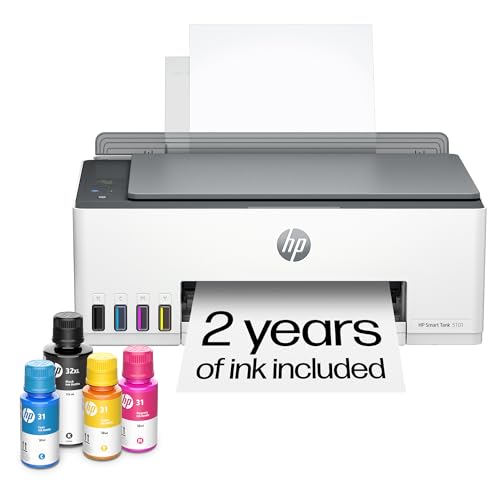
The HP Smart Tank 5101 is built for high-volume color printing with a refillable ink system. It includes up to two years of ink in the box, which can translate into lower running costs for families or small offices that print frequently. Wireless printing and mobile compatibility support convenient setups across devices, while the printer’s straightforward interface helps users manage documents, photos, and everyday tasks without frequent cartridge changes.
Buying Guide: Key Purchase Considerations
- Printer type and color versus monochrome: For mixed-use homes, a color inkjet (like the Brother MFC-J1360DW or Canon PIXMA TS6520) offers versatile results for documents and photos. Monochrome laser (like the Brother DCP-L2640DW) excels in fast black-and-white document printing and can be cost-effective in high-volume environments.
- Connectivity and Mac compatibility: Look for models that support AirPrint, Google Cloud Print alternatives, and direct cloud saving/opening from apps. Cloud app integrations simplify long-term workflows when using macOS or iOS.
- Duplex printing and paper handling: Automatic duplex printing saves paper and time, while an ADF streamlines scanning multi-page documents. A larger paper tray reduces refill frequency for busy households or small offices.
- Ink system and running costs: Refillable ink tanks (as with HP Smart Tank) can minimize cost per page for high-volume users, while standard cartridges may suffice for lighter use. Consider total ink yield and replacement frequency.
- All-in-one features: Copy, scan, and fax capabilities address diverse needs. A built-in ADF and efficient scanning speeds help with digital archiving and workflow efficiency.
- Size and footprint: Choose a model that fits the available desk or cabinet space. Some home printers prioritize compactness without sacrificing essential functions.
- Ease of setup: A straightforward setup process, mobile-first apps, and intuitive displays help reduce initial friction, especially for Mac users who rely on seamless software integration.
- Warranty and support: A solid warranty and accessible customer support are valuable for home offices with constant printing demands.
These models collectively cover common Mac use cases, from home offices requiring reliable document printing to households needing flexible, cloud-connected scanning and copying. When selecting, balance upfront cost, ink efficiency, and the frequency of high-volume printing to choose the best long-term fit.