In modern presentations, a reliable wireless clicker can make the difference between a smooth, engaging talk and awkward interruptions. Below are five top options designed to work across Windows, Mac, and other platforms, with features like laser pointers, page navigation, volume control, and USB-C compatibility. The selections aim to balance range, ergonomics, and ease of setup so you can move freely and focus on your message.
| Product | Brand | Key Feature | Link |
|---|---|---|---|
| Wireless Presenter, Hyperlink Volume Control | DinoFire | 100 ft range, hyperlink, volume control | https://www.amazon.com/dp/B01410YNAM?tag=electrodiest-20 |
| Logitech Wireless Presenter R400 | Logitech | Built-in laser pointer, intuitive controls | https://www.amazon.com/dp/B002GHBUTK?tag=electrodiest-20 |
| Presentation Clicker Wireless Presenter Remote | ELISWEEN | USB-C dongle, dual-port compatibility | https://www.amazon.com/dp/B0BMQ4KLY2?tag=electrodiest-20 |
| CLIKBUTM Wireless Presenter Remote | CLIKBUTM | Ergonomic, compact, broad OS support | https://www.amazon.com/dp/B09X1G5DCC?tag=electrodiest-20 |
| Logitech Wireless Presenter R500s | Logitech | Laser pointer, up to 20 m range | https://www.amazon.com/dp/B0972FLM2Z?tag=electrodiest-20 |
DinoFire Wireless Presenter With Hyperlink and Volume

The DinoFire wireless presenter offers plug-and-play setup with a 2.4 GHz USB receiver. It supports common presentation functions such as page forward/backward, volume control, and hyperlink access, along with a switch windows feature and full/black screen options. A bright red pointer helps highlight points on most backgrounds, though performance may vary on some LCD/LED screens. The device can reach up to 100 feet, enabling liberty to roam a large room while presenting.
Key considerations
- Ease of use: No software installation needed—just plug in the USB receiver.
- Range: Up to about 100 ft for room-to-room mobility.
- Pointer visibility: Red laser/pointer works on many backgrounds.
Logitech Wireless Presenter R400

The Logitech R400 focuses on easy slide control, with dedicated presenter mode and a built-in red laser pointer for highlighting slide elements. It supports up to 50 feet of wireless range, allowing comfortable movement around the room. The device uses AAA batteries and is known for reliable performance and intuitive touch-keys, making it a popular choice for classroom and meeting room settings.
Key considerations
- Pointer quality: Red laser is designed for clear visibility.
- Range and compatibility: Balanced for typical rooms; works with major slide software.
- Battery type: Requires AAA batteries; plan for replacements.
ELISWEEN USB-C Presentation Clicker
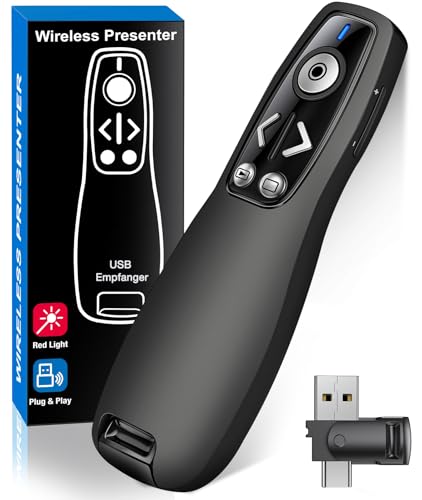
The ELISWEEN presentation clicker features a dual USB-C/USB-A design for broad device compatibility, including Mac, Windows, and Linux. It supports typical presentation functions such as volume control, page navigation, and window switching, plus a bright red indicator light to emphasize points. A magnet on the dongle helps keep the USB receiver secure when not in use. It runs on two AAA batteries and is designed for easy one-button access and reliable performance in darker rooms.
Key considerations
- Port compatibility: USB-C and USB-A support modern laptops and older devices.
- Ergonomics: Contoured keys for easy access in conference settings.
- Power: Battery-powered; ensure availability of spare batteries.
CLIKBUTM Wireless Presenter Remote
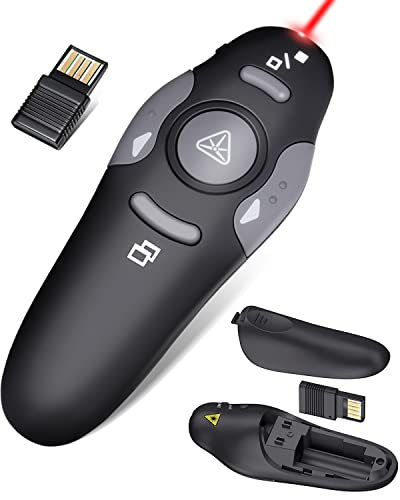
The CLIKBUTM remote emphasizes ergonomic design with a compact form factor, designed for comfortable all-day use. It supports Windows, Mac, Linux, and common slide software including Keynote, Google Slides, and PowerPoint. The USB dongle stores in the battery compartment, reducing the chance of misplacing the receiver. It uses a bright red laser pointer for emphasis and features a plug-and-play setup that avoids driver installation in most cases.
Key considerations
- Design and portability: Pocket-friendly with a secure dongle slot.
- Software compatibility: Broad OS support and popular presentation apps.
- Laser visibility: Red pointer suitable for various backgrounds.
Logitech Wireless Presenter R500s
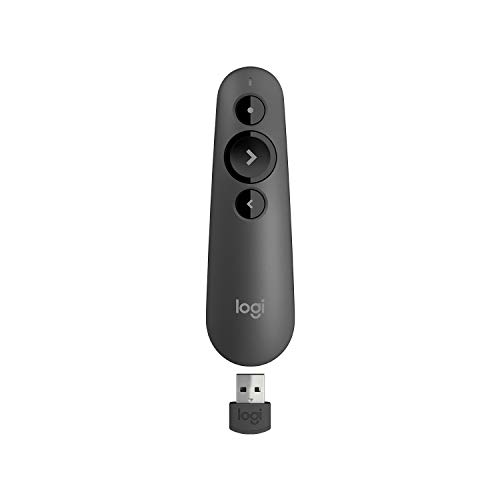
The Logitech R500s offers a compact wireless presenter with a laser pointer and intuitive controls. It operates with AAA batteries and provides up to 20 meters of wireless range, which is ample for large rooms or auditoriums. The device emphasizes reliable performance and straightforward control, making it a solid option for users who want a familiar Logitech experience with robust slide advancement features.
Key considerations
- Range: Up to 20 meters, suitable for bigger spaces.
- Pointer and controls: Clear laser pointer and familiar button layout.
- Battery life: AAA power; consider backup batteries for long sessions.
Buying Guide: What To Look For In A Wireless Presentation Clicker
Choosing the right wireless presenter depends on how you plan to use it. Consider these factors to align features with your needs:
-
<li Compatibility and setup: Look for plug-and-play models that don’t require software installation. If you’re using Macs, ensure USB-C support or dual USB-A/USB-C options is available.
- Range and reliability: For large classrooms or conference halls, prioritize models with at least 50–100 feet of range and a stable wireless connection.
- Pointer type and visibility: Red laser pointers work well in most rooms, but some screens (LCD/LED) may affect visibility. Check pointer brightness and be mindful of screen compatibility.
- Power and battery life: Decide between AAA batteries or rechargeable options. Rechargeable models can save ongoing costs, but ensure you have a charging plan during events.
- Ergonomics and weight: A comfortable grip and balanced weight reduce hand fatigue during long presentations. Smaller, pocket-friendly devices are useful for on-the-go speakers.
- Functionality: Prioritize essential functions (forward/back, full/black screen, and volume control) and optional features like hyperlink support or multi-device compatibility if you frequently switch devices.
- Durability and storage: A secure dongle slot or built-in storage helps prevent loss of the receiver during travel or setup.
Performance varies across brands and models. When selecting a wireless presenter, assess how well it integrates with your typical presentation software (PowerPoint, Keynote, Google Slides) and whether you need USB-C compatibility for newer laptops. For educators and professionals who move around a room, ergonomics and reliable range take precedence over extra features that may complicate use.
Summary of key features to compare quickly:
– Range: 50–100 ft is ideal for larger rooms.
– Connectivity: USB-A, USB-C, or dual-port designs offer broad compatibility.
– Pointer: Bright red laser with reliable visibility.
– Power: Battery type and life impact long sessions and travel.