Discover top wireless keyboards with backlighting that blend comfort, performance, and versatility. Whether you’re gaming, working late, or learning in low-light spaces, these picks offer reliable wireless connectivity, customizable lighting, and thoughtful design to fit Windows, Mac, and Linux environments.
Summary of chosen products:
| Product | Brand | Backlight Type | Connectivity | Notable Feature |
|---|---|---|---|---|
| Logitech MX Keys S Wireless Keyboard | Logitech | Backlit, adjustable | Bluetooth, USB-C rechargeable | Fluid typing with programmable Smart Actions |
| Soueto Wireless Keyboard with 7-Color RGB Backlit | Soueto | 7-color RGB backlight | 2.4G wireless | Phone/tablet holder, quiet typing |
| KLIM Chroma Wireless Keyboard | KLIM | RGB backlight (static or breathing) | USB receiver (instant connect) | Long battery life, no drivers required |
| Large Print Backlit Wireless Keyboard | Hamile | 7-color backlight, large print keys | 2.4G wireless, rechargeable | Oversized high-contrast keys for easy reading |
| Redragon K503 Wireless Gaming Keyboard | Redragon | RGB backlit | Tri-mode: 2.4G, BT, USB | Fully programmable with long battery life |
Logitech MX Keys S Wireless Keyboard

The Logitech MX Keys S delivers a low-profile typing experience with laptop-like, spherically dished keys designed for fast, precise typing. It supports Bluetooth and USB-C rechargeability, making it versatile for Windows, Linux, Chrome, and Mac ecosystems. This keyboard includes programmable Smart Actions via the Logi Options+ app, enabling users to automate repetitive tasks with a single keystroke. The build emphasizes comfort and focus, featuring a sturdy, slim profile and an optimal keyboard angle to reduce fatigue during long work sessions.
Soueto Wireless Keyboard with 7-Color RGB Backlit

This Soueto model features a seven-color RGB backlight with multiple modes and adjustable brightness, ideal for creating a personalized typing atmosphere. It includes a built-in 8.7-inch device holder for phones or tablets, helping keep desks tidy. The keyboard’s keys are backlit and tuned for responsive, quiet typing, contributing to a more efficient workflow in dim lighting or late-night sessions. The wireless connection is stable and easy to set up for both Mac and Windows environments.
Rii Wireless Keyboard

Note: This entry is included as a reference of similar backlit wireless keyboards. The Rii model supports dual connection options (Bluetooth and 2.4G USB dongle) and can connect multiple devices simultaneously in Bluetooth mode. It offers RGB backlighting and a rechargeable design, providing flexible connectivity across devices while maintaining a compact footprint for space-constrained desks.
KLIM Chroma Wireless Keyboard

The KLIM Chroma offers instant USB receiver connectivity for quick setup, plus a rechargeable battery that eliminates the need for disposable batteries. Its RGB backlighting provides visual flair with static or breathing lighting modes. While colors are not customizable on some models, the keyboard remains a strong option for users who want vibrant backlighting and straightforward plug-and-play use without driver installation, making it suitable for gaming or daily work tasks.
Large Print Backlit Wireless Keyboard
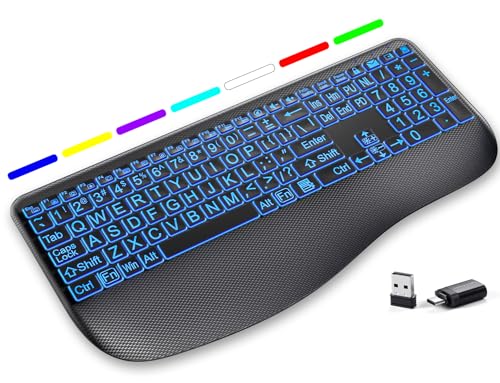
This large-print keyboard focuses on readability with oversized, high-contrast keys and a full-size layout. The 7-color backlight supports brightness adjustments and memory save, so preferred lighting settings persist between uses. It uses a 2.4G wireless connection and is rechargeable, making it practical for users who benefit from clearer keys and quieter keypresses for shared workspaces or libraries. The design emphasizes accessibility without sacrificing everyday productivity.
Redragon K503 Wireless Gaming Keyboard

The Redragon K503 provides tri-mode connectivity (2.4G, Bluetooth, USB) for flexibility across devices. It features a fully programmable software suite that enables custom lighting patterns, key functions, and macro assignments, suitable for gamers and productivity users who want personalized control. The keyboard’s 4000 mAh battery offers extended use between charges, while RGB backlighting enhances the gaming and typing ambience, with battery indicators to monitor life remaining.
Buying Guide
- Backlight customization: Decide if you prefer RGB across the board, a static color, or breathing modes. Some models offer per-key customization, while others provide global lighting options only.
- Connectivity options: Consider whether you need Bluetooth, USB-C rechargeable, 2.4G dongle, or multi-device pairing. Tri-mode keyboards offer maximum flexibility but may require more setup.
- Typing comfort and layout: Low-profile keys can reduce fatigue on long sessions, while larger keyboards with high-contrast, oversized keys benefit readability. If you type a lot at night, backlight brightness and key spacing matter.
- Programmable features: Look for Smart Actions, macros, or software suites that enable automation and personalized workflows, especially for work or creative tasks.
- Battery life and charging: Rechargeable keyboards avoid ongoing battery costs, but check the claimed hours under RGB ON vs. RGB OFF and whether USB-C charging is supported.
- Platform compatibility: Ensure the keyboard supports your primary OS (Windows, macOS, Linux) and any critical software integrations you rely on.
- Durability and form factor: If your workspace is small, a compact 60–75% keyboard might be ideal, whereas a full-size layout provides a dedicated number pad and function keys for data entry.
- Typing noise: Quiet or silent switches and scissor switches are preferable in shared spaces, libraries, or open offices.
These considerations help balance lighting aesthetics with practical needs like comfort, productivity features, and cross-platform use. When choosing, prioritize keyboards that offer durable wireless connections, clear backlighting, and a layout that aligns with your daily tasks and workspace constraints.