Upgrade your entrance with wireless door locks that blend security, convenience, and remote access. This guide highlights five top choices designed for American homes, explaining what makes each model stand out and how to choose the best fit for your door, lifestyle, and smart ecosystem.
Summary Table
| Product | Brand | Key Features |
|---|---|---|
| Philips Wi-Fi Door Lock | Philips | Built-in Wi-Fi, app control, voice via Alexa/Google, multiple unlock methods |
| Sifely Fingerprint Smart Door Lock | Sifely | Fingerprint, keypad, app, remote access, Airbnb-ready |
| August Home Wi-Fi Smart Lock | August | Fits over existing deadbolt, app-based access sharing, easy install |
| TEEHO TE001 Keyless Entry Lock | TEEHO | Keypad entry, 20 access codes, auto-lock feature |
| Yamiry Smart Door Handle Lock | Yamiry | 6-in-1 unlocks, DIY install, app control, remote access |
Philips Wi‑Fi Door Lock

The Philips Wi‑Fi Door Lock provides flexible access options to fit different routines. Unlock by app, passcode, fingerprint, physical key, or voice through Alexa or Google Assistant. The built-in Wi‑Fi enables remote locking and unlocking from anywhere via a smartphone, without requiring a separate hub. Note: 2.4 GHz networks are supported, and the lock operates within an approx. 65-foot range for stable remote control. Keep spare batteries on hand, as they are not included.
Key considerations include compatibility with your smart ecosystem, the stability of your home Wi‑Fi, and the importance of hands-free control for busy households. Installation is designed for standard doors, and the product supports remote monitoring and voice-activated entry for added convenience.
Sifely Fingerprint Smart Door Lock

This fingerprint-enabled smart door lock offers a versatile mix of access methods: fingerprint, keypad, smartphone app, FOB, or traditional key. It is particularly well-suited for households with kids or elderly members who prefer not to carry keys. The lock supports remote access management, making it compatible with Airbnb or rental properties for guest codes and activity logs. DIY installation is quick and designed to fit most standard doors, with a reversible handle for left or right-handed doors.
Consider how guests will be managed, the reliability of fingerprint recognition in varying conditions, and whether you need remote guest access and audit trails for properties you rent out.
August Home Wi‑Fi Smart Lock
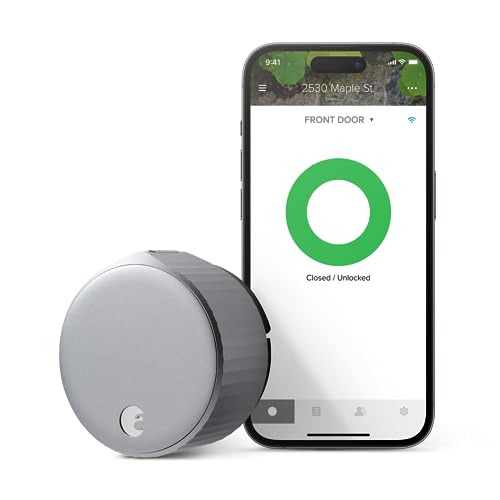
The August Smart Lock upgrades an existing deadbolt by adding smart functionality without replacing the entire mechanism. It offers the ability to share access via the August app, creating flexible permanent, scheduled, or temporary permissions. Installation is typically straightforward and compatible with most single-cylinder deadbolts, maintaining a compact form that fits over your current hardware. The system emphasizes ease of use and broad access control for households and small property managers.
When evaluating, assess whether you want to preserve your current keys as a backup, how you plan to manage access for guests or service workers, and the reliability of the app-based permission system in your area.
Yamiry Smart Door Handle Lock

The Yamiry door lock emphasizes 6-in-1 access, including fingerprint, smartphone app, passcodes, key fobs, mechanical keys, and voice unlock through Alexa (with a gateway). It is designed for easy installation and compatibility with most standard American doors. The app enables remote unlocking, guest codes, and unlock history, delivering a comprehensive remote-access experience suitable for families, Airbnb hosts, and multi-resident homes.
Prospective buyers should weigh the breadth of unlock options, the need for a separate gateway for voice unlocking, and how the lock’s footprint aligns with their door style and handle design.
Buying Guide: Key Purchase Considerations
- Unlock Methods: Consider which methods matter most (fingerprint, keypad, app, voice control, or backup keys). A mix of methods offers flexibility for all household members and guests.
- Connectivity and Ecosystem: Built-in Wi‑Fi simplifies remote access but may depend on your home network stability. If you already use a smart home hub, verify compatibility with your existing devices (Alexa, Google Assistant, Apple HomeKit).
- Installation and Compatibility: Check whether the lock fits your door type (deadbolt vs. handle, door thickness) and whether it requires removing or altering existing hardware. Some models fit over existing deadbolts with minimal drilling.
- Security Features: Look for tamper alerts, auto-lock timing, and audit trails (event logs) to monitor who accessed your door and when. Some models allow temporary guest codes with expiration settings for rental scenarios.
- Power and Backup: Battery life and the availability of backup keys or mechanical keys are important for reliability during outages. Some products include battery health indicators within the app.
- Remote Access and Privacy: Ensure the app uses secure authentication and encryption. Consider how data and access logs are stored and who can view them.
- Cost of Ownership: While no price details are provided here, factor in potential subscription requirements for advanced features, as well as the cost of replacement batteries over time.
- Warranty and Support: Check the manufacturer’s warranty length and the availability of customer support for installation and troubleshooting.
These options provide a spectrum of features—from straightforward, chair-side installs to feature-rich systems with multiple access channels. When selecting a wireless door lock, align the model with your security preferences, household needs, and how you manage access for guests, service providers, and family members.