Looking for a reliable wireless display adapter to mirror your smartphone, tablet, or laptop to a TV or monitor? This guide highlights five top options that fit common needs—from iOS mirroring to PC casting—so you can choose the right solution for home, work, or classroom use. Each product is evaluated for user type, ease of setup, and potential limitations.
| Product | ||
|---|---|---|
| SUNMENCO Wireless HDMI Display Dongle | iPhone/iPad users who want AirPlay casting | 4K decoding; 33 ft range; HDCP restrictions may apply to some apps |
| AIMIBO iOS Wireless Display Adapter 4K 5G | Apple ecosystem users seeking plug-and-play mirroring | No WiFi needed; PIN entry on iOS; broad device compatibility |
| lulaven iShare iOS Wireless HDMI Display Adapter | iPhone/iPad owners wanting simple AirPlay mirroring | Designed for iOS; notes about Netflix/HDCP restrictions |
| SOCLLLife Wireless HDMI Display Adapter 4K | Android/Windows users needing 4K casting | Supports AirPlay, Miracast, DLNA; some apps may restrict streaming |
| j5create ScreenCast HDMI Wireless Display Adapter (JVAW56) | Multi-device casting with broad compatibility | 50 ft range; supports Miracast, AirPlay, Chromecast; ensure open line of sight |
SUNMENCO Wireless HDMI Display Dongle Adapter

The SUNMENCO Wireless HDMI Receiver supports 4K decoding with 1080P/60Hz output, enabling crisp visuals for home theater and business presentations. It uses dual-band 2.4G/5G transmission for stable streaming up to about 33 feet and claims ultra-low latency suitable for gaming and real-time classes. Best for users who want AirPlay/Miracast compatibility without apps or extra software. A potential limitation is that some streaming services may block playback due to HDCP restrictions, so rely on personal media or web content for optimal results.
AIMIBO iOS Wireless Display Adapter 4K 5G
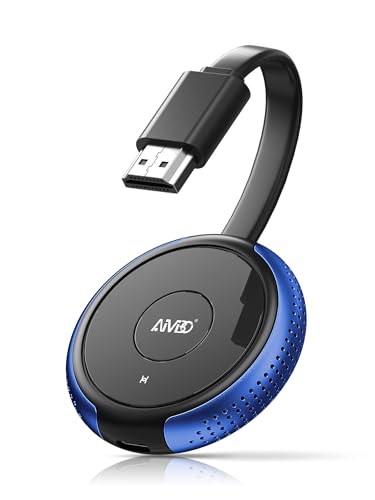
Designed for Apple devices, the AIMIBO adapter works without WiFi by establishing a direct peer-to-peer connection. It supports AirPlay, Miracast, DLNA, and Cast, making it a flexible choice for iPhone, iPad, MacBooks, and newer iPad models. Best for seniors, educators, and presenters who prefer a straightforward plug-and-play setup. It’s important to note that some Android features may require alternative methods, and compatibility can vary by device and iOS version.
lulaven iShare iOS Wireless HDMI Display Adapter

The lulaven adapter emphasizes iOS-centric mirroring with a simple plug-and-play setup. It supports both Lightning and USB-C devices, covering a wide range of iPhones and iPads, including recent models. Best for households and classrooms where iOS devices are dominant. A limitation is that Netflix and other HDCP-protected apps may not work through some wireless adapters, so plan for your preferred apps accordingly.
SOCLLLife Wireless HDMI Display Adapter 4K

The SOCLLLife 4K adapter aims to mirror 4K video from iPhone, iPad, MacBook, Android devices, and PCs to TVs, monitors, or projectors. It supports AirPlay, Miracast, and DLNA, enabling broad compatibility. Best for users who want a versatile option across Apple and Android ecosystems. A potential drawback is that some streaming apps restrict HDCP-encrypted content, reducing compatibility with certain services.
SOCLLLife Wireless HDMI Display Adapter (Second Model)

This SOCLLLife model also provides wireless 4K casting for iOS, Android, and Windows, with AirPlay, Miracast, and DLNA support. It emphasizes ease of use with a plug-and-play approach and a dual-band chip to improve anti-interference performance. Best for mixed-device environments. A noted limitation is that Windows 11 devices may have limited support depending on drivers and software updates.
j5create ScreenCast HDMI Wireless Display Adapter (JVAW56)

The j5create ScreenCast adapter supports Miracast, AirPlay, and Chromecast, enabling cross-platform wireless display from Windows, macOS, iOS, Android, and more. Best for users who frequently switch between devices and require flexible compatibility. It offers a generous 50-foot range with low latency, though walls and interference can reduce performance in real rooms.
INVERSE NET Wireless Display Adapter

The INVERSE NET adapter emphasizes USB-to-HDMI mirroring with 4K decoding and 1080P at 60Hz. It is a straightforward plug-and-play solution for iPhone, iPad, PCs, and Android devices. Best for quick, cable-free presentations. A potential limitation is that some streaming apps with DRM protection may limit playback through wireless adapters.
Buying Guide
- What device ecosystem do you primarily cast from? If you use iPhone/iPad, prioritize AirPlay-capable options; for a mixed environment, look for Miracast/Chromecast compatibility.
- Do you need WiFi-free operation or is a network-based setup acceptable? Some adapters work without a WiFi network, while others use wireless networks for discovery.
- What resolution and latency do you require? If you want 4K output or gaming, choose models advertising 4K decoding and low latency (<0.01s or similar).
- What is your typical viewing distance and room layout? Consider range (30-50 feet typical) and potential signal interference from walls or electronics.
- Are there streaming service restrictions? Many apps (Netflix, Prime Video, Hulu) may block playback via wireless adapters due to HDCP restrictions.
- Ease of setup and ongoing compatibility? Direct plug-and-play with minimal apps is ideal for classrooms and meetings; broader compatibility helps for households with multiple devices.
Frequently Asked Questions
- Can I mirror my iPhone to a TV without WiFi? Yes, many adapters support direct peer-to-peer connections without a WiFi network.
- Will all apps play through these adapters? Some streaming apps enforce HDCP restrictions, which may block content on certain adapters.
- Do these adapters require drivers? Most modern adapters are plug-and-play and do not require drivers on compatible devices.
- What is the typical range for wireless display adapters? Most offer 30–50 feet of range in open spaces; walls and interference can shorten this.
- Are there latency issues for gaming? Low-latency claims are common, but results vary by device and environment; expect slight delays in busy networks.
- Which adapter is best for a mixed device environment? A device supporting Miracast, AirPlay, and Chromecast covers the widest array of devices.