Whether you’re upgrading an older desktop or building a new rig, a PCIe wireless card can dramatically improve Wi-Fi speed, range, and reliability. This guide highlights five reliable options that deliver solid Wireless-AC performance, compatible drivers, and practical benefits for different user types—from gamers to streaming enthusiasts and remote workers. Each card is evaluated for best use cases, potential limitations, and what to consider before buying.
| Product | Type | Best For |
|---|---|---|
| LinksTek Wireless-AC 1200Mbps PCIe Card | PCIe Wireless-AC Card | Desktop PC owners needing dual-band 2.4/5 GHz with MU-MIMO |
| Cudy WE3000 AX3000 PCIe Card | Wi-Fi 6 PCIe Card | Users seeking Wi-Fi 6 speeds and robust security |
| REKONG 7260HMW Mini PCIe WiFi Card | Mini PCIe WiFi Card | Upgrading a compatible laptop/ultrabook or compact system |
| TP-Link Archer TX3000E WiFi 6 PCIe Card | Wi-Fi 6 PCIe Card | High-speed gaming and multi-device networks |
| OKN WiFi 6E AX210 NGW Card | Wi-Fi 6E NGW Module | Tri-band, ultra-low latency setups with newer routers |
LinksTek Wireless-AC 1200Mbps PCIe Card

Best for traditional desktop users needing reliable dual-band wireless alongside a simple upgrade path. The LinksTek PCIE-AC7265 uses the Intel Wireless-AC 7265 chipset to deliver 2.4GHz up to 300 Mbps and 5GHz up to 867 Mbps, totaling about 1200 Mbps in optimal conditions. This makes it suitable for general internet use, HD video streaming, and online gaming on desktops without built-in Wi-Fi. The design includes two external antennas for improved reception, and it supports Windows 11/10/8.x/7 with driver installation from Intel or LinksTek.
- Best for: Desktop users with a PCIe slot seeking a straightforward upgrade to dual-band Wireless-AC.
- Why selected: Solid, mid-range performance with MU-MIMO potential and detachable antennas for flexibility.
- Limitation: Requires driver installation; not compatible with macOS or older Windows XP/Vista systems.
Cudy WE3000 AX3000 PCIe Card

Best for users upgrading to Wi-Fi 6 with strong throughput and modern security. The WE3000 houses an AX200-based Wi-Fi 6 module and supports 2.4GHz up to 574 Mbps and 5GHz up to 2402 Mbps, with WPA3 security and Bluetooth 5.2. This card is ideal for gaming and 4K streaming on routers that support Wi-Fi 6. It also offers broad compatibility with 802.11ax/ac/a/b/g/n networks and Windows 11/10. The included Bluetooth adds value for peripherals.
- Best for: Desktop environments needing faster Wi-Fi 6 speeds and improved security.
- Why selected: Wi‑Fi 6 capabilities with strong range and Bluetooth integration.
- Limitation: Real-world speeds depend on router support and environment; AX200-based module may not reach every AX router’s peak in every scenario.
REKONG 7260HMW Mini PCIe Card
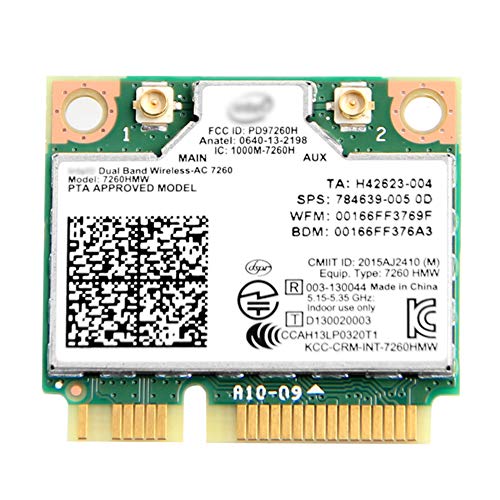
Best for laptops or compact systems that support mini PCIe slots and need Dual Band Wireless-AC. The 7260HMW delivers 2.4GHz up to 300 Mbps and 5GHz up to 867 Mbps, with built-in Bluetooth 4.0. It is a compact upgrade option for select notebooks or small form factor PCs. Installation is straightforward on compatible devices, but users should verify slot compatibility before purchasing.
- Best for: Upgrading legacy laptops or small desktops with a mini PCIe interface.
- Why selected: Reliable dual-band performance in a compact form factor.
- Limitation: Mini PCIe compatibility varies by model; some newer laptops may require different adapter interfaces.
TP-Link Archer TX3000E WiFi 6 PCIe Card

Best for power users who want high-end Wi-Fi 6 performance with low latency. The Archer TX3000E supports up to 2.4 Gbps combined throughput (574 Mbps on 2.4 GHz and 2402 Mbps on 5 GHz) and includes MU-MIMO and OFDMA for smoother gaming and VR experiences. It’s designed for Windows 11/10 64-bit, with driver installation either via the CD or online. This card excels in busy networks with many devices.
- Best for: Desktop gamers and multimedia enthusiasts needing robust Wi-Fi 6 features.
- Why selected: High throughput, low latency, and broad router compatibility.
- Limitation: Requires driver setup; performance depends on router capabilities and network congestion.
OKN WiFi 6E AX210 NGW Card

Best for users seeking tri-band performance with the latest standard. The AX210 NGW module adds Wi-Fi 6E (6 GHz) alongside 2.4 GHz and 5 GHz, delivering speeds up to 2,400 Mbps on 5 GHz and 6 GHz bands, plus 574 Mbps on 2.4 GHz. It supports MU-MIMO and OFDMA and is compatible with Windows 11/10 (64-bit). This option is ideal where routers and devices support 6 GHz, offering lower interference and higher capacity in dense environments.
- Best for: Early adopters or high-demand setups needing the newest Wi-Fi band spectrum.
- Why selected: Tri-band access with 6 GHz support for ultra-low latency networks.
- Limitation: 6E requires a compatible router and environment; not all setups will utilize the 6 GHz band yet.
Buying Guide
What should you consider before buying a wireless PCIe card?
- Wi‑Fi standard: If you already have a Wi‑Fi 6/6E router, prioritize a card that supports 802.11ax or 6E for higher throughput and better efficiency.
- Slot compatibility: PCIe cards require a PCI Express slot; mini PCIe adapters fit only compatible laptops or small form factor devices. Verify slot type before purchase.
- Maximum throughput vs. real-world speeds: Theoretical speeds assume ideal conditions. Real-world performance depends on router capability, interference, and distance.
- Security: Look for WPA3 support for stronger network security. Some cards also offer Bluetooth integration for peripherals.
- Driver availability: Ensure drivers are readily available for your operating system and that they receive ongoing updates.
- Antenna configuration: External antennas can improve range and reception; check if detachable antennas are included.
- Compatibility with OS: Some cards specify Windows versions; verify compatibility with your OS version to avoid driver issues.
Frequently Asked Questions
- Do I need Wi-Fi 6 or 6E to notice a difference?
– If your router supports Wi-Fi 6 or 6E and you have multiple devices, you’ll benefit from improved capacity, lower latency, and better performance in congested networks. - Will a PCIe card improve streaming performance?
– Yes, especially if your current connection is weak or unstable. A faster, more reliable link reduces buffering and improves video quality. - Is a wireless card compatible with desktop PCs without built-in Wi-Fi?
– PCIe cards add a dedicated wireless interface to desktops, providing a straightforward upgrade path for any system with a free PCIe slot. - Are mini PCIe cards suitable for all laptops?
– No. Mini PCIe is specific to certain laptops and form factors. Check your model’s slot type and compatibility before buying. - Do I need to install drivers from Intel or the card maker?
– Yes. Most cards require driver installation. Some include a CD or provide online downloads for Windows 11/10 and older systems. - Will 6E work everywhere?
– 6E requires a router and environment that support the 6 GHz band. If your network gear doesn’t, 6E won’t provide a noticeable improvement.