Exploring wired access points helps you build a scalable, reliable network with seamless roaming and robust security. This guide highlights five leading models that balance performance, manageability, and price for American users. Each product includes key features, setup options, and network suitability to help you compare at a glance.
Summary Table
Product | Brand | Key Strengths | Ideal For
TP-Link EAP650 Ultra-Slim | TP-Link | Wi-Fi 6 AX3000, cloud management, ultra-slim design | Small to medium offices, cafés, classrooms
TP-Link TL-WA801N | TP-Link | 2.4 GHz 300 Mbps, multi-mode, passive PoE | Budget deployments, retrofits, simple ranges
Ubiquiti U6+ | Ubiquiti Networks | 3 Gbit/s speeds, versatile Wi‑Fi 6/6E-style performance | Small businesses needing robust throughput
TP-Link Omada BE5000 (EAP720) | TP-Link | Wi‑Fi 7 dual band, 5‑GHz speeds, cloud centralization | AdvancedOmada deployments, remote management
TP-Link TL-WA1201 | TP-Link | MU‑MIMO, multiple modes, PoE compatibility | Flexible office setups, multi-device environments
TP-Link EAP650 Ultra-Slim Wireless Access Point

The TP-Link EAP650 is a компакт, cloud-managed access point designed for dense environments. It supports the latest Wi‑Fi 6 standard to deliver high-throughput speeds and improved overall efficiency. The device integrates seamlessly with Omada cloud management for centralized monitoring and configuration, reducing the need for on-site hardware controllers. Its ultra-slim design blends into modern office or classroom spaces, while dual-band operation supports reliable client connections and smoother roaming within mesh networks.
Key features: Free Omada Essentials cloud management; dual‑band Wi‑Fi 6 with up to 2976 Mbps theoretical throughput; slim, space-saving chassis suitable for deskside or ceiling mount. Intended uses include offices, hotels, cafés, and education environments seeking scalable, secure wireless access with simple management.
TP-Link TL-WA801N Wireless Access Point
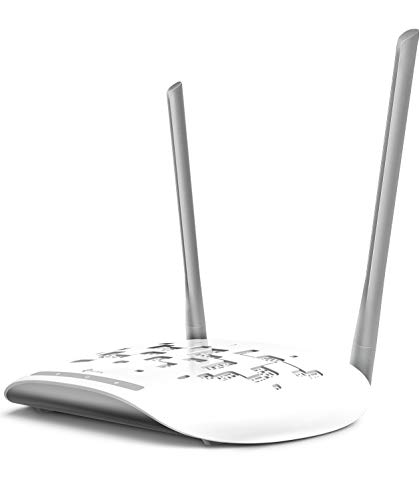
The TL-WA801N is a budget-friendly, flexible access point designed for smaller deployments or retrofit projects. It operates on the 2.4 GHz band with up to 300 Mbps, making it suitable for basic web browsing and light streaming. The device supports multiple modes—AP, range extender, bridge, or client—to adapt to varied networking needs. Passive PoE compatibility and a ~30-meter deployment range help extend coverage without a heavy power footprint.
Key features: Multiple modes (AP, range extender, bridge, client); supports Passive PoE for streamlined power and data; practical range for small offices or home workspaces; 2.4 GHz-only performance suitable for basic networks.
Ubiquiti U6+ Dual Band Access Point

The Ubiquiti U6+ is a robust option for business networks requiring reliable performance across multiple devices. It emphasizes high-speed wireless transmission with dual-band capabilities and compatibility with common IEEE 802.11 standards, ensuring straightforward integration into existing networks. With a focus on scalable deployment, this AP suits medium-sized offices and commercial environments where consistent coverage and dependable throughput are critical.
Key features: Up to 3 Gbit/s wireless speed; supports modern Wi‑Fi standards for reliable connectivity; designed for straightforward deployment and efficient management in business settings.
TP-Link Omada WiFi 7 BE5000 Wireless Access Point

The BE5000 (Omada EAP720) brings Wi‑Fi 7 capabilities into an Omada‑managed ecosystem. It pairs a dual-band 4×4 design with a high total throughput and a 2.5 Gbps Ethernet port for future-proofing. Centralized management via Omada Cloud centralizes configuration, monitoring, and policy enforcement while enabling Zero-Touch Provisioning for quick rollout across multiple locations. This model suits growing offices, campuses, and retail spaces that demand scalable, future-ready wireless infrastructure.
Key features: Free Omada cloud centralization; dual-band 4‑stream Wi‑Fi 7; 2.5 Gbps port for high-speed uplinks; remote management and rapid deployment capabilities.
TP-Link TL-WA1201 Wireless Gigabit Access Point

The TL-WA1201 blends MU‑MIMO performance with versatile deployment modes, including AP, client, and range extender configurations. It offers dual-band capabilities with speeds up to 1200 Mbps and supports Passive PoE for flexible installations. This model is a practical fit for small to medium offices and shared spaces that need reliable multi-device connectivity without complex installations.
Key features: MU‑MIMO with up to 1200 Mbps total bandwidth; four operational modes; Passive PoE compatibility for simple power provisioning; adaptable for various wireless applications.
Buying Guide
Choosing wired access points requires weighing performance, management, and deployment needs. Consider these factors to select the best fit for your environment:
- Coverage area and capacity: Larger spaces or high-density areas benefit from Wi‑Fi 6/7 APs with multi‑user MIMO and higher throughput. Look at device ceilings when planning for future device growth.
- Management approach: Cloud-based management like Omada simplifies centralized configuration and monitoring across multiple locations, reducing on-site maintenance. On-prem solutions may be preferable for ultra-tight security policies.
- Wired uplink options: PoE (Power over Ethernet) or multi-gig Ethernet ports (2.5G/5G) support cleaner installations and higher backhaul capacity essential for backhaul-intensive networks.
- Roaming and mesh capabilities: Seamless roaming reduces drop-offs for mobile devices moving across spaces. Mesh-ready or centralized roaming policies can improve user experience in campus-like environments.
- Security features: WPA3, guest networks, and network segmentation help protect sensitive data and isolate guest traffic within shared spaces.
- Future-proofing: Wi‑Fi 7 and higher-bandwidth backhauls offer longer-term resilience as connected devices proliferate and streaming demands rise.
Common deployment scenarios:
- Offices and coworking spaces needing scalable coverage with centralized management.
- Retail environments requiring robust guest access while keeping internal networks secure.
- Educational campuses needing reliable multi-user support and straightforward provisioning.
When comparing models, align their strengths with your priorities: cloud management vs. on-site control, high throughput versus budget constraints, and the desired future-proofing through Wi‑Fi 6/7 standards.