Looking to turn a USB printer into a network printer without the clutter of extra cables? A wifi print server lets multiple computers share a single printer over a local network. This article highlights five strong options, explaining who each product is best for and why it stands out. The top picks cover easy setups, multi-printer sharing, and compatibility with Windows, macOS, and Linux environments. Use the quick comparison below to pick the right model for your needs.
Summary table of selected products:
| Product | Best For | Key Benefit | Notes |
|---|---|---|---|
| Xiiaozet LK100W | Small offices or home setups | Easy wireless sharing with dual-port wired options | Second port wired only for PC; no wireless-to-ethernet bridging |
| BrosTrend AC1200 | Mixed networks needing strong Wi‑Fi bridge | AC1200 speeds, no driver install required | Best for streaming and gaming devices |
| CHEECENT Wireless Print Server | Two-printer sharing in a single unit | Two USB ports, network/Wi‑Fi sharing | Not Plug & Play; follow manual |
| Xiiaozet LK300EW | USB devices beyond printers | Multi-function USB server and print server | AirPrint not supported; IPP/RAW printing |
| StarTech PM1115UW | Reliable small office deployments | 802.11n with wired RJ45; clear installation | Requires setup; non-Plug-and-Play |
Xiiaozet LK100W Wireless Print Server

Best for households or small offices needing simple wireless printer sharing. The LK100W converts a USB printer into a network printer accessible by multiple computers on the same LAN. It supports automatic queuing to improve workflow and can be accessed via the assigned IP address from anywhere on the network.
- Best for: users with a single USB printer who want wireless sharing without a computer acting as a host.
- Why selected: straightforward setup, reliable network sharing, and a compact design.
- Limitation: second port is wired to PC only in wired mode and does not support wireless-to-ethernet bridging.
BrosTrend AC1200 WiFi to Ethernet Adapter

This dual-band adapter is ideal for devices that require a wired connection but lack Wi‑Fi. It works with smart TVs, game consoles, printers, and other Ethernet-enabled devices, delivering up to 867 Mbps on 5 GHz and 300 Mbps on 2.4 GHz. No extra drivers needed for compatible devices.
- Best for: turning a wired printer or other Ethernet device into a wireless client on an AC network.
- Why selected: strong wireless performance and broad device compatibility without software.
- Limitation: performance depends on overall network conditions; not a full USB print server by itself.
CHEECENT Wireless Print Server for USB Printer
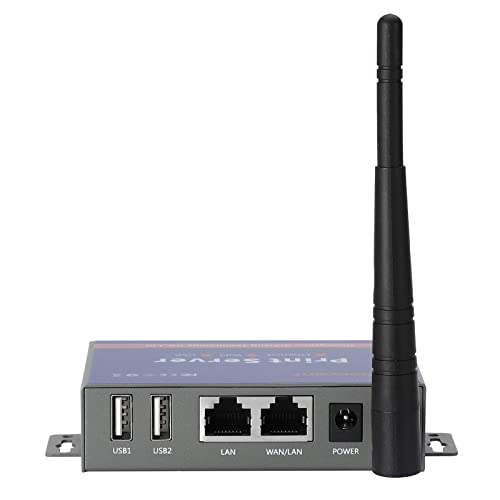
Best for environments that need to share two USB printers without connecting a PC. It supports Ethernet or Wi‑Fi networking and is Windows, Mac, and Linux compliant. It requires some setup and should be read along with the user manual and videos.
- Best for: small offices or homes with two printers requiring centralized sharing.
- Why selected: dual USB ports enable multiple printers on one network.
- Limitation: not plug-and-play; setup and ongoing configuration are required.
Xiiaozet LK300EW Wireless USB Device Server

Best for users who want to share a broader range of USB devices, including printers, scanners, and storage, across a network. It supports RAW and IPP printing, enabling flexible printer connections via IP address or hostname. Note that AirPrint and mobile printing are not supported.
- Best for: multi-device sharing beyond printers in small offices.
- Why selected: versatility in USB device sharing not limited to printers.
- Limitation: some features like mobile printing may not be available.
StarTech 1-Port Wireless N Print Server

Best for home or small office networks needing a dependable wireless print server with an RJ45 wired port. It supports 802.11b/g/n and provides online setup guidance for shared printing. Ideal for environments where a dedicated print server is preferred and wired networking is common.
- Best for: straightforward wireless printer sharing with a fixed wired option.
- Why selected: compact design and clear installation steps.
- Limitation: initial setup may require following an online guide.
StarTech 1-Port USB 2.0 Network Print Server
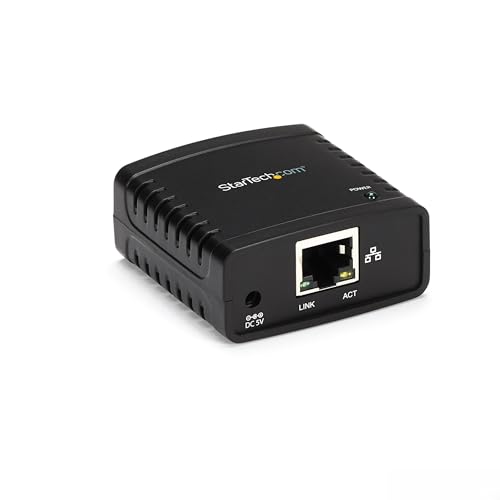
Best for users who require a wired network print server with detailed configuration options. This model uses a web-based interface for static IP or DHCP setups and is compatible with most USB 2.0 printers using standard drivers. It is not compatible with hubs or printers needing full bi-directional communication.
- Best for: users comfortable with manual network setup and traditional USB printers.
- Why selected: robust compatibility with standard USB printers and clear network configuration.
- Limitation: not plug-and-play; requires intermediate network knowledge.
Buying Guide: Choosing The Right Wifi Print Server
What you should consider before buying a wifi print server:
- Printer compatibility: Ensure the device supports your printer’s USB class and protocols (RAW, IPP).
- Network type: Do you need pure wireless sharing, or is a dual-port wired option valuable for desk organization?
- Number of printers: If you have multiple printers, a dual-port model or a two-printer server may be preferable.
- Setup complexity: Some models require manual configuration or reading manuals; others are more plug-and-play.
- Operating system support: Look for compatibility with Windows, macOS, and Linux if you operate across systems.
- Security: Check for network access control and any required firmware updates to secure the printer network.
- Device role: Decide whether you need a simple print share, or a broader USB device server that also supports scanners or storage devices.
FAQ
- What is a wifi print server used for?
A wifi print server connects a USB printer to a wireless network, allowing multiple computers to print without a direct USB connection to each computer.
- Do all printers work with print servers?
Most USB printers work with standard print servers using RAW or IPP protocols, but some laser, thermal, or proprietary printers may have limitations. Check compatibility notes for the specific model.
- Is setup difficult?
Setup ranges from plug-and-play to requiring manual configuration. Check the user manual for initial network configuration steps and IP addressing guidance.
- Can print servers share two printers?
Yes. Some models offer dual USB ports to share two printers or connect additional USB devices, depending on the product.
- Is AirPrint supported by all models?
No. AirPrint support varies by model. If you need mobile printing, verify AirPrint or alternative mobile printing options before purchase.