Looking for a reliable USB WiFi adapter to boost your Mac’s wireless performance? This guide highlights five compatible options that cater to different needs, from portable travel adapters to high-gain desktop solutions. Whether you’re streaming, gaming, or video conferencing, these picks are chosen for macOS compatibility, driver availability, and real-world usefulness. The buyers below are best for: frequent travelers, home office setups, casual MacBook users, and power users needing strong MU-MIMO support. A quick summary table follows to compare key specs at a glance.
| Product | Best For | Key Benefit | Notes |
|---|---|---|---|
| TP-Link Archer T3U | Home/Office with USB-C or USB-A | 2.4G/5G dual band with MU-MIMO | USB 3.0; portable |
| TP-Link Nano T2U Nano | Travel and light use | Ultra-compact design | Dual band, plug-and-forget |
| TP-Link TL-WN725N | Budget builds, basic needs | Nano size; solid 150 Mbps | 2.4 GHz only |
| EDUP AC600M | Desktop PCs needing flexibility | Dual band; AP mode | Windows/macOS compatible |
| TP-Link Archer T4U Plus | Desktops/gamers needing speed | AC1300 speeds; dual antennas | Windows/macOS compatible |
TP-Link Archer T3U AC1300 Dual Band USB Adapter

Best for: Mac users who want strong dual-band performance and MU-MIMO without complicated setup. The Archer T3U delivers 2.4GHz and 5GHz connections with Beamforming to reduce lag in busy networks. USB 3.0 compatibility helps achieve higher real-world speeds on supported Macs.
Why selected: It combines MU-MIMO with dual-band support in a compact package. Its USB 3.0 interface provides faster data transfer than older USB standards, making it a solid choice for stable streaming and online gaming on Mac systems.
Limitation: Some macOS versions may require driver updates for optimal performance; verify driver support for your macOS version before purchase.
TP-Link Nano AC600 USB WiFi Adapter (Archer T2U Nano)
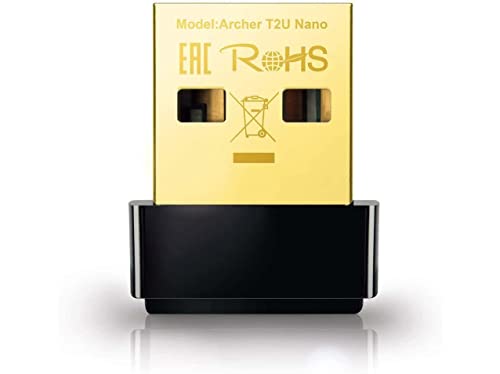
Best for: MacBook users who travel often and need a tiny, unobtrusive adapter. The Nano T2U Nano provides dual-band 2.4G/5G connectivity in a travel-friendly form factor, making it easy to carry in a laptop sleeve or wallet.
Why selected: Its small footprint means it won’t block adjacent USB ports or protrude from the laptop. The dual-band capability helps maintain reliable connections in varied environments, from cafes to hotel rooms.
Limitation: Lower overall maximum speed compared to larger, more feature-rich adapters; adequate for everyday web use and HD streaming but not designed for high-end gaming on macOS.
TP-Link USB WiFi Adapter TL-WN725N N150

Best for: Budget-conscious Mac users needing a simple upgrade to wireless connectivity. The TL-WN725N is a nano-sized adapter that delivers basic N150 speeds, suitable for email, browsing, and video calls on macOS.
Why selected: It’s a reliable entry point to add WiFi to older Macs or desktops without built-in wireless. Its compact design minimizes desk clutter and reduces interference with other USB devices.
Limitation: It is limited to 2.4GHz and lower speeds, which may fall short for high-definition streaming or multiplayer gaming on busy networks.
EDUP AC600M USB WiFi Adapter

Best for: Mac users who need a flexible dual-band option with extra features. EDUP AC600M supports 2.4GHz/5.8GHz bands and includes AP mode for sharing internet.
Why selected: AP Mode can turn a computer into a hotspot, useful for creating a quick wireless shared connection in areas with limited network access. The dual-band capability helps manage interference in busy environments.
Limitation: Some Windows/macOS driver installation steps may require manual setup; verify driver availability for your specific macOS version before purchase.
TP-Link Archer T4U Plus AC1300 USB WiFi Adapter
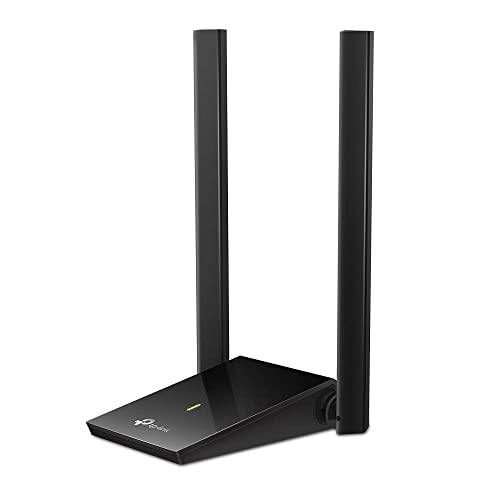
Best for: Mac users who want robust desktop performance for gaming, streaming, or large file transfers. The Archer T4U Plus offers higher theoretical speeds and dual antennas for improved range and stability.
Why selected: It combines AC1300 speeds with dual antennas to deliver better coverage and steadier connections in larger rooms or with distant routers, which can be beneficial for desktop setups on macOS.
Limitation: Real-world speeds depend on router capabilities and network load; setups in some environments may still face interference or require router optimization.
Buying Guide: What To Consider When Choosing A Mac WiFi Adapter
Connectivity needs vary by user. Consider these practical questions to pick the right adapter for your Mac.
Which speed and band matter for you?
If you mainly browse, stream HD video, and attend video calls, a dual-band adapter (2.4GHz and 5GHz) with MU-MIMO helps maintain stable connections in congested networks. For simple tasks, a single-band or lower-speed model can be sufficient and more affordable.
Is portability important?
Traveling or using a MacBook on the go favors nano or ultra-compact designs. A tiny adapter minimizes desk clutter and reduces the risk of snagging cables.
Do you need extra features?
AP mode, easy driver installation, and native macOS compatibility can influence your choice. AP mode is useful for sharing a connection, while native macOS support means smoother plug-and-play experiences.
Mac compatibility and drivers
Verify driver support for your macOS version. Some adapters require manual driver installation on older macOS versions, while newer systems may offer plug-and-play operation.
What about antennas and range?
High-gain antennas improve range and signal stability, especially in larger rooms or if the router is far away. If you have a compact workspace, a smaller antenna setup can be preferable to avoid desk clutter.
Budget vs performance
Budget models provide basic connectivity, while higher-end adapters offer MU-MIMO, better speeds, and enhanced range. Choose based on your typical network activity and the router you use at home or work.
FAQ
- Will these adapters work with MacBook Air? Yes, most listed adapters are compatible with macOS versions that support standard USB networking, though driver steps may vary by macOS version.
- Do I need drivers on macOS? Many modern macOS versions support plug-and-play, but older versions may require driver installations from the manufacturer’s site.
- Can I use a USB WiFi adapter with a desktop Mac? Yes, a USB adapter can add WiFi to any desktop Mac with a USB port. Ensure driver compatibility for your macOS version.
- What does MU-MIMO do for me? MU-MIMO helps multiple devices communicate with the router more efficiently, reducing wait times and improving throughput in busy networks.
- Is dual-band always better? Dual-band is advantageous when your router supports both bands and you face interference on one band. For simple tasks, 2.4GHz may suffice.
- Should I choose USB 3.0 adapters? USB 3.0 provides higher real-world speeds than USB 2.0, especially when your router and network support fast connections.