Parents today want reliable eyes on the nursery with a simple setup, secure connections, and flexible viewing options. The following selection highlights popular wifi-enabled baby monitors (and strong non-wifi options where relevant) that pair with dedicated parent units or apps for convenient, real-time monitoring. Each product emphasizes clear video, secure data transfer, and practical features like pan-tilt-zoom, night vision, and lullabies. Read on to compare top candidates and find the right monitor for your home.
| Product | Brand | View Method | Key Benefit |
|---|---|---|---|
| HelloBaby HB6550 | HelloBaby | No WiFi / 2.4GHz FHSS | Remote pan/tilt, long 1000 ft range |
| HelloBaby HB6550-2 | HelloBaby | No WiFi | Two cameras with one large screen |
| VTech VM901 | VTech | 1080p/HD remote + local viewing | |
| jeeber 1080P WiFi Monitor | jeeber | WiFi + app | 2 cameras, 360° view, cry detection |
| Momcozy BM04 | Momcozy | WiFi or non-WiFi | 5″ 1080p, motion & cry alerts |
| ieGeek 2-Camera Monitor | ieGeek | Non-WiFi + app | Split-screen with 2 cameras |
The table above reflects a mix of wifi-enabled models and robust non-wifi setups. Each entry below provides a detailed, objective breakdown to help you choose based on display quality, security, battery life, and ease of use.
HelloBaby No WiFi Monitor HB6550

The HB6550 is designed for households that prefer a non-WiFi setup. It uses a 2.4 GHz FHSS private link for a secure, low-latency connection between camera and 5″ color display. With a 355° pan and 120° tilt, parents can monitor from multiple angles. Night vision is infrared for clear images in low light, and there is a 1000 ft range for coverage in larger homes. Features like VOX mode for power saving and lullabies help soothe the baby without leaving the room.
HelloBaby Upgrade 5” No-Wifi Monitor HB6550-2
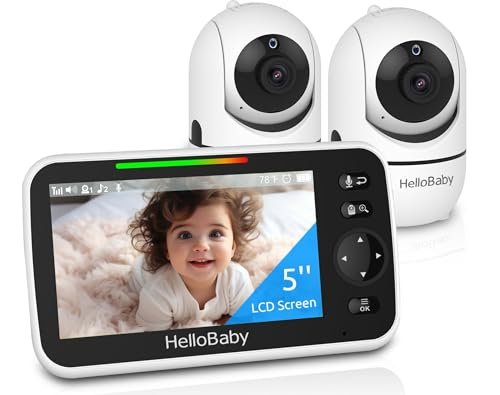
This two-camera HelloBaby setup expands monitoring across two rooms while maintaining a single large display. It uses the same secure 2.4GHz link and provides easy plug-and-play operation. The two cameras are pre-connected, enabling quick setup. The system supports long-range transmission and offers clear night vision and remote audio. It’s ideal for families with multiple sleeping areas where a non-WiFi configuration is preferred for security or reliability reasons.
VTech VM901 Smart WiFi Baby Monitor

The VM901 combines a 5″ IPS display on the parent unit with optional 1080p remote viewing via WiFi. It supports remote pan, tilt, and zoom, delivering a wide view of the nursery with smooth motorized control. Night vision is enhanced for clear screening after dark, and the system emphasizes secure local viewing in Direct Mode without internet. When connected to WiFi, the MyVTech app provides additional remote access on iOS and Android, with no ongoing subscription fees.
ieGeek 2-Camera Split-Screen Monitor
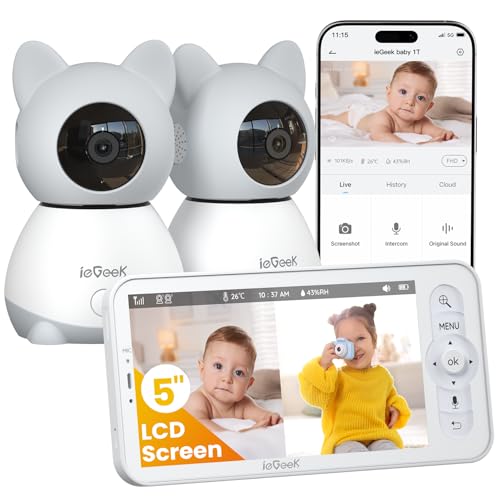
ieGeek offers a 5″ 2K HD display with two cameras and split-screen viewing. It provides auto-tracking, 4X digital zoom, and a 350° pan/60° tilt for flexible room coverage. The system supports secure non-WiFi parent-unit monitoring while offering app access via 2.4GHz WiFi for remote viewing. This dual-connection approach is designed for families needing two camera angles and a quick, clutter-free setup with robust local and cloud-like access when desired.
jeeber 1080P WiFi Monitor (2 Cameras)

jeeber combines two cameras with a 4″ IPS screen and app connectivity for flexible viewing. The camera system features 340° pan/tilt, 68° wide-angle lens, 2K/1080P options, and auto IR night vision. Cry and motion detection provide real-time alerts to your phone, with lullabies and a temperature sensor enhancing nursery monitoring. The dual-camera setup is suitable for twins or bedrooms needing multiple vantage points, while WiFi access allows remote viewing when you’re away from home.
Momcozy BM04 Smart WiFi Monitor

Momcozy BM04 offers a flexible wifi/non-wifi option with a 5″ 1080p display and a long battery life in portable use. It supports motion and cry detection, safe fence alerts, and a 2-way talk feature. The device emphasizes privacy and security with encrypted video, plus the option to pair with a dedicated parent unit or use the Momcozy app on the go. This dual-path approach makes it suitable for caregivers who want to monitor from multiple settings or away from home.
GoodBaby No-WiFi Monitor

GoodBaby’s no-WiFi option focuses on a secure local feed with pan-tilt-zoom, 2-way talk, and night vision. It shows a long-range setup (up to 960 ft) and supports a temperature sensor plus lullabies. This model is ideal for households prioritizing offline operation and straightforward, private monitoring without external network exposure.
Buying Guide: Key Purchase Considerations
When choosing a wifi baby monitor with a parent unit, consider the following factors to balance security, convenience, and value:
- Connection Type and Security: Favor models with encrypted transmissions and private channels (e.g., FHSS or robust app security). Decide between local-only viewing and optional app-based remote access.
- Display and Camera Quality: Look for 1080p or 2K resolution options, responsive pan/tilt/zoom, and night vision clarity. A larger parent-unit screen often reduces eye strain.
- Number of Cameras and Viewing Mode: Single-camera systems are simple; dual-camera setups support multiple angles or twins. Split-screen versus single-view modes affect how you monitor space.
- Battery Life and Power: Battery duration matters for portable use. Some models extend ECO modes to save power, while others are plugged in continuously.
- Range and Reliability: Outdoor range matters for multi-story homes. Consider models that require antenna adjustments or offer extended-range capabilities.
- Alerts and Notifications: Motion and cry detection can alert you instantly. Ensure notifications work reliably on your preferred devices.
- Additional Features: Lullabies, temperature sensors, feeding reminders, and smoke-contrast night vision can add value but may be optional depending on your needs.
- Ease of Setup: Plug-and-play devices with pre-connected cameras reduce complexity. Non-WiFi options avoid internet exposure altogether, increasing security for some families.
- App Experience: If you want remote viewing, consider apps that are intuitive, support multiple devices, and do not require monthly fees.
- Price and Longevity: Higher-end models offer advanced zoom and better night vision, but mid-range options frequently provide ample performance for most households.
In summary, wifi-enabled options typically provide seamless remote viewing and flexible multi-device access, while non-WiFi models emphasize local, private monitoring with strong reliability. Your choice should align with your home layout, privacy preferences, and whether you value remote viewing on a phone or tablet.