Discover the top wide angle webcams designed to capture every detail in larger groups, classrooms, and home studios. This guide highlights five popular options with features like 120° field of view, AI noise cancellation, automatic light correction, and dual-camera setups. Whether you’re conferencing with colleagues, streaming content, or teaching online, these cameras help you look your best on every call. Below is a quick summary of the featured products to help you compare at a glance.
| Product | Brand | Key Feature |
|---|---|---|
| Angetube Wide Angle 4K Webcam | Angetube | 120° FOV, PDAF, AI Noise Cancellation |
| Shcngqio 1080P HD Webcam | Shcngqio | Wide-Angle Lens, Auto Light Correction |
| Spedal 920 Pro | Spedal | 120° Wide Angle, 360° Rotation |
| Spedal 4K Webcam | Spedal | 120° Ultra-Wide, Sony Sensor, Auto Focus |
| EMEET C60E Dual-Camera | EMEET | Dual Cameras, 11X Hybrid Zoom, PDAF |
Note: All products are suitable for PC, Mac, and laptop setups, and support common video conferencing apps. Feature sets vary, including 1080p or 4K resolution, microphone configurations, and remote control options. Consider your workspace lighting and room size when selecting a wide angle webcam.
Angetube Wide Angle 4K Webcam
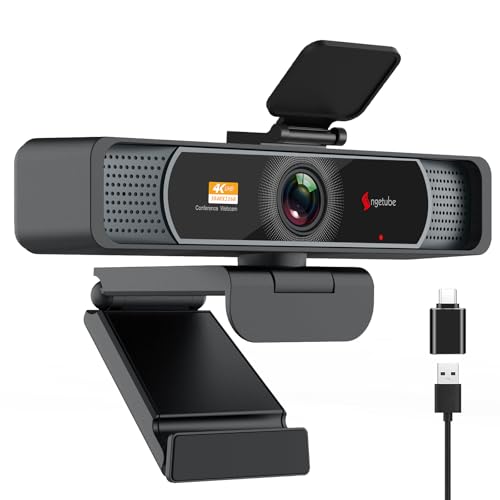
The Angetube camera delivers Ultra HD 4K video (3840×2160 @ 30fps) with an option for 1080p @ 60fps, using a premium CMOS sensor. A 120° wide-angle lens provides distortion-free views, aided by Phase Detection Auto Focus for rapid, accurate focusing during movement. Dual microphones support AI noise cancellation to minimize background noise up to a long-range distance. It’s designed for business meetings, remote learning, and streaming, with light correction to maintain color accuracy in varying environments. Note: 4K is enabled via software like OBS or PotPlayer.
Key features:
– 4K (3840×2160 @ 30fps) and 1080p (1920×1080 @ 60fps)
– 120° wide-angle lens with distortion control
– PDAF autofocus for sharp images
– AI-powered noise cancellation with long-range voice capture
– Privacy cover and USB connectivity
Shcngqio 1080P HD Webcam

The Shcngqio TWC29 webcam focuses on 1080p clarity with a wide-angle lens designed for vibrant, smooth video at 30fps. It includes a built-in noise-canceling microphone to ensure clear voice transmission in noisy environments. Automatic light correction dynamically adjusts brightness and color to improve visibility in diverse lighting conditions, making it suitable for webinars, video calls, and streaming. It works well with laptops, desktops, and Mac setups and supports common conferencing apps.
Key features:
– 1080p resolution with wide-angle lens
– Noise-canceling microphone
– Automatic light correction for variable lighting
– Plug-and-play USB connection
Spedal 920 Pro Wide Angle Webcam

The 920 Pro is designed for large groups and conference rooms with a 120° wide-angle field of view and a 360° horizontal plus 180° vertical rotation range. It features a built-in noise-canceling microphone optimized for clear conversations in huddle spaces. The camera is plug-and-play and tripod-ready, with a focus that accommodates near and distant subjects. The upgraded flexible base supports panoramic captures with minimal distortion.
Key features:
– 120° wide-angle with 360°/180° rotation
– Built-in noise-canceling microphone
– Plug-and-play with universal clip and tripod support
– Panoramic 720-degree coverage
Spedal 4K Webcam with Tripod

This Spedal model features a 4K resolution using a Sony 1/2.8″ sensor for cinema-grade clarity. It offers a 120° ultra-wide lens with a 7-element glass structure to minimize distortion and deliver razor-sharp focus from 7 cm to infinity, thanks to fast autofocus. The camera also provides a broad dynamic range (HDR) for balanced exposure in high-contrast scenes, ensuring a professional look in streaming and conferencing contexts.
Key features:
– Native 4K (3840×2160) with high color depth
– 120° ultra-wide lens with fast autofocus
– 90.9dB dynamic range for HDR-like performance
– Included tripod for versatile mounting
EMEET C60E Dual-Camera 4K Webcam

The EMEET C60E features dual cameras sharing a 1/2.8″ CMOS 4K sensor for flexible streaming. The left wide-angle camera captures panoramic scenes, while the right telephoto camera provides up-close detail at a comfortable distance. It supports up to 11X hybrid zoom and uses PDAF autofocus to maintain sharpness across zoom levels. A remote control and EMEET STUDIO software enable on-the-fly brightness, color, and RGB lighting adjustments for refined production value.
Key features:
– Dual-camera 4K setup with 11X hybrid zoom
– Left wide-angle and right telephoto camera
– PDAF autofocus and remote control
– RGB lighting via EMEET STUDIO
Buying Guide
When choosing a wide angle webcam, consider these purchase considerations to ensure the best fit for your space and needs:
- Field of View: A 120° FOV covers larger groups but may introduce slight edge distortion. Look for lenses with distortion correction and autofocus for sharpness across the frame.
- Resolution and Frame Rate: 4K offers crisp details but requires more bandwidth and processing power. 1080p at 60fps is smoother for fast movement and should suffice for most calls.
- Autofocus and Zoom: PD/AF helps maintain focus when you move, while some models offer hybrid zoom. Note that true 4K 60fps may limit zoom functionality on some cameras.
- Microphone Quality: Built-in mics with AI noise cancellation benefit noisy environments. Consider USB audio options if your setup needs higher audio fidelity.
- Lighting and HDR: Automatic light correction or hardware HDR improves visibility in variable lighting, reducing the need for external lights.
- Compatibility and Setup: Most webcams are plug-and-play on Windows, macOS, and common conferencing apps. Check for software support like OBS or studio controls if you plan advanced streaming.
- Mounting and Mobility: Tripod compatibility, clip attachments, and 360/180° rotation enhance placement flexibility for desks, conference rooms, or studios.
- Privacy Features: Built-in privacy shutters protect privacy when the camera is not in use.
Depth and use-case considerations vary by environment. For large group calls or classrooms, prioritize 120° wide-angle capabilities and robust noise suppression. For live streaming and professional productions, 4K sensors, advanced HDR, and dual-camera setups can offer greater versatility. Always balance video quality with your computer’s processing capacity and bandwidth to ensure smooth performance during meetings or streams.