Finding a dependable webcam that delivers smooth 1080p at 60 frames per second can elevate every video call, livestream, or online class. This guide highlights five standout models that balance sharp image quality, reliable autofocus, and user-friendly features like privacy covers and noise-reducing mics. Whether you’re working from home, teaching online, or streaming gameplay, these webcams are designed to keep you visually crisp and clearly heard in everyday environments. The selection emphasizes value, broad compatibility, and practical design for American users.
| Product | Key Features | FOV | Notes |
|---|---|---|---|
| NexiGo N660P | 1080p60, dual mics, auto white balance | 74° | Privacy cover included |
| Shcngqio 1080P | 1080p60, noise-canceling mic, auto light correction | 78° | Plug & Play USB |
| Logitech Brio 101 | Auto-light balance, built-in mic, GameChat support | 90° | USB-A |
| EMEET C950 | PDAF autofocus, 1080p60, privacy cover | 70° | 4K framing options |
| saylas 2K/1080P | 2K/1080p60, 2 mics, privacy cover | 78° | Plug & Play |
NexiGo N660P 1080P 60FPS Webcam

The NexiGo N660P delivers 1920×1080 resolution at 60fps, with automatic white balance and exposure to maintain clear video in varying lighting. Two built-in microphones provide stereo capture and noise reduction for clearer voice transmission in meetings, classes, and streams. A privacy cover protects users when the camera is not in use, and the included privacy features make it suitable for home offices and shared spaces. This model emphasizes smooth video at high frame rates without requiring specialized software, making it versatile for OBS, Zoom, and Teams.
Key advantages include reliable autofocus optimization and a straightforward setup that suits both beginners and experienced streamers. The dual mics help with voice clarity in busy households or open-plan offices, while the 60fps performance ensures fluid motion for gaming and fast-paced tutorials. If you want a solid, plug-and-play option that emphasizes practical performance, this NexiGo model is a strong pick.
Shcngqio 1080P HD Webcam

The Shcngqio TWC29 webcam captures sharp 1080p video at 30fps in its standard mode, with a wide-angle lens that expands the field of view for inclusive video calls and gaming sessions. Its built-in noise-canceling microphone helps deliver clearer voice in real-world environments where background noise is common. Auto light correction adjusts brightness and color to improve visibility in dim or overly bright settings, ensuring you appear clearly during virtual meetings, online teaching, and content creation.
Designed for easy plug-and-play use with laptops, desktops, and Mac systems, this webcam prioritizes straightforward setup and dependable performance without needing extra software. The combination of wide field of view, automatic light correction, and a noise-reducing mic makes it a well-rounded option for everyday video communications and streaming on a modest budget.
Logitech Brio 101 Full HD 1080p Webcam

The Logitech Brio 101 supports 1080p video with enhanced auto-light balance and a built-in microphone to ensure clear voice capture during meetings, streaming, and online classes. It’s designed to pair with a range of platforms, including Zoom and Teams, and includes GameChat compatibility for Nintendo Switch users. The webcam emphasizes reliable performance in variable lighting, with a focus on balance between brightness and natural color reproduction. It’s a practical option for users who want a reputable brand with solid software support and cross-platform compatibility.
While Brio 101 also targets higher resolutions and premium features, its 1080p60 performance remains a competitive baseline for many business and education use cases. The built-in mic and brand-aligned reliability provide a dependable experience for everyday video conferencing and educational sessions.
EMEET C950 4K Webcam with 1080p60
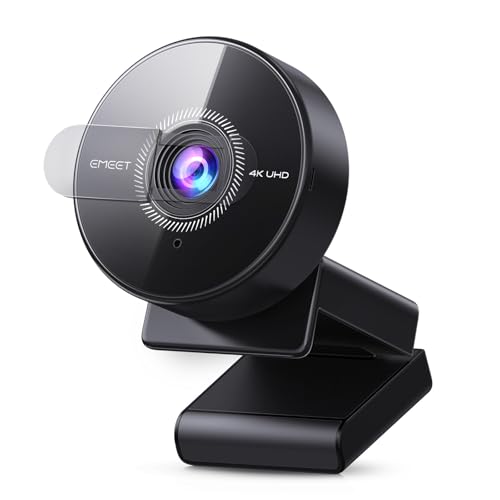
The EMEET C950 uses PDAF autofocus to deliver fast, precise focusing and better stability across scenes, with flexible 4K/1080p options and built-in noise-reducing microphone for clearer audio. The C950 offers 70° field of view and a privacy cover for security. While 4K capture is an option, 1080p at 60fps provides smooth video suitable for remote meetings, online classes, streaming, and gaming. The camera’s design emphasizes ease of use, firmware updates via EMEETLINK, and reliable performance in varied lighting conditions.
Users benefit from the PDAF-driven focus performance and the balance between image quality and convenience. The C950 suits those who want a versatile camera that supports higher-resolution work while maintaining solid 1080p60 performance for everyday use, including virtual conferences and content creation.
saylas 2K/1080P Webcam With Microphone

The saylas webcam supports 2K at 30fps and 1080p at 60fps, delivering clear, detailed images and smooth motion. It features two noise-canceling microphones to minimize background noise and echo, improving voice clarity during calls, webinars, and streaming. The 78° wide field of view ensures a broad enough frame for personal or small-group videos, and the privacy cover provides security when not in use. This model emphasizes value with flexible resolutions and a straightforward plug-and-play setup for Windows, Mac, and popular conferencing platforms.
Buying Guide: Choosing The Right 1080p 60FPS Webcam
- Resolution and frame rate: For smooth video, prioritize 1080p at 60fps. Many models also offer 4K options; use 4K when you need the highest detail, but 1080p60 typically suffices for calls and streams.
- Autofocus and light balance: PDAF autofocus and automatic light correction help maintain sharpness and visibility across lighting conditions.
- Microphone quality: Dual mics or noise-canceling features improve voice clarity in noisy environments; consider built-in mics if you don’t plan to use a separate microphone.
- Field of view: A wider FOV (70°–90°) captures more of your environment, useful for demonstrations or teaching, while narrower FOV is better for solo presentations.
- Privacy and security: A physical privacy cover adds peace of mind when the camera isn’t in use.
- Software and compatibility: Check for plug-and-play compatibility with Windows, macOS, and common platforms like Zoom, Teams, OBS, and browsers.
- Mounting flexibility: Look for tripods, monitor mounts, or clip-on designs that fit your workspace and desk setup.
When evaluating these webcams, consider your typical setup, lighting conditions, and whether you prioritize streaming performance, conferencing reliability, or content creation versatility. The models above balance price, ease of use, and effective 1080p60 output, with several offering higher-resolution options or advanced autofocus for demanding tasks.