Choosing the right web camera can improve video quality, audio clarity, and overall meeting experience. This guide highlights five dependable options suitable for professional and personal video conferencing across Windows, Mac, and more. Each option offers features like built-in mics, auto light correction, and easy plug-and-play setup to support productive virtual meetings.
Summary of chosen products:
| Product | Brand | Key Feature |
|---|---|---|
| NexiGo N60 1080P Webcam | NexiGo | 1080p video with built-in mic, privacy cover |
| Logitech C920x HD Pro | Logitech | Autofocus, light correction, versatile compatibility |
| SZGIARUY 1080P Webcam | SZGIARUY | Auto focus, noise-cancelling mic, plug-and-play |
| MTORED USB HD 1080P Webcam | MTORED | Wide angle, built-in mic, privacy cover |
| EMEET C960 1080P Webcam | EMEET | 2 mics, low-light correction, plug-and-play |
NexiGo N60 1080P Webcam

The NexiGo N60 webcam delivers Full HD 1080p video at 1920 x 1080 resolution with 30fps. A 3.6mm glass lens provides a crisp image within a typical indoor range of about 19.6 inches to 13 feet. It features USB 2.0/3.0 compatibility and requires no extra drivers for most devices, enabling quick setup. Built-in noise-cancelling microphone improves audio by reducing background noise, making it suitable for Zoom, Skype, Teams, and other conferencing platforms.
Logitech C920x HD Pro PC Webcam

Logitech C920x HD Pro offers Full HD 1080p at 30fps with autofocus and high-quality lighting correction. It is designed for bright, sharp video suitable for streaming, meetings, and collaboration. The camera supports multiple conferencing apps and devices, and includes advanced software features to fine-tune video and audio. Its compatibility with various platforms makes it a versatile choice for home offices and professional setups alike.
SZGIARUY 1080P HD Webcam
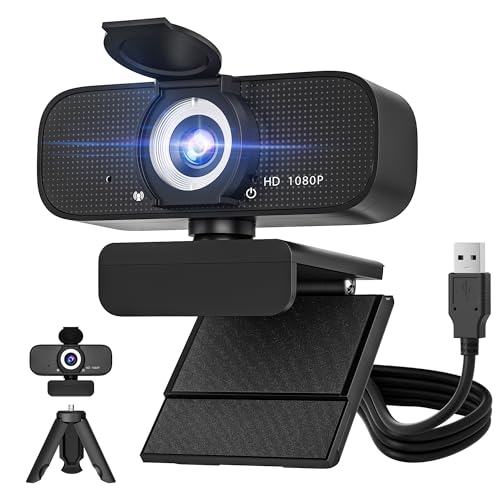
SZGIARUY’s 1080p webcam emphasizes a built-in noise-cancelling microphone and automatic light correction. The plug-and-play design works with USB 2.0/3.0/3.1 without requiring drivers, making it straightforward to deploy for video conferencing, online classes, and live streaming. Automatic lighting adjustments help maintain visible color and clarity in varying home or office lighting conditions.
MTORED USB HD 1080P Webcam

The MTORED webcam features full HD 1080p video with a wide-angle lens and a built-in microphone. It includes a privacy cover and a rotatable tripod for flexible placement. Automatic light correction enhances video quality across lighting conditions, and the plug-and-play design reduces setup time for meetings, webinars, and streaming sessions.
EMEET 1080P Webcam with Microphone

The EMEET C960 delivers 1080p resolution with two built-in noise-reduction microphones and automatic low-light correction. This plug-and-play webcam is designed for online calls, conferencing, and streaming, providing clear voice capture and brighter video in dim settings. It’s a practical option for users seeking reliable performance and simple setup.
Buying Guide
- Video quality and frame rate: Look for 1080p at 30fps or higher for smooth, clear video in most conferencing scenarios.
- Audio: Built-in stereo mics or noise-cancelling mics improve voice clarity; consider dual-mic configurations for larger rooms.
- Lighting performance: Auto light correction helps maintain visibility in varied lighting; lamps or windows can affect image quality.
- Mounting and placement: Tripod compatibility and adjustable clip options provide flexibility for desktops, laptops, and monitors.
- Privacy features: A physical cover or lens shield preserves privacy when the camera is not in use.
- Compatibility: USB 2.0/3.0 support and driver-free operation reduce setup friction across Windows, macOS, Linux, and Chrome OS.
- Additional features: Some models offer AI framing, built-in speakers, or software enhancements—evaluate these against your conferencing needs.
- Use-case perspective: For small meeting rooms, a compact webcam with good mics may suffice; for larger virtual classrooms or teams, a wide-angle and higher-quality audio setup can be more effective.