Choosing a PC VR headset involves balancing visuals, tracking, comfort, and ecosystem. This guide highlights five leading options that pair well with a gaming PC, covering standalone and PCVR-capable devices. Each entry includes standout features, what to expect in gameplay, and practical buying tips to help you pick the right fit for your setup.
Summary of chosen products
| Product | Key Strengths | Ecosystem | Connectivity |
|---|---|---|---|
| HTC Vive XR Elite with Deluxe Pack | Deluxe accessories, standalone + PCVR | PC VR, mixed reality | USB-C, wireless options |
| Meta Quest 3 512GB | Sharp visuals, untethered play | Meta ecosystem, Horizon | Wi‑Fi, optional PC link |
| HTC Vive Focus Vision | Standalone with PC VR streaming | VIVEPORT and SteamVR | DisplayPort, Ethernet option |
| DPVR E4 VR Headset | High refresh rates, wide FOV | SteamVR compatibility | USB-C/DP streaming |
| Pimax Crystal | 4K per eye clarity, wide FOV | PC VR powerhouse | USB-C, DisplayPort |
HTC Vive XR Elite with Deluxe Pack

The HTC Vive XR Elite blends mixed reality and PC VR into a versatile headset designed for both standalone sessions and PC-connected gaming. The Deluxe Pack includes essential VR accessories such as the VIVE Face Gasket 2.0, VIVE Deluxe Strap, VIVE Temple Clips, and VIVE MR Gasket, adding comfort and customization for longer play sessions. When connected to a VR-ready PC, users can access high-fidelity PC-VR titles with low latency while enjoying a more immersive mixed-reality experience thanks to its wide field of view and multiple cameras for tracking. The headset is advertised as base station–free, offering freedom to play without external sensors. This model suits players who want a premium, all‑in‑one solution with robust PC VR capabilities.
Considerations: Ensure your PC meets the headset’s processing needs for optimal PC VR performance. If you plan to use mixed reality features, check compatibility with your workspace and lighting. Battery life and comfort are key for long sessions, so the Deluxe Pack accessories can help improve wearability. If you’re transitioning from a previous Vive era, note the potential for different tracking ecosystems and software compatibility.
Meta Quest 3 512GB

The Meta Quest 3 pushes sharp visuals with near-4K level clarity through its Infinite Display and a nearly 30% improvement in resolution over prior generations. This headset shines in untethered play, letting you explore a wireless VR space with the freedom to roam. It also doubles as a powerful PC VR option when linked to a compatible PC, enabling access to a broad library via PC VR portals. The Quest 3 packs dual-generation processing power to deliver faster loads and smoother performance, making it a strong all‑in‑one device for both casual and dedicated VR gamers.
Buying tips: If you primarily game on PC, consider how often you’ll use standalone features versus PC VR streaming. A larger internal storage can help with installing more titles and downloaded demos. Compatibility with popular PC VR titles is essential, so verify SteamVR and other platform support. For long gaming sessions, ergonomic weight distribution and comfort features are worth assessing.
HTC Vive Focus Vision

The Vive Focus Vision blends standalone VR with PC VR streaming to offer flexible gameplay options. It supports eye tracking and social interaction features in VR environments, enhancing immersion. The DisplayPort mode enables lossless, high-fidelity visuals when connected to a PC, allowing access to broader SteamVR experiences. The headset emphasizes intuitive control and natural movement through integrated eye tracking and hand-tracking systems, making it a strong candidate for users who value precise interaction in virtual spaces. It also integrates with VRChat and other social platforms for collaborative play.
Considerations: If you plan to use PC VR streaming, ensure your network setup supports reliable streaming. The headset’s standalone capabilities make it appealing for quick plays without a PC, but PC VR enthusiasts should test latency and tracking quality when connected. Compatibility with content libraries (VRChat, SteamVR) is another factor to verify before purchase.
DPVR E4 VR Headset

The DPVR E4 targets PC gamers seeking a robust SteamVR experience with strong visual quality and broad compatibility. It features a high-resolution Fast LCD display (3664×1920) and adjustable refresh rates (72Hz/90Hz/120Hz), plus a roomy 116° field of view facilitated by Fresnel lenses. The headset is light at around 285 grams and includes IPD adjustments for a comfortable fit across different face shapes. The binocular overlap contributes to solid depth perception, which helps with 3D immersion in fast-paced titles and simulations. This headset stands out for gamers who want a compelling, budget-conscious PC VR option with strong visual fidelity.
Buying considerations: Examine long-term comfort for extended sessions and verify the availability of SteamVR titles you care about. Analyze how the E4’s tracking performs with your PC’s GPU and whether you’ll use external trackers or inside-out tracking for your preferred games.
Pimax Crystal
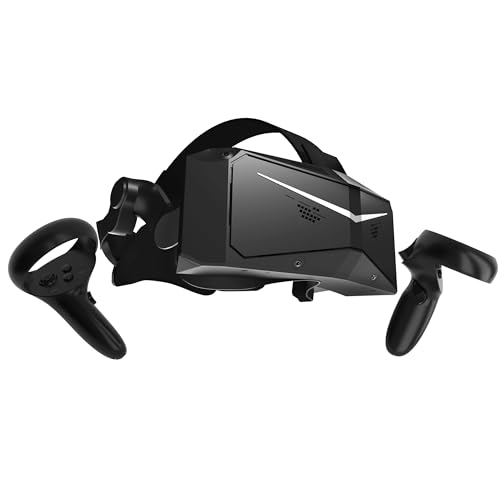
The Pimax Crystal is designed for immersive PC VR with an emphasis on exceptional visual fidelity. It delivers a high-resolution 4K per eye experience with a QLED local-dimming display and HDR, which translates to deep contrast and vivid colors. The headset uses a glass aspheric lens setup to minimize distortion and maximize edge-to-edge clarity, making it a top pick for flight sims, racing, and expansive open-world titles. Its strong FOV and resolution are aimed at users who want to push the boundaries of PC VR clarity and immersion, though setup and calibration may require more investment in GPU power and PC tuning compared to more consumer-friendly models.
Practical notes: Ensure your PC’s GPU and processing capability align with the Crystal’s demands. While visuals are superb, the setup process and room requirements can be more involved. If you value ultra-crisp imagery and wide immersion, this headset is a leading option for power users who prioritize image quality over plug‑and‑play convenience.
Buying Guide: Key Purchase Considerations
- Purpose and usage: Distinguish between standalone freedom, PC VR depth, or mixed reality experiences. If you primarily game on a PC, prioritize PC VR compatibility, tracking accuracy, and display clarity.
- Display quality: Higher resolution and refresh rates reduce motion blur and improve comfort. Look for at least 90Hz and target higher if your PC can render demanding games smoothly.
- Tracking and sensors: Inside-out tracking vs. base stations affects room setup and precision. Consider space size, lighting, and whether you want wall-mounted sensors or portable setups.
- Comfort and ergonomics: Weight distribution, adjustable head strap, and foam comfort significantly impact session length. Delve into mask fit, IPD adjustment, and face gasket design.
- Software ecosystem: Verify library access through SteamVR, Meta Horizon, Viveport, or other stores. Compatibility with your favorite titles is essential for long-term value.
- Connectivity: Assess whether the headset supports wireless PC streaming or requires a wired link. USB-C, DisplayPort, and Ethernet options influence latency and setup.
- Future-proofing: Look for devices with ongoing software updates, good developer support, and broad accessory ecosystems to maximize longevity.
- Security and warranties: Check warranty terms and renewal options, especially for refurbished or renewed models in the lineup.
In summary, the right PC VR headset depends on your balance of price, performance, and how you plan to interact with VR content. If you want a premium, feature-rich experience, explores options like the Vive XR Elite or Crystal. If you value wireless convenience for room-scale play, Quest 3 offers a strong all-around package with PC VR compatibility. For social and collaborative experiences, consider devices with robust avatar and tracking integration. Always verify compatibility with your PC’s GPU, your room size, and the software libraries you intend to use before purchasing.