Flight simulation enthusiasts increasingly rely on high-fidelity VR to create a convincing cockpit experience. The right VR-ready peripherals—from flight sticks and HOTAS setups to specialized panels and VR-ready controllers—can dramatically enhance immersion, precision, and comfort. This guide highlights five top VR-friendly flight sim accessories and how they fit into a realistic flight deck. A quick summary table below lists core details to help you compare options at a glance.
| Product | Brand | Key Benefit | VR Compatibility |
|---|---|---|---|
| REALFLIGHT Evolution RC Flight Simulator | REALFLIGHT | Intuitive InterLink DX controller; broad aircraft selection | VR supported |
| Logitech G X56 HOTAS | Logitech | Dual sticks with programmable controls and RGB | VR compatible |
| WINWING Phoenix MIP(VR) Flight Controller | WINWING | Comprehensive VR cockpit modules | VR ready |
| Thrustmaster T-Flight Hotas One | Thrustmaster | Official Microsoft Flight Simulator license; detachable throttle | VR compatible |
| Flight Simulator Instrument Panel Six Pack | AltMot | Integrated knobs and monitor for cockpit realism | VR optional |
Below, five hand-picked products are explored in detail, focusing on how their features translate into a more immersive VR flight experience. Each section provides a concise overview, key features, and practical use notes for flight sim enthusiasts in the American market.
REALFLIGHT Evolution RC Flight Simulator
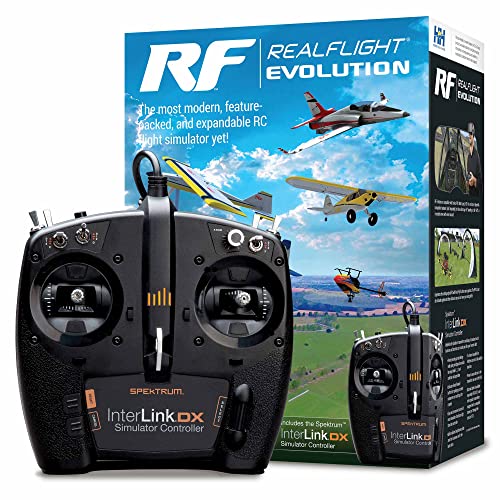
The REALFLIGHT Evolution RC Flight Simulator package centers on an updated user interface designed to streamline control. The InterLink DX controller reduces the need for a keyboard or mouse, which can be beneficial during VR sessions where hands-on control mimics a real cockpit. The software supports a wide spectrum of aircraft—from ultra micro to scale models—and includes multiple helicopter options. Its PhotoField flying site at Triple Tree Aerodrome provides a realistic backdrop for VR immersion, complementing flight dynamics with visually rich environments. This setup is ideal for VR pilots seeking a broader aircraft library and a more tactile control experience.
Logitech G X56 HOTAS
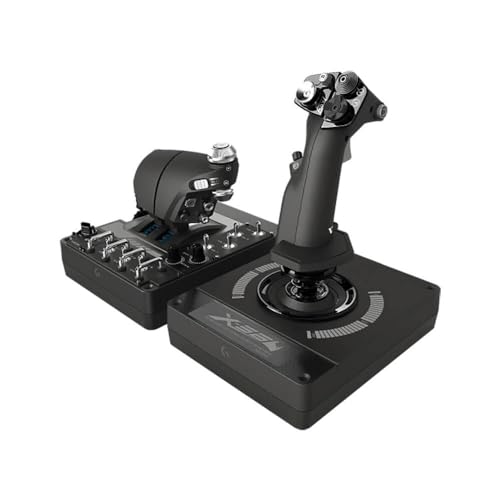
The Logitech G X56 HOTAS offers a versatile control surface with dual sticks, a 2x USB connection, and a customizable control system. Its 189 programmable controls and RGB lighting enable tailored configurations for different VR flight sims, enhancing situational awareness in the cockpit. The device supports a range of flight modes, including space and atmospheric flight, and the software allows color coding to match your rig. For VR users seeking precise pitch, roll, yaw, and weapon or sensor control, the X56 provides a robust, upgradeable platform that can adapt to evolving flight sim titles.
WINWING Phoenix MIP(VR) Flight Controller

The WINWING Phoenix MIP(VR) kit presents a modular, immersive cockpit experience designed for VR users. It includes UFC1, MFD1 X3, HUD1, and MP1 X3 components, each offering distinct controls and displays that emulate real cockpit panels. Detailed design and thoughtfully placed backlit controls contribute to a believable VR environment with tactile feedback. The ascending channel knob enhances realism, while the combination of materials and backlit switches ensures durability for frequent VR use. This package is well-suited for pilots who want a deeper, multi-panel cockpit in VR rather than a single-stick setup.
Thrustmaster T-Flight Hotas One

Thrustmaster’s T-Flight Hotas One delivers official Microsoft Flight Simulator licensing for Xbox Series X|S and PC, with a complete flight package that includes a 10-bit precision, five axes, 14 buttons, a rapid trigger, and a multidirectional hat switch. The detachable throttle adds flexibility, allowing the throttle to stay docked or be used separately on a lap or desk setup. For VR enthusiasts, the Hotas One provides reliable force feedback and straightforward calibration, letting pilots transition between VR cockpit views and traditional monitor setups without major hardware changes.
Thrustmaster T-Flight Hotas X

The Thrustmaster T-Flight Hotas X focuses on ergonomic comfort and programmable controls. It features a wide hand-rest for extended sessions and a fully programmable 12-button, five-axle control layout. The dual-system design provides aerodynamic handling with a rotating handle and an integrated blocking system, enabling precision in VR cockpits that demand accurate throttle and stick input. This setup is a practical choice for mid-range VR flight sims where reliability and comfort matter for longer VR training flights or complex mission scenarios.
Flight Simulator Instrument Panel Six Pack

The AltMot Flight Simulator Instrument Panel Six Pack brings a hands-on cockpit feel to VR by integrating physical knobs and an integrated monitor. Compatible with major Windows flight sim titles such as X-Plane 11/12 and Microsoft Flight Simulator 2020, this package extends beyond basic input devices to provide tactile reference points for airspeed, altitude, heading, and attitude settings. The included monitor consolidates essential readouts, aiding in real-time cockpit management during VR sessions and offering a visually grounded experience for pilots who value authentic instrument interaction in VR environments.
Buying Guide: Key Purchase Considerations
- VR compatibility and comfort: Ensure your chosen devices support your preferred VR headset and provide ergonomic designs for long VR sessions. Look for adjustable stands, weight distribution, and cable management to reduce fatigue.
- Control precision and programmability: For realistic flight in VR, prioritize devices with multiple axes, precise pitch/roll/yaw control, and customizable button mappings. Programmable controls help you tailor settings to specific aircraft and mission types.
- Modularity versus all-in-one kits: Some setups offer modular cockpit components (MIP, HUD, etc.), which can increase realism but require more space and setup time. All-in-one controllers are easier to deploy but may offer fewer customization options.
- Software compatibility: Verify that the devices you select are compatible with your go-to simulators (Microsoft Flight Simulator, X-Plane, etc.) and that VR features are actively supported by the software ecosystem.
- Durability and build quality: VR flight gear endures frequent, sometimes abrupt, use in immersive environments. Durable housings, reliable switches, and backlit controls can save maintenance headaches over time.
- Budget versus value: High-fidelity VR cockpits can be an investment. Compare features, such as backlit controls, detachable throttles, and panel modules, against the price to ensure you’re maximizing value for your VR needs.
- Space requirements: Some setups demand substantial workspace, especially multi-panel cockpits. Measure your area and consider stackable or wall-mount options if space is constrained.
With VR flight sim setups, the goal is to balance immersion, precision, and comfort. The options above provide a range of solutions—from all-in-one throttle-and-stick packages to modular cockpit panels—that can be mixed and matched with your VR headset and PC configuration. Whether you prioritize a realistic instrument panel, a highly programmable HOTAS, or a versatile VR-ready controller, there is a configuration to fit different flight disciplines, environments, and budget levels.