For people with low vision, a high-quality video magnifier can turn everyday tasks—reading menus, labels, newspapers, and books—into a more comfortable, independent experience. This guide reviews five top-rated options, highlighting magnification range, color modes, usability, and portability. Each product section includes a direct link to its Amazon listing, a visual preview, and key features to help you compare at a glance.
Summary of chosen products
- Eyoyo Digital Magnifier Portable Electronic Video Magnifier Reading Aids — 3.5″ LCD, 2x-25x, foldable handle
- Eyoyo Portable Digital Video Magnifier Electronic Reading Aid — 3.5″ LCD, 2x-25x, foldable handle
- RayHong Portable Digital Video Magnifier — 5.0″ LCD, 2x-32x, foldable handle
- MoreDisp Digital Magnifier 5 Inch — 2x-32x, 26 color modes, auto-focus
- Zoomax Luna 6 Portable Video Magnifier — 6″ HD screen, built-in handle, wireless charging
Eyoyo Digital Magnifier Portable Reading Aid (3.5 Inch)

The Eyoyo 3.5-inch digital magnifier offers adjustable magnification from 2x to 25x, designed for quick reading tasks. Its portable design and foldable handle support on-the-go use, making it suitable for daily reading needs. The device provides multiple color modes to optimize contrast, including full color and contrasting text schemes, which can help users tailor the display to individual vision requirements. A snapshot feature allows capturing images for later viewing, and TF card support enables saving content for reference.
Eyoyo Portable Digital Video Magnifier (3.5 Inch)

This Eyoyo model covers 2x, 8x, 16x, and 25x magnifications on a compact 3.5-inch LCD. Like the first Eyoyo option, it emphasizes portability and a foldable handle, with eight color modes to match user needs. The device supports snapshots and a screen lock function, enabling quick preservation and later review of important text or images. TF card expansion up to 32GB is supported, providing ample storage for captured content.
RayHong Portable Digital Magnifier (5.0 Inch)

The RayHong model delivers up to 32x magnification on a larger 5.0-inch screen, which can reduce eye strain during extended reading sessions. Its ergonomic design includes a foldable handle and a bracket that helps position the screen at a comfortable reading angle. Color modes and memory functions simplify repeated use, while a left/right-hand adjustable stand accommodates different user preferences. The device is noted for intuitive operation, especially for those with macular degeneration or similar conditions.
MoreDisp Digital Magnifier (5 Inch) With 26 Color Modes

The MoreDisp 5.0-inch model provides 2x-32x zoom and a rich set of 26 color modes, enabling sharp text with customizable contrast. It also features automatic memorization of user preferences for effortless setup across sessions and supports photo capture and playback. Like other models, it uses a foldable form factor designed to reduce strain during prolonged reading. It is particularly suitable for those who appreciate flexible color tuning and memory features to simplify daily use.
Zoomax Luna 6 Portable Video Magnifier
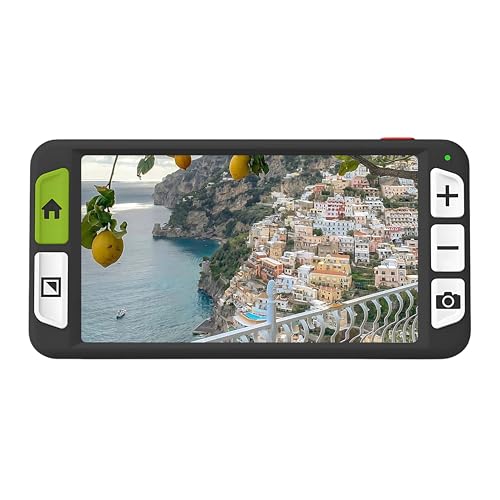
The Zoomax Luna 6 features a 6-inch high-definition screen for sharp, readable text. Its built-in handle and foldable stand support stable, comfortable use across different reading scenarios. The model emphasizes long battery life and convenient wireless charging, making it well-suited for users who read in multiple environments or need a device that travels well. Its balance of screen size, portability, and power management positions it as a versatile option for daily reading tasks.
Buying Guide: Key Considerations For Choosing A Video Magnifier
When selecting a video magnifier, consider these dimensions to match your needs and preferences:
- Magnification range: Choose a device that covers your typical zoom requirements. Models in 2x-25x or 2x-32x ranges handle most everyday tasks, including reading small print and price tags.
- Display size and image quality: Larger screens (5–6 inches) reduce eye strain and improve clarity. HD or high-resolution displays provide crisper text, which is essential for long reading sessions.
- Color modes and contrast: A variety of color schemes (full color, black-on-white, white-on-black, blue-on-white, etc.) helps optimize readability for different vision conditions and lighting environments.
- Portability and ergonomics: Foldable handles, compact form factors, and lightweight construction support extended use without fatigue. Look for adjustable stands or brackets for comfortable angles.
- Usability features: Snapshot or screen lock functions, memory presets, and easy navigation reduce cognitive load and speed up repeated tasks.
- Storage and expandability: TF card support allows saving captured images for later review, which can be valuable for study or reference materials.
- Power and battery life: Longer battery life and convenient charging options (such as wireless charging) are beneficial for travel and daily use away from power outlets.
- Maintenance and support: Check for reliable customer support, warranty terms, and availability of replacement parts or upgrades in the future.
How To Evaluate A Video Magnifier At Home
If you’re evaluating options, test these aspects in a comfortable setting:
- Read a standard document or a page with small print to compare legibility across magnification levels.
- Switch color modes to determine which provides the strongest contrast for your eyes and typical reading conditions.
- Experiment with the angle and distance to find a bias-free reading posture and minimal neck strain.
- Try capturing a few pages or labels to assess the usefulness of the camera’s autofocus, focus stability, and the accessibility of saved content.
- Assess how the device handles long reading sessions: weight, warmth, button placement, and ease of operation.
All five options discussed above offer a blend of magnification, color customization, and portability. The Eyoyo models are notable for compact design and quick color adjustments, while RayHong and MoreDisp devices emphasize memory presets and extended color configurations. The Zoomax Luna 6 stands out with a larger display and wireless charging, catering to users who prioritize screen real estate and convenience during extended use.