Choosing the right video conference monitor can boost meeting quality, reduce eye strain, and simplify collaboration. The following picks combine built-in webcams, mic arrays, speakers, and versatile connectivity to support home offices, small teams, and corporate setups. Each model offers IPS panels, wide viewing angles, and features tailored to video conferencing, learning, and productivity.
| Product | Brand | Key Feature | Panel Type |
|---|---|---|---|
| ASUS BE279QSK | ASUS | Built-in 2MP webcam, mic array, speakers | IPS |
| Philips 34E1C5600HE | Philips | UltraWide QHD, Windows Hello webcam, USB-C dock | VA (curved) |
| ASUS BE24EQK | ASUS | Integrated 2MP webcam, mic array, speakers | IPS |
| ASUS BE27ACSBK | ASUS | WQHD, AI noise-canceling mic, USB-C | IPS |
| ViewSonic VG2741V | ViewSonic | Windows Hello-compatible 5MP webcam, mic | IPS |
Below you’ll find detailed profiles for five carefully chosen models. Each entry notes the built-in collaboration features, display quality, and connectivity to help you compare at a glance.
ASUS BE279QSK Video Conference Monitor

The ASUS BE279QSK combines a 27-inch Full HD IPS panel with an integrated adjustable 2MP webcam, a mic array, and stereo speakers. This setup is designed for video conferencing and online learning, delivering wide viewing angles and accurate color. The display includes DisplayPort, HDMI, VGA, and USB upstream for webcam integration, plus an earphone jack for flexible audio options. Its frameless design and height-adjustable stand help create an ergonomic workspace for long meetings.
Philips 34E1C5600HE UltraWide With Built-in Webcam

This 34-inch UltraWide QHD curved monitor spans 3440 x 1440 with a 21:9 aspect ratio for expansive multitasking. The built-in Windows Hello webcam and noise-canceling microphone improve video calls, while USB-C docking simplifies device connections. The curved VA panel and Ultra Wide-Color technology offer rich, immersive color for both work and media. The model is ideal for teams needing extra screen real estate and convenient conferencing features in a single chassis.
ASUS BE24EQK 24” Video Conference Monitor

The ASUS BE24EQK offers a compact 24-inch Full HD IPS panel with an integrated adjustable 2MP webcam, mic array, and stereo speakers. It supports DisplayPort and HDMI inputs, with a frameless bezel design for minimal desk intrusion. Its wide viewing angles and 178-degree horizontal and vertical coverage ensure clear visuals during video calls. This model is suited for smaller workspaces or homelife conferencing setups requiring reliable built-in collaboration tools.
ASUS BE27ACSBK 27” QHD Video Conference Monitor

The ASUS BE27ACSBK delivers a 27-inch WQHD (2560×1440) IPS panel paired with an integrated 2MP webcam, mic array, and speakers. It adds AI Noise-Canceling Microphone support for crisper calls and improved voice clarity in busy environments. USB-C, HDMI, and USB hubs enable streamlined connectivity. The ergonomic, wall-mount-friendly design helps maintain a clean workspace, while the higher resolution enhances on-screen document preview and collaboration material during meetings.
ViewSonic VG2741V 27” Video Conferencing Monitor
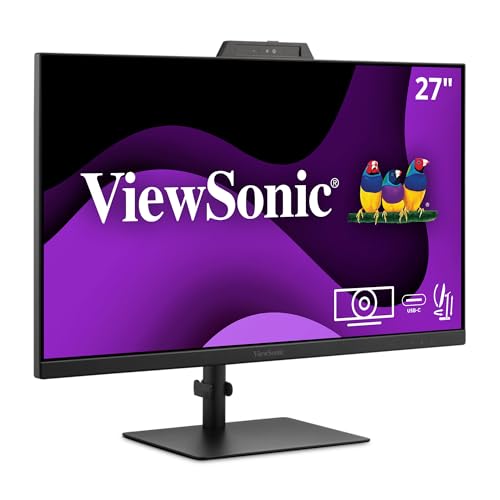
The ViewSonic VG2741V focuses on collaboration with a 27-inch IPS panel, 1080p resolution, and a built-in 5MP camera with privacy shutter. It includes a microphone and speakers, plus Windows Hello-certified IR for easy sign-in. The 120Hz refresh rate enhances fluid video, while multi-input options (HDMI, DisplayPort, USB) provide flexible device compatibility. This model suits teams prioritizing secure, quick access and reliable conferencing features in one screen.
Buying Guide: Key Purchase Considerations
Display quality and ergonomics: A large, high-contrast IPS panel with wide viewing angles reduces eye strain and improves video clarity. An adjustable stand, tilt and height options, and VESA compatibility support comfortable, long sessions.
Built-in collaboration tools: Cameras, microphones, and speakers integrated into the monitor simplify setups, especially in shared or limited-space environments. Look for USB-C docking and upstream USB for easy peripheral connections.
Connectivity and compatibility: Ensure a mix of HDMI, DisplayPort, and USB inputs for versatility across devices. USB-C is convenient for docking newer laptops with fewer cables.
Security and privacy: Windows Hello-capable cameras and IR-based sign-in provide quick, password-free access. Privacy shutters or mechanical covers for cameras help maintain control when not in use.
Color accuracy and desktop productivity: For content creation and document collaboration, consider higher resolutions (QHD) and color coverage (sRGB/Adobe RGB ranges) to improve realistic previews and editing.
Warranty and support: A longer warranty with responsive service is valuable for business environments, ensuring minimal downtime during deployments.