Enhance remote conversations by bringing video calls onto the living room screen. The following devices offer big-screen video calling, smart assistants, and simple setups for families, seniors, and everyday entertainment. This guide highlights five options with clear features to compare at a glance.
| Product | Brand | Best For |
|---|---|---|
| Meta Portal TV | Group calls on the TV, wide room view | |
| JubileeTV Remote Care System | Caavo | Caregiving and direct-to-TV video calls |
| Portal TV | Meta Quest | Smart camera, versatile video calling on big screen |
| Amazon Fire TV Cube | Amazon | Streaming plus hands-free control and search |
| ONN Android TV 4K UHD | ONN | 4K streaming and Google Assistant convenience |
Note: This overview uses the listed product features to compare how each device supports video calling, voice control, and TV compatibility. Availability and app support may vary by region and model.
Meta Portal TV Big Screen Video Calling
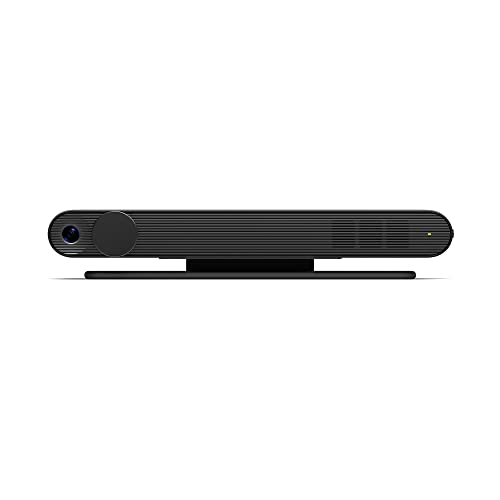
Meta Portal TV brings group video calling to the living room, capturing the whole room to keep everyone in frame without crowding for space. It enables calls via Messenger and WhatsApp, allowing connections with friends and family even if they don’t own a Meta device. The big-screen setup is designed to scale conversations for multiple participants, creating a more immersive video call experience on your TV.
JubileeTV Remote Care System for Seniors

The JubileeTV system centers on enabling family video calls directly to a loved one’s TV with simple setup and a voice-enabled remote. A dedicated app allows control from a smartphone or tablet, and a direct auto-answer feature supports hands-free communication. The One-Button Call function simplifies initiating video check-ins, making it a practical option for caregivers and households prioritizing ease of use.
Portal TV From Meta Quest

Portal TV offers smart video calling on the largest screen in your home with features like automatic camera panning and zooming, plus Smart Sound to reduce background noise. It supports calls via Messenger or WhatsApp and allows adding multiple participants to group calls. Alexa built-in enhances control and aids in hands-free navigation, blending video calling with smart home management.
Amazon Fire TV Cube

Fire TV Cube combines fast streaming with hands-free Alexa across the TV setup. Its AI-powered search helps find content quickly, using voice to control the TV, soundbar, and compatible devices from across the room. While primarily a streaming device, its strong processing and voice capabilities make it a convenient hub for smart home interactions, including simple video calling integrations where supported by apps.
ONN Android TV 4K UHD Streaming Device
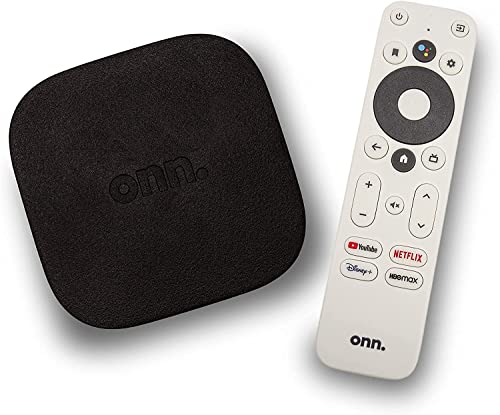
ONN’s Android TV 4K streaming device delivers Ultra HD resolution and access to the Google Play Store for a broad app selection. The included voice remote with Google Assistant enables quick searches and control, offering a practical option for users who want a straightforward path to streaming and compatible video calling apps on a large screen.
Buying Guide: Video Calling on TV — Key Purchase Considerations
- Video calling ecosystem: Look for devices that support widely used apps (Messenger, WhatsApp, and other preferred platforms). Ease of adding participants to group calls matters for family and caregiving use cases.
- Camera and microphone quality: A clear camera with good field of view and reliable auto-framing helps ensure everyone stays in view without repositioning equipment.
- Display and audio experience: A larger screen enhances visibility, while sound quality and background noise reduction improve intelligibility during calls.
- Smart home integration: Devices with built-in voice assistants (Alexa, Google Assistant) can streamline control of the TV and connected devices, adding convenience beyond calling.
- Setup and remote usability: Simple setup, remote compatibility, and one-button calling features are valuable for seniors or tech-averse users.
- Content and app availability: Ensure the device supports your preferred streaming apps and has regular software updates for security and new features.
- Privacy and security: Check auto-answer settings, call permissions, and camera shutter options to protect users’ privacy during idle moments.
- Room suitability: Consider room layout and seating arrangements to determine whether a wall-mounted display, stand, or portable unit best fits your space.
- Future-proofing: Look for devices with ongoing support and compatibility with popular video calling platforms to maximize long-term value.