If you need to connect legacy devices like VHS players, PS2 consoles, or DVD players to a modern TV, a video audio converter is essential. This guide highlights five dependable options that convert RCA composite signals to HDMI, making old media easier to view on contemporary screens. Best fits include retro gamers, parents preserving memories, and anyone upgrading an aging home theater without replacing equipment.
Summary table of selected products:
| Product | Brand | Input | Output | Best For |
|---|---|---|---|---|
| RCA to HDMI Adapter (Viagkiki) | Viagkiki | RCA Composite | HDMI | Convenient all-in-one kit |
| Tengchi RCA to HDMI Converter | Tengchi | RCA Composite | HDMI | Value-focused with easy setup |
| BD&M RCA to HDMI Converter | BD&M | RCA Composite | HDMI | Broad compatibility for older AV gear |
| ABLEWE RCA to HDMI | ABLEWE | RCA Composite | HDMI | Compact and simple plug-and-play |
| WENTER RCA to HDMI Converter | WENTER | RCA Composite | HDMI | Compact option with wide device support |
Viagkiki RCA to HDMI Adapter
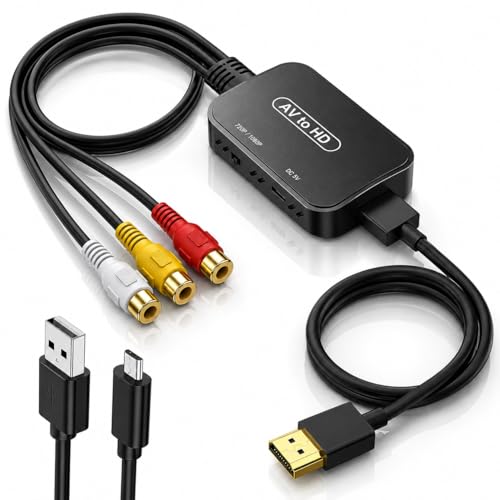
The Viagkiki RCA to HDMI Adapter converts analog RCA composite input to HDMI 1080P at 60Hz, enabling old equipment to display on a modern TV or monitor. It ships with a 60 cm RCA cable and a 100 cm HDMI cable, reducing the need to buy extra cables. This plug-and-play unit requires a USB power connection to 5V to operate. Best for users who want a simple, all-in-one solution for bringing vintage sources back to life on current displays. Caution: HDMI cable is detachable, which can be convenient but may require careful reattachment for a stable setup.
Tengchi RCA to HDMI Converter

Tengchi’s model converts RCA composite input to HDMI 1080p output and is compatible with PS1, PS2, PS3, STB, and various VCR/DVR devices. It uses USB power and is designed for easy plug-and-play use. It does not support 3D or 4K, and it does not convert HDMI back to AV. Best for budget-conscious buyers needing reliable 1080p output from classic gaming and AV setups. Limitation: requires external USB power supply during use.
BD&M RCA to HDMI Converter

BD&M’s AV to HDMI converter emphasizes broad compatibility, supporting VHS, VCR, DVD players, camcorders, retro gaming consoles, and older AV devices with standard RCA outputs. It outputs 720p/1080p HDMI, delivering stable and sharp video suitable for typical modern HDTVs and displays. Best for users who need a versatile, widely compatible converter. Caution: Ensure your source materials are compatible with 720p/1080p output for best results.
ABLEWE RCA to HDMI

ABLEWE’s mini RCA to HDMI converter is a plug-and-play device handling 720p/1080p output with a bundled USB power cable. It supports multiple PAL/NTSC formats and is designed for quick, straightforward setup. Best for users who want a compact, easy-to-use option with broad compatibility. Limitation: Some older displays may require manual input selection to match the HDMI output resolution.
WENTER RCA to HDMI Converter

WENTER’s model provides 720p/1080p HDMI output from RCA AV CVBS inputs. It emphasizes a compact, one-way conversion design and notes that it does not support HDMI to RCA. It ships with a USB power cable and uses advanced signal processing for improved color and detail. Best for users who want a small, dedicated RCA-to-HDMI solution. Caution: Not suitable if you require HDMI to RCA conversion.
Buying Guide
What to consider before buying
- Output format and resolution: Most models offer 720p or 1080p HDMI output. Choose based on your TV’s capabilities and the source’s quality.
- Power requirements: Many converters require USB power. Ensure you have a suitable power source close by.
- Input compatibility: All listed products support standard RCA composite inputs (yellow, white, red). Some also handle PAL/NTSC formats; verify your region and devices.
- One-way vs two-way conversion: All options here convert RCA to HDMI only. If you need HDMI to RCA, select a model explicitly offering that feature.
- Cable inclusions: Several come with built-in RCA and HDMI cables; others include a power cable. This affects setup simplicity and cost.
Which features matter most for your setup?
- For retro gaming: Look for 720p/1080p output with reliable color processing and minimal input lag. A model that supports PS1/PS2/PS3 and classic consoles is ideal.
- For archiving memories: Prioritize stable output and clear audio transfer. USB-powered devices are convenient for quick digitization without extra power adapters.
- For home theater upgrading: A converter with strong HDMI compatibility and broad device support, including VHS/VCR/DVD players, ensures fewer compatibility headaches.
How to set up quickly
- Connect RCA cables from the source device to the converter’s RCA input ports.
- Connect the converter’s HDMI output to your TV or monitor.
- Plug the USB power cable into a 5V power source to power the converter.
- Switch your display input to the corresponding HDMI source and test with a video/color test pattern.
FAQ
- Can RCA to HDMI convert 4K signals? No. Most affordable adapters output 720p or 1080p; they do not upscale to 4K.
- Do I need software or drivers for these converters? No. All listed options are plug-and-play and driver-free.
- Will these work with VHS tapes? Yes, these converters are designed to handle analog RCA inputs from VHS/VCR players.
- Is external power always required? Most products require USB power; check the product page to confirm your model’s needs.
- Can I use these with game consoles like PS2 or Xbox? Yes, several are specifically marketed as compatible with PS1/PS2/PS3 and other consoles.
- Will the HDMI output carry audio as well? Yes, these converters pass audio through the HDMI signal from the RCA inputs.