If you’re looking to convert aging VHS tapes to modern digital formats, a VHS to DVD recorder combo is a practical solution. These all-in-one units streamline the process by allowing you to capture footage directly to DVD with the press of a button. This guide highlights five solid options, designed for different types of buyers—from casual home archivists to budget-conscious collectors. The top picks are chosen for reliability, ease of use, and transfer quality. The quick-reference table below helps you compare core details at a glance.
| Product | Best For | Strength | Limitations |
|---|---|---|---|
| LG VHS to DVD Recorder VCR Combo | First-time users | One-button transfer to DVD | Limited modern features beyond transfer |
| Magnavox VHS to DVD Recorder VCR Combo (Renewed) | Budget-minded shoppers | Low-cost option with reliable performance | Renewed unit; might show signs of wear |
| Sony VHS to DVD Recorder VCR Combo | Brand trust & reliability | Solid transfer quality; easy operation | Occasional firmware quirks |
| Panasonic DMR-ES35VS DVD Recorder / VCR Combo | Feature-rich archiving | DV input and flexible recording options | Bulkier; older interface |
| Toshiba VHS to DVD Recorder VCR Combo | Value-focused buyers | Simple, dependable transfers | HDMI models vary by region |
LG VHS to DVD Recorder VCR Combo with Remote

Designed to easily transfer VHS tapes to DVD with the press of a button, this LG unit focuses on a straightforward home workflow. It targets buyers who want an uncomplicated path from tape to disk without extra steps. The feature set emphasizes reliability and simple operation, making it a good option for casual archivists who want to preserve family videos quickly.
Best for: first-time converters and families preserving home videos.
Why selected: LG offers a familiar, user-friendly interface with guaranteed 100% working status and simple returns through Amazon if issues arise.
What to watch for: While the transfer process is straightforward, there are limited capabilities beyond basic digitization. If you want advanced editing or streaming features, consider other models.
Magnavox VHS to DVD Recorder VCR Combo (Renewed)

This renewed Magnavox model offers a budget-friendly path to digitize tapes at home. It’s designed for shoppers who want to reduce costs while maintaining the core capability of transferring tapes to DVD with a simple press of a button. It includes Amazon’s hassle-free returns policy and a 100% working guarantee in its listing, which is reassuring for budget-conscious buyers.
Best for: budget-minded households needing reliable at-home transfers.
Why selected: It emphasizes home conversion, helping users avoid costly transfer services while providing renewed value.
What to watch for: Renewed units may exhibit minor cosmetic wear or usage signs. Verify return policies and test promptly.
Sony VHS to DVD Recorder VCR Combo

Sony’s model emphasizes dependable performance and straightforward operation, making it a solid choice for households that want a trusted name in the electronics category. The one-touch transfer function helps streamline the digitization process, reducing the number of steps required to move content from tape to disc.
Best for: buyers who prioritize brand reliability and ease of use.
Why selected: Sony’s reputation for consistent performance supports a smoother digitization workflow, especially for mixed-media collections.
What to watch for: Some users report occasional firmware quirks; ensure you have access to basic setup instructions and a simple troubleshooting path.
Panasonic DMR-ES35VS DVD Recorder / VCR Combo

Panasonic’s DMR-ES35VS stands out for feature depth. It combines a DVD recorder with a VCR and adds a DV input for broader compatibility and flexibility in your archiving workflow. It is well-suited for users who want more control over how content is recorded, including the ability to copy directly to DVD-R/RW or DV-based workflows.
Best for: power users seeking more recording options and DV input support.
Why selected: This model enables more versatile archiving beyond basic transfers, which can be helpful for older video formats or mixed media projects.
What to watch for: It is a larger unit with a more traditional, older interface. If space is an issue or you prefer a modern UI, consider other options or a less feature-heavy alternative.
Toshiba VHS to DVD Recorder VCR Combo
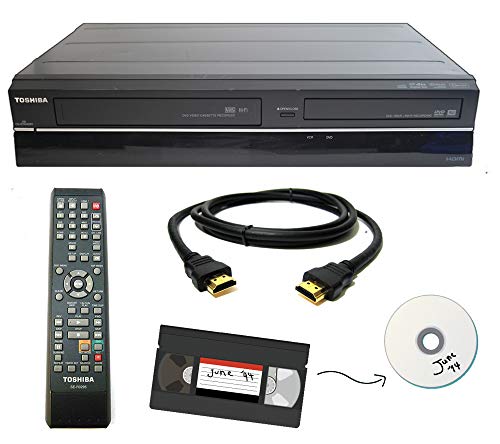
This Toshiba model emphasizes a straightforward transfer process, ideal for buyers who want a reliable, no-frills device. It’s designed to convert tapes to DVD at home, avoiding the need for shipping tapes to a lab. The unit is wired for simple, dependable operation with Amazon’s returns policy.
Best for: users seeking a simple, dependable transfer experience.
Why selected: It delivers a clear, practical approach to digitization without extra features that may complicate the process.
What to watch for: Ensure compatibility with your existing DVDs and confirm the supported media formats, as some older models have limited compatibility with newer discs or discs types.
Buying Guide: Key Considerations For VHS To DVD Combos
- Transfer quality: Look for devices that advertise direct VHS-to-DVD transfer and verify whether the unit supports the most common disc formats (DVD-R/RW, DVD+R/RW, DVD-RAM).
- Ease of use: A one-button transfer or simple remote control makes archiving much faster, especially for large tape collections.
- Brand reliability: Well-known brands may provide more reliable components and easier access to support or parts.
- Media compatibility: If you plan to expand into DV or other formats, a model with DV input or broader recording options may be preferable.
- Form factor and setup: Consider space in the home theater or living room. Some units are bulkier but offer more features, while compact models emphasize simplicity.
- Return and warranty policies: Amazon-backed returns and warranties can provide peace of mind when digitizing valuable tapes.
- Future-proofing: While no single device will digitize every tape format perfectly, prioritizing models with broad compatibility can help protect your archives over time.
FAQ
- Q: Do these devices require a computer to transfer tapes to DVD? A: No. Most VHS to DVD recorders transfer directly to DVDs on built-in recording media.
- Q: Can I transfer VHS to digital files like USB drives or cloud storage with these units? A: Some models support direct DVD recording only; others may offer DV inputs or USB outputs, but verify model-specific capabilities.
- Q: Are renewed or refurbished units a good value? A: Renewed units can offer substantial savings, though they may show wear and could have shorter remaining warranties. Check return policies carefully.
- Q: Will these devices play back modern media? A: Most are designed primarily for VHS-to-DVD workflows. Playback of newer formats depends on the built-in DVD player/recorder capabilities and disc compatibility.
- Q: Is one-button transfer truly reliable? A: It simplifies the process, but ensure you have a clean tape and good disc quality for the best results.
- Q: Do these devices preserve video quality during transfer? A: Transfer quality depends on the original tapes and the recorder’s analog-to-digital conversion. Some loss of quality is typical with aging tapes.
All five selections emphasize straightforward at-home transfer from VHS to DVD, with varying emphasis on price, features, and brand reliability. The right choice depends on how much hands-on control you want, your tape collection size, and whether you value a trusted brand or a lower upfront cost.