In today’s digital workflow, a user-friendly printer saves time, reduces frustration, and helps teams stay productive. This guide highlights five printers that blend simplicity with reliable performance—covering dye-sublimation, laser, and inkjet options. Each picks emphasizes straightforward setup, intuitive controls, and dependable output for everyday tasks such as documents, photos, labels, and small-scale crafts. Whether you’re building a compact home office or equipping a small team, these models offer clear interfaces, solid connectivity, and consistent results across common use cases.
Summary of chosen products (by key strengths):
- Epson SureColor F170 Dye-Sublimation Printer – Compact sublimation with included inks and full manufacturer support
- Canon PIXMA TS3720 – All-in-one convenience with wireless setup and versatile printing
- HP LaserJet MFP M234dw – Fast monochrome laser with two-sided printing and smart setup
- HP ENVY 6055e – Color inkjet with HP+ features and three-month ink included
- Brother ColAura – Zero-ink color label printer for quick, mess-free labeling
Below are five product sections that detail why each model stands out for users who value ease of use, reliable performance, and straightforward operation.
Epson SureColor F170 Dye-Sublimation Printer

The Epson SureColor F170 is designed for compact sublimation work with a strong emphasis on user-friendly setup and reliable results. This model arrives as an original OEM product with a full manufacturer warranty, ensuring confidence for first-time sublimation users and experienced crafters alike. A full set of genuine Epson sublimation inks is included, certified for textile and accessory applications such as mugs and leather goods. With its PrecisionCore printhead, the F170 emphasizes high-quality output and consistent color reproduction, making it a practical choice for small business projects or home craft studios.
Key considerations for this printer include its specialized dye-sublimation workflow, the need for compatible substrates, and the importance of using authentic inks for warranty protection. The bundled inks and documentation simplify onboarding, while the compact footprint helps keep workspaces uncluttered. If you frequently produce personalized merchandise or do small-batch printing, the F170 offers dependable results with clear guidance from Epson.
Canon PIXMA TS3720

The Canon PIXMA TS3720 combines print, scan, and copy in a compact, wireless package suited for home offices. It features easy setup and a straightforward interface, with a 60-sheet rear tray that reduces frequent paper replenishment. This model supports wireless printing from computers and mobile devices, facilitating quick job submission from multiple devices. Its borderless photo capability and efficient color handling make it a practical option for families, students, and small households that require versatility without a complicated learning curve.
When evaluating it, consider your typical mix of documents versus photo prints, the size of your workspace, and whether a single device needs to handle occasional scanning or copying in addition to printing. The TS3720’s balance of simplicity, speed, and flexible connectivity makes it a reliable all-around choice for casual daily use.
HP LaserJet MFP M234dw

The HP LaserJet MFP M234dw pairs fast monochrome laser printing with scanning and copying in a compact form factor suitable for small teams. It emphasizes efficient workflow with high-speed two-sided printing, smart setup, and reliable wireless connectivity. The HP Smart app extends productivity by enabling remote management, mobile printing, and document handling from a single interface. With Instant Ink eligibility and built-in security features, this model is positioned as a practical choice for workgroups needing dependable output and easy maintenance.
Key decision factors include the daily page volume, the importance of two-sided efficiency, and whether mobile or cloud-based printing fits your environment. The M234dw’s balance of speed, versatility, and security makes it a solid option for small offices or teams prioritizing throughput and straightforward management.
HP ENVY 6055e Wireless Color Printer
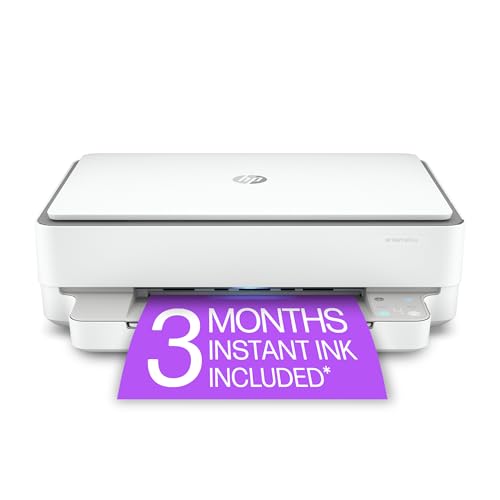
The HP ENVY 6055e targets households seeking color versatility with integrated smart features and a simple out-of-box experience. It is designed for multi-use families, offering reliable color prints for documents and photos with straightforward wireless setup. The printer includes a three-month Instant Ink trial tied to the HP+ ecosystem, providing convenient replenishment options and ongoing updates. HP’s mobile-friendly thinking and easy-to-use app experience help households manage printing tasks across devices, from phones to laptops, without a steep learning curve.
Consider how often you print photos versus documents, whether you value subscription-based ink delivery, and how critical mobile-friendly features are for your daily routines. The ENVY 6055e’s consumer-oriented features make it a practical pick for busy homes seeking effortless color printing with modern connectivity.
HP LaserJet MFP M234sdw
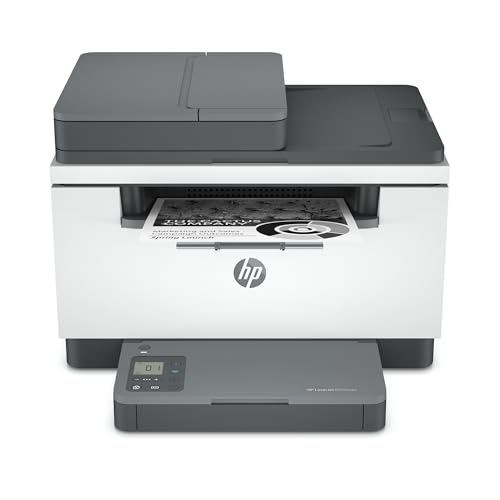
The HP LaserJet MFP M234sdw extends the M234 family with features tailored for shared workspaces. It combines fast monochrome printing with scanning, copying, and a robust wireless setup. The auto document feeder enables hands-free copying and scanning, which can improve efficiency in busy office scenarios. Like its siblings, this model emphasizes security and ease of management, with Instant Ink eligibility for ongoing supply management. It is well-suited for small teams requiring dependable output, straightforward configuration, and scalable performance as document workloads grow.
Important considerations include team size, document-heavy workflows, and the desire for quick two-sided printing. The M234sdw offers a compelling mix of speed, versatility, and simple administration that helps maintain steady office productivity without complicating IT processes.
Buying Guide: Key Purchase Considerations For User-Friendly Printers
- Purpose and print type: If you need color photos or labels in addition to documents, prioritize inkjet or dye-sublimation models with easy media handling. For high-volume text, laser printers offer speed and efficiency.
- Setup and software: Look for models with streamlined initial setup, guided on-screen prompts, and mobile app support for printing from phones or tablets. Compatibility with your devices is essential.
- Connectivity: Choose printers with USB, Wi-Fi, and optional Ethernet to fit multiple workflows. AirPrint or Google Cloud Print compatibility can simplify mobile printing.
- Operating costs: Consider ink or toner yield, replacement costs, and any planned programs (like HP Instant Ink) that reduce downtime and surprise expenses.
- Reliability and support: OEM warranties, documented setup steps, and accessible customer support help minimize downtime during busy periods.
- Print quality and media: Sublimation and photo printing demand color accuracy and substrate compatibility; verify media options and print resolutions that align with your projects.
- Paper handling: Assess input capacity, duplex printing, and specialty trays that reduce refills and streamline workflows in small teams.
- Footprint and design: For home offices, a compact design that fits desks and shelves without sacrificing usability is often a priority.
In summary, choosing a user-friendly printer hinges on aligning features with daily tasks, device ecosystems, and budget considerations. The options above offer a mix of all-in-one versatility, quick setup, and dependable output—ideal for American homes and small offices seeking efficient, straightforward printing experiences.