Looking for a USB WiFi adapter that works well with a Mac? This guide highlights five strong options that deliver reliable dual-band connections, MU-MIMO where available, and easy USB 3.0 compatibility. Ideal buyers include students, remote workers, and home-office users who want simple plug-and-play upgrades or replacements for built-in wireless.
Summary table of chosen products
| Product | Best For | Notes |
|---|---|---|
| TP-Link Archer T3U (AC1300) | Everyday home use, desks and laptops | Dual-band, MU-MIMO, USB 3.0 |
| TP-Link Archer T2U Nano (AC600 Nano) | Travel and compact setups | Mini size, dual-band, portable |
| TP-Link Archer T2U Plus (AC600) | Long-range desktop upgrade | High-gain antenna, dual-band |
| TP-Link Archer T3U Plus (AC1300) | Desktop with MU-MIMO | MU-MIMO, dual-band, high speed |
| TP-Link Archer TX20U Plus (WiFi 6 AX1800) | Future-proof with AX routers | WiFi 6, USB 3.0, WPA3 |
TP-Link Archer T3U AC1300 USB WiFi Adapter

The Archer T3U provides dual-band Wireless AC connectivity for desktops and laptops. It is a practical option for users who want a balance of speed and portability. With 2.4 GHz and 5 GHz bands, MU-MIMO helps improve network efficiency on compatible routers.
Best for: Home offices, students, and casual gamers who need solid dual-band performance and a compact USB 3.0 device. It’s particularly suitable for Mac users seeking straightforward installation and reliable connections.
Caution: Driver support and macOS compatibility notes should be checked for very old Mac OS X versions. While the item lists Mac OS compatibility, some users may require driver updates for older systems.
TP-Link Nano AC600 USB WiFi Adapter (Archer T2U Nano)
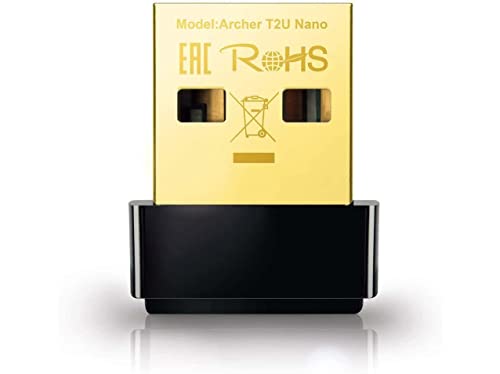
The T2U Nano is a travel-sized dual-band adapter designed for portability. It provides reliable 2.4 GHz and 5 GHz connectivity in a compact form factor, making it a convenient choice for users who often work away from a fixed workstation.
Best for: Mac users who want a tiny, discreet adapter for laptops and travel setups. The nano size is ideal for keeping a clean desk and staying ready on the go.
Caution: The nano design emphasizes portability over aggressive antenna gain; users in far-from-router locations may experience lower maximum range compared with larger antennas.
TP-Link Archer T2U Plus AC600 USB WiFi Adapter

This long-range adapter uses a high-gain 5dBi antenna to extend Wi-Fi coverage. It supports dual-band 2.4 GHz and 5 GHz connections and is designed to improve throughput in desktop setups or rooms farther from the router.
Best for: Mac users with larger spaces or rooms where signal strength needs a boost. Choose this if you want better range without adding external network gear.
Caution: The data states performance improvements are dependent on conditions and obstacles; actual speeds can vary with distance and interference.
TP-Link Archer T3U Plus AC1300 USB 3.0 Adapter

The T3U Plus combines MU-MIMO with dual-band 802.11ac speeds and a high-speed USB 3.0 interface. It’s a solid desktop upgrade for users who need reliable streaming and gaming performance without wires cluttering the workspace.
Best for: Mac users who want robust, lag-free connections on a desktop setup. The MU-MIMO feature helps when multiple devices are active on the network.
Caution: While compatible with many macOS versions, some users on older systems may require driver checks or updates for full functionality.
TP-Link Archer TX20U Plus AX1800 USB WiFi Adapter

TX20U Plus is a WiFi 6 (AX1800) capable USB adapter. It delivers faster speeds and lower latency on compatible routers, with WPA3 security and a dual-band configuration. USB 3.0 ensures higher throughput for sustained tasks like video calls, gaming, and streaming.
Best for: Mac users seeking future-proof performance that pairs well with modern routers offering WiFi 6. It’s a strong choice for households with multiple high-demand devices.
Caution: Requires a WiFi 6 router to realize AX900/AX1800 speeds; older routers may limit performance.
Buying Guide
- Compatibility with macOS: Check that the adapter lists macOS support for your specific version (some models note compatibility up to certain macOS releases). For older Macs, you may need driver updates or alternative models.
- Wi‑Fi Standard and speed: For everyday browsing and HD streaming, AC dual-band (2.4 GHz/5 GHz) is usually sufficient. If you use a recent WiFi 6 router, consider AX models for improved efficiency and future proofing.
- Antennas and range: High-gain antennas or MU-MIMO can improve throughput and extend range in larger spaces or areas with many walls. Nano-sized adapters prioritize portability over range.
- USB interface: USB 3.0/3.1 provides better throughput than USB 2.0. Ensure your Mac’s USB ports support the required standard for sustained performance.
- Security and features: WPA3 support offers stronger protection on newer networks. If you rely on older security protocols, verify compatibility and potential needs for updates.
- Portability vs. performance: Travel-friendly nano adapters are convenient for laptops but may trade off some performance. Desktop-oriented models often provide better range and stability.
Frequently Asked Questions
- Do USB WiFi adapters work with Macs without drivers? Many modern adapters include built-in drivers for macOS, but some may require driver installation or updates. Always confirm macOS compatibility with your exact version.
- Is a WiFi 6 adapter worth it for a Mac? If your router supports WiFi 6 and you want lower latency and higher capacity with multiple devices, a WiFi 6 adapter is beneficial. For smaller households or older routers, AC models may suffice.
- Can a USB adapter replace built-in Mac WiFi? Yes, a USB adapter can replace or supplement built-in WiFi to improve range, speed, or reliability, especially on older Macs.
- What should I look for in a macOS-ready adapter? Verify macOS compatibility, USB interface (3.0+), dual-band operation, and any required drivers for your OS version.
- Will these adapters work with all routers? Dual-band adapters work with most modern routers; however, performance depends on router capabilities, distance, interference, and network congestion.