This guide highlights top USB surge protector power strips that offer multiple outlets, USB ports, and smart charging features. Each pick balances space-saving design, safety ratings, and convenient mounting options to support desks, dorm rooms, and workspaces. Below you’ll find brief product snapshots and in-depth sections to help you compare performance and build quality.
| Product | Brand |
|---|---|
| Surge Protector Power Strip – HANYCONY 8 Outlets 4 USB (2 USB C) | HANYCONY |
| 6 Ft Surge Protector Power Strip – 8 Widely Outlets with 4 USB Ports | YISHU |
| Wall Charger, QINLIANF 5 Outlet Extender with 4 USB Ports | QINLIANF |
| 6Ft Power Strip Surge Protector – Yintar | Yintar |
| Surge Protector Outlet Extender – One Beat | One Beat |
Choosing a USB surge protector involves examining outlet count, USB port types, joule rating, cord length, and safety features. The following sections break down five popular options to help you decide which model best fits your space and device inventory.
HANYCONY 12-In-1 Surge Protector Power Strip

The HANYCONY surge protector combines 8 AC outlets with 4 USB ports (including 2 USB-C) in a compact, tri-side design. It can power a sizeable setup—up to 12 devices—while keeping outlets spaced 2.2 inches apart to accommodate larger adapters without crowding. USB-C ports deliver up to 5V/3A, and USB-A ports supply up to 5V/2.4A, with overall USB output around 5V/3.1A (15.5W). An integrated overload protection system safeguards connected devices, and a clearly lit switch indicates when protection is active. This model is ETL-listed, making it a solid option for home offices, dorms, and busy workstations.
YISHU 8-Outlet Surge Protector With 4 USB Ports

The 3-side YISHU design emphasizes outlet spacing and broad compatibility, with a total of 8 AC outlets and 4 USB ports (2 USB-A, 1 USB-C, plus one more USB-C). It supports 100V–240V input, enabling operation across various regions. With 600 Joules of energy absorption, it provides essential protection against surges and short circuits. The design keeps outlets accessible and avoids blockages thanks to the expanded spacing between sockets, making it suitable for media gear, laptops, and multiple peripherals in home offices or classrooms.
QINLIANF 5-Outlet Wall Extender With USB Ports
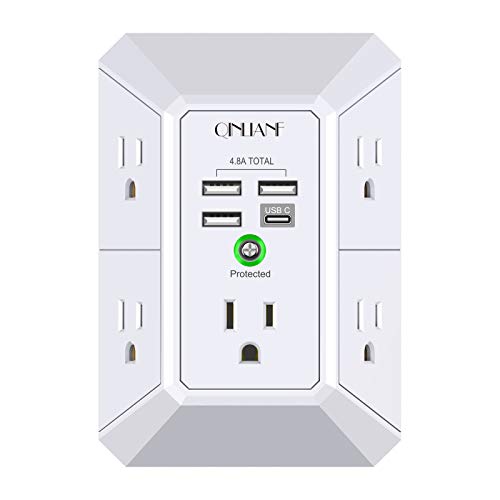
The QINLIANF extender secures onto a duplex wall outlet, providing five AC outlets across three sides and four USB ports (two USB-A and two USB-C) with a combined output up to 4.8A. A back groove design allows flush mounting on compatible walls, which is ideal for homes and offices that prioritize a tidy, low-profile setup. Its smart charging features detect device needs and optimize speed, though the USB-C port is not compatible with higher voltage Quick Charge requirements. This model suits spaces where wall-sitting adapters and compactness matter.
Yintar 6-Outlet Surge Protector With USB Ports

The Yintar unit provides six AC outlets plus three USB ports (including a USB-C port) and a six-foot cord, designed for home and office use. It uses 1680 Joules of protection and a three-circuit approach alongside a surge protector indicator and an overload protection switch. The 120–240V compatibility makes it versatile for different regions, and the smart charging ports help optimize power to devices ranging from smartphones to tablets. With a broad coverage of outlets and the benefit of a longer cord, it remains convenient for desk setups and travel-oriented needs.
One Beat 10-In-1 USB Wall Outlet Extender

The One Beat outlet extender features six AC outlets across three sides and four USB ports (two USB-C). It includes a rotating plug for flexible placement and a surge-protected 1800 Joules rating. With smart charging capabilities, USB ports automatically recognize connected devices and deliver optimal charging speeds. The compact form and rotating plug design make it a strong choice for small desks, travel bags, or wall-mounted configurations where outlet space is at a premium.
Buying Guide: Key Purchase Considerations
- Outlet layout and spacing: Wider spacing reduces adapter blockage, especially for bulky bricks. Look for 3-sided designs if you need multiple devices in tight areas.
- Surge protection rating: Joules indicate energy absorption capacity. Higher values generally imply better protection for valuable electronics; however, real-world use also depends on build quality and circuit design.
- USB port mix: Decide on USB-A vs. USB-C, and total shared amperage. USB-C ports offer faster charging on many devices, but ensure power limits align with your devices’ needs.
- Cord length and mounting options: Longer cords provide flexibility, while wall-mount or desk-mount compatibility helps reduce clutter and prevent tip-overs.
- Safety certifications: Look for ETL or UL listings to ensure compliance with safety standards and reliability in daily use.
- Power capacity and total load: Check wattage limits to avoid overloading the strip when combined with high-wattage devices like laptops or printers.
- Special design features: Rotating plugs, flat plugs for tight spaces, and smart charging features can influence how well a unit fits your setup.
These considerations help compare models beyond price, focusing on long-term safety, device protection, and user convenience. When matching a USB surge protector to your workspace, map out the devices you routinely plug in, measure desk space, and prioritize outlets with sufficient spacing and a robust protection mechanism. For travelers, compact, wall-mountable designs with a flat or rotating plug may offer meaningful benefits in hotels or dorms.