If you’re expanding a single USB port into multiple connections, a reliable USB port replicator (hub) or docking solution can streamline work, study, and play. This guide highlights practical hubs and docking stations that balance speed, compatibility, and ease of use across Windows, macOS, and Chromebooks. Below you’ll find five well-rounded options, each with a concise feature snapshot to help you compare at a glance.
| Product | Ports & Speed | Power/Charging | Special Note |
|---|---|---|---|
| Anker USB Hub 4 Ports | 4× USB 3.0, up to 5Gbps | Not for charging | Solid data performance, broad compatibility |
| Acer USB Hub 4 Ports | 4× USB 3.0, up to 5Gbps | Requires separate power for reliability with drives | Gl3510 chip with good thermals |
| Anker USB C Hub 5-in-1 | USB-C data up to 5Gbps; 2× USB-A 5Gbps; HDMI 4K | 85W pass-through (charger not included) | High versatility for USB-C laptops |
| ANYPLUS USB 3.0 Hub 4-Port | 4× USB 3.0, up to 5Gbps | Not for charging | Broad compatibility, portable |
| Giq USB C Docking Station | HDMI/DP, USB 3.0, Ethernet | Power delivery support | 14-in-1 style expansion (with caveats for HDMI/DP) |
Note: All products listed below are selected for relevance to USB port expansion, with emphasis on data transfer speed, compatibility, and practical use cases like laptops, desktops, and docking setups. Clickable links in headings take you to the respective Amazon product pages for convenience.
Anker 4-Port USB Hub: Simple Expansion

The Anker USB Hub 4 Ports provides a straightforward way to convert a single USB port into four USB 3.0 connections. It supports SuperSpeed data transfer up to 5Gbps, enabling quick file moves—such as transferring an HD movie in seconds. This hub is designed for data peripherals and is not intended for charging devices. It’s compact, widely compatible, and leverages the Anker Advantage, benefiting from Anker’s established reliability and customer base. Ideal for users who need quick, plug-and-play expansion without adding power delivery concerns.
Acer 4-Port USB Hub With Power Considerations

The Acer USB Hub expands a device with four USB 3.0 ports, offering data transfer speeds up to 5Gbps. Its GL3510-based design emphasizes stable operation and thermals, with a plug-and-play approach that requires no drivers. A practical tip: when connecting hard drives for sustained transfers, use the hub with an external power source via the USB-C power port to maintain stability and speed. The Acer hub suits workflows that demand reliable bandwidth across multiple peripherals.
Anker 5-in-1 USB-C Hub With 4K HDMI

This Anker 5-in-1 USB-C hub expands a laptop’s USB-C port into a multiport solution: 4K HDMI output, two 5Gbps USB-A ports, a USB-C data port, and a 100W USB-C PD-IN port for charging power delivery (note that the PD port is charging-only and does not transfer data). It supports up to 85W pass-through charging, enabling a laptop to stay powered during intensive tasks. The USB-C data port delivers fast transfers up to 5Gbps, while the HDMI output supports 4K video (subject to device compatibility and bandwidth allocation). A strong choice for MacBook Pro or other USB-C laptops needing a compact dock with display and data capabilities.
ANYPLUS 4-Port USB 3.0 Hub

The ANYPLUS USB 3.0 Hub expands a single USB port into four simultaneous USB 3.0 ports with speeds up to 5Gbps. It is designed for broad compatibility across Windows, Mac OS X, Linux, and Chrome OS, and works with laptops, desktops, consoles, and peripherals like flash drives and mice. A key limitation is that this hub does not support charging, making it best suited for data transfer and peripheral connections where external power is not necessary. It remains a compact, portable option for travel or desk setups requiring extra USB peripherals without a power adapter.
Giq USB C Docking Station With Dual HDMI
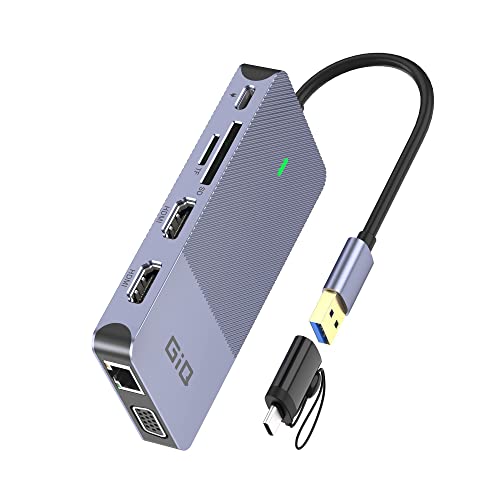
The Giq USB C Docking Station offers a 14-in-1 expansion including dual HDMI outputs, a USB-C 100W PD port, Ethernet, multiple USB ports, SD/TF card readers, and audio. It’s designed to transform a USB-C laptop into a full workstation, supporting dual or triple monitor configurations (depending on the output combo and device limitations). Notably, the USB-C charging port is for power delivery and does not support data transfer, so users should plan data and power separately. This dock is best for users needing extensive display options and multiple peripheral connections in one compact hub.
VIENON USB 3.0 4-Port Hub

The VIENON 4-Port USB 3.0 hub expands one USB port into four, supporting simultaneous operation of all ports and offering USB 3.0 speeds up to 5Gbps. It is not designed for charging devices, making it suitable for data transfer and peripheral hubs plugged into laptops or desktops. The device emphasizes plug-and-play use with broad compatibility and is a solid option for expanding quick data access to peripherals like printers, drives, and mice without power delivery concerns.
VVB 14-in-1 USB-C Docking Station

The VVB USB-C Docking Station provides a broad array of ports, including dual 4K HDMI and DP displays, Ethernet, USB-A and USB-C ports, SD/TF card readers, and a 100W PD charger. It offers a robust 14-in-1 experience suitable for multi-monitor setups and extensive peripheral connectivity. Users should verify display output limitations for their specific devices (MacBooks may require matching external monitor images). This dock is well-suited for creators and professionals who need a single hub to manage multiple displays and devices.
Buying Guide: Key Purchase Considerations
- Data transfer vs. charging: If you need to power devices, look for hubs with powered USB-C PD input or dedicated power adapters. Some models provide pass-through charging while others are data-only.
- Port types and speeds: USB-A 3.0/3.1 ports offer up to 5Gbps data transfer. USB-C hubs often provide a mix of data ports and video outputs (HDMI/DisplayPort) for multi-display setups.
- Video output capabilities: HDMI and DisplayPort support vary by model and host device. Check resolution support (4K, 30–60Hz) and whether HDMI/DP can run simultaneously with data ports.
- Power delivery compatibility: For laptop use, ensure the dock or hub supports adequate PD power for your device. Some hubs limit PD to a portion of the total charging needs or require a specific charger.
- Device compatibility: Most hubs work with Windows, macOS, and Chrome OS, but some features (like HDMI output or display support) may be restricted by the host device, OS version, or driver availability.
- Build and cooling: Thermals matter when running several high-speed USB devices, external drives, or displays. Look for hubs with solid casings and proper heat management.
- Port density vs. desk footprint: If desk space is limited, prioritize compact hubs that still deliver the necessary ports (HDMI, Ethernet, multiple USB-A/C).
- Split options: Some docks offer 4K HDMI alongside DisplayPort or multiple USB-C/USB-A ports. Match your primary needs (peripherals vs. displays) to pick the right combo.
- Reliability and warranty: Brands with long-standing hub products and good warranty support tend to offer better customer service and firmware updates when needed.