Finding a dependable USB optical drive remains essential for many users who still rely on physical discs for software installations, media libraries, or archival backups. This guide highlights five top-rated USB optical drives that offer plug-and-play setup, fast transfer speeds, and broad compatibility across Windows, macOS, and Linux. Each model supports common DVD and CD formats, with some also offering Type-C connectivity for newer laptops. Read on to compare features, performance, and suitability for your computer setup, whether you’re a student, professional, or casual user.
Summary of chosen products
| Product | Connectivity | Max Speed | Compatibility | |
|---|---|---|---|---|
| Amicool External DVD Drive | USB 3.0 / USB-C | DVD 8x, CD 24x | Windows, Mac, Linux | Slim, portable, no Blu-ray |
| Rioddas External CD/DVD Drive | USB 3.0 | DVD 8x, CD 24x | Windows, Mac, Linux | Back compatibility USB 2.0 |
| LG GP65NB60 | USB 2.0 (USB 3.0 compatible) | Max 8x DVDR | Windows, Linux, Mac | Ultra slim, M-Disc support |
| ORIGBELIE External Drive | USB 3.0 / Type-C | DVD 8x, CD 24x | Windows, Mac, Linux | Plug & Play, dual interfaces |
| ASUS ZenDrive | USB 2.0 / Type-C | 8x DVDR | Mac, Windows | Ultra slim, Nero compatibility |
These selections balance portability, speed, and broad operating-system support. Each offers straightforward operation, making them suitable for laptops without built-in optical drives or desktops upgrading from older systems. When choosing, consider the port availability on your computer (USB-C, USB-A), your typical disc tasks (reading vs. burning), and whether M-Disc support or dual-interface connectivity matters for your workflow.
Amicool External DVD Drive – USB 3.0 & Type-C

The Amicool external drive is designed for easy plug-and-play operation with both USB 3.0 and Type-C interfaces. It is typically recognized immediately by most systems without additional drivers, though direct connection to a computer’s USB port is recommended for stable power delivery. It supports a variety of disc formats including DVD+R, DVD-R, CD-R, and CD-RW, with a maximum read/write speed of 8x for DVDs and 24x for CDs. Compatible with Windows, macOS, and Linux, it does not support Blu-ray or specialized formats, and it is not intended for TVs or standalone players.
Key points: dual-interface convenience, straightforward setup, and broad OS compatibility. Suitable for users needing a portable drive for tasks like software installation, media playback, or disc backups. The lack of Blu-ray support means it’s best for standard DVDs and CDs, not high-capacity discs.
Rioddas External CD/DVD Drive – USB 3.0

The Rioddas model emphasizes plug-and-play usability, powered entirely through a USB connection with no separate power adapter. For desktops, it’s best to connect to a high-power USB port on the back of the motherboard. It offers USB 3.0 with backward compatibility to USB 2.0, delivering up to 5Gbps data transfer speeds. Its design minimizes freezing and errors during playback and burning and includes a physical eject button to safely release discs even if the host computer fails to recognize the drive. Copper mesh technology supports stable data transmission for consistent performance.
Ideal for users who prioritize reliability and ease of use, especially in setups with multiple devices. The drive is compatible with Windows, macOS, and Linux, making it a versatile choice for mixed OS environments. As with all external drives, ensure the USB port provides sufficient power for optimal results.
LG GP65NB60 Ultra Slim – USB 2.0
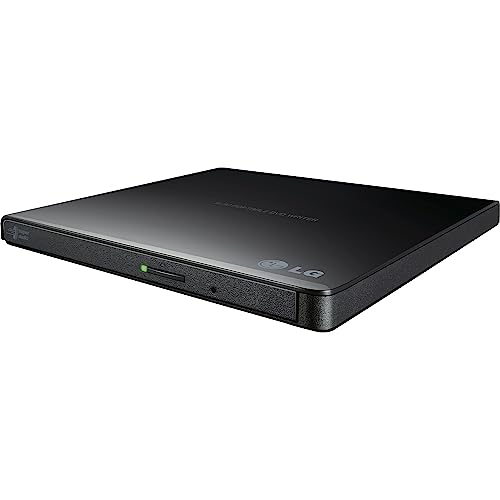
The LG GP65NB60 focuses on ultra-slim design with USB 2.0 connectivity and optional USB 3.0 compatibility for faster transfers. It supports up to 8x DVDR write speeds and is compatible with Windows, Linux, and Mac OS. This model is compact enough to slip into a laptop bag, making it convenient for travel or a compact desktop setup. It’s a solid option when space is at a premium and you primarily need a drive for DVD burning and playback rather than high-speed data transfer.
Typical users include students and professionals who want a lightweight, dependable drive for media libraries and installation discs. The balance between slim form factor and reliable performance makes it a common choice for portable workstations that still rely on physical media.
Alronly External CD/DVD Drive – Type-C Ready

Alronly’s external drive uses dual connectivity (USB 3.0 and Type-C) to reach up to 5Gbps transfer speeds. It delivers up to 8x DVD rewrite/read and 24x CD rewrite/read. The plug-and-play design means no driver installation is required, and it includes both USB-A and USB-C connectors to fit a wide range of devices. Broad compatibility extends to Windows, macOS, and Linux, with some devices requiring minor system settings for full functionality. The drive’s robust construction and stable data transmission tech help minimize read/write interruptions during disc operations.
Best suited for users who want future-proof connectivity and a simple setup with strong cross-OS support. If you frequently switch between a USB-C laptop and a USB-A desktop, Alronly provides a convenient, single-dock style solution for both.
ASUS ZenDrive – Slim USB 2.0 / Type-C

The ASUS ZenDrive is an ultra-slim external drive designed for Mac and Windows systems, with both USB 2.0 and Type-C cables included. It supports M-Disc and is compatible with Nero BackItUp for Android devices, offering a versatile option for data archiving and software installations. The compact form factor makes it a good travel companion, and compatibility across major operating systems ensures broad usability. While USB 2.0 is slower than USB 3.0, the included Type-C support helps mitigate performance gaps on modern machines with USB-C ports.
For users prioritizing a lightweight, portable drive with cross-OS compatibility and bundled accessory cables, this ASUS model provides a straightforward, dependable experience for everyday DVD and CD tasks.
Buying Guide: Key Purchase Considerations
When choosing a USB optical drive, consider several factors to tailor a purchase to your needs:
- Connectivity: USB 3.0 and Type-C offer faster transfers and broader device compatibility. If you own newer laptops with USB-C, a dual-interface model is especially convenient.
- Speed and Disc Support: Look for drives that specify DVD read/write speeds (e.g., up to 8x) and CD speeds (up to 24x). Note whether the drive supports only standard discs or also M-Disc; the latter offers longer-term archival reliability.
- Power and Port Location: Some drives are powered through the USB port alone, which requires a high-power port on the host. For desktops, prefer ports on the back to minimize power drop.
- Compatibility: Confirm support for your operating system (Windows, macOS, Linux). Some devices may require minor settings for full functionality on certain OS versions.
- Form Factor: Ultra-slim designs are ideal for portability but may have trade-offs in robust build or drive tray feel. Choose based on how mobile you need the device to be.
- Use Case: If you need to back up data and store large media libraries, consider drives with reliable error correction and stability features. For occasional media playback, more affordable options may suffice.
- Limitations: Many drives do not support Blu-ray, Blu-ray 3D, or certain proprietary formats. Ensure the device meets your disc format needs before purchase.
Depth of compatibility and ease of setup are common threads across top models. Users seeking portability should favor ultra-slim, dual-interface devices; those prioritizing speed and reliability in mixed OS environments may prefer drives with stronger power management and copper mesh technology for stable connections. Always connect directly to a computer port rather than through hubs to maximize performance and minimize power-related issues.