When shopping for USB C to Micro USB cables, the goal is clear: reliable charging and steady data transfer for devices that still rely on Micro USB. This guide highlights five solid options, each with practical strengths for different users—whether you’re upgrading a new USB-C phone, syncing old cameras, or charging legacy accessories. The top picks below are tailored for: casual Android users upgrading from Micro USB, setup enthusiasts needing adapters for cameras or controllers, and travelers who want durable, tangle-resistant cables.
| Product | Best For | Why It Stands Out |
|---|---|---|
| USB C to Micro USB Cable 1ft — 16W | Everyday charging for old devices | Durable braided design with aluminum case; fast 3.1A current; bi-directional syncing |
| Cable Matters Braided USB C to Micro USB Cable 3.3ft | Data transfer and multi-device setups | Versatile, robust braided jacket; USB 2.0 speeds up to 480 Mbps; reversible USB-C |
| JXMOX USB C to Micro USB Adapter (4-Pack) | On-the-go micro USB compatibility | Compact adapters; simple charge/data transfer; micro USB devices compatibility |
| SUNGUY 2-Pack USB C to Micro USB Cable 3.3FT | OTG-enabled devices and multiple devices | Nylon braided; USB-C host with OTG cues; data and charging up to 480 Mbps |
| 3FT USB C to Micro USB Cable for Old Devices | Legacy devices and occasional Mac/PC use | Clear caution: limited to charging old micro USB devices; broad compatibility with micro USB peripherals |
USB C to Micro USB Cable 1ft, 16W Charging

Best for: users who still rely on Micro USB devices but want a compact, sturdy cable for everyday charging. This cable combines an aluminum alloy shell and braided jacket to resist wear, making it suitable for travel or desk use. It supports charging up to 3.1A at 5.2V and data transfer up to 480 Mbps, providing a balanced mix of speed and durability. The dual-ended, USB-C to Micro USB design makes it ideal for transferring data from older phones to new devices or for linking a camera to a laptop. Beware: the shorter length may require more cable management in some setups.
Cable Matters Braided USB C to Micro USB Cable, 3.3ft

Best for: users who need a versatile, longer Micro USB to USB-C solution for laptops, tablets, cameras, or game controllers. Its braided design adds durability, and the USB 2.0 support provides reliable 480 Mbps transfers. It’s especially useful when connecting a Micro USB phone to a USB-C laptop or a USB-C charger to a Micro USB device. Limitations include that it does not enable high-speed USB-C data transfer beyond USB 2.0 and the braided coating may feel stiff in very tight spaces.
JXMOX USB C to Micro USB Adapter (4-Pack)

Best for: travelers who need lightweight adapters to keep Micro USB devices usable with USB-C powered hubs or chargers. This 4-pack provides flexibility for different devices and locations. It supports up to 2.4A charging and 480 Mbps data transfer. A caveat is that it does not support OTG or high-power peripherals like external drives, so use these primarily for charging or syncing micro USB devices with USB-C hosts.
SUNGUY 2-Pack USB C to Micro USB Cable 3.3FT

Best for: users who need a durable, OTG-capable setup to connect USB-C host devices to Micro USB accessories, such as older phones, cameras, or PS4 controllers. The nylon braid adds resilience for daily use and the cable supports USB 2.0 speeds up to 480 Mbps with charging up to 10W. A limitation is that OTG functionality depends on device compatibility, so verify OTG support on your peripheral before purchase.
3FT USB C to Micro USB Data Transfer & Charge Cable
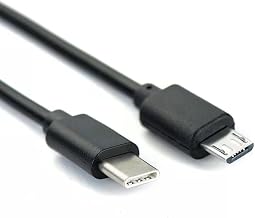
Best for: users needing a straightforward option to charge and transfer data with older micro USB devices, while using a USB-C host such as a MacBook or modern Android phones. This cable clearly states it is for charging old devices that still use Micro USB and is not intended for Micro USB devices that require USB-C charging ports. Consider this choice if you frequently work with legacy hardware alongside newer equipment.
Buying Guide: Key Considerations For USB C To Micro USB Cables
- Device compatibility: Confirm whether your Micro USB device requires OTG, or if you simply need charging and data transfer.
- Cable length: Short cables save space; longer cables are convenient for desks and nightstands but bulkier.
- Durability features: Look for braided jackets and reinforced connectors for long-term use, especially if you travel or move devices often.
- Data transfer speed: USB 2.0 (up to 480 Mbps) is common for Micro USB to USB-C cables; plan higher speeds only if your peripherals support USB 3.x or higher.
- Power delivery: Check the current rating (amps) to ensure it meets your device charging needs; higher amperage supports faster charging on compatible devices.
- Port compatibility: Ensure the USB-C host side and Micro USB device side match your setup, including whether OTG is required.
Frequently Asked Questions
- What is the main difference between USB-C to Micro USB cables and adapters? – Cables provide a direct connection for charging and data transfer; adapters convert connectors but may add bulk or limit certain features like OTG.
- Can these cables be used for OTG-enabled devices? – Some cables support OTG, but it depends on the device and cable; verify OTG compatibility before use.
- Are these cables suitable for fast charging legacy devices? – Many support up to 3.1A or 2.4A charging, but charging speed also depends on the charger and device compatibility.
- Will a USB-C to Micro USB cable work with a USB-C wall charger? – Yes, if the Micro USB device is compatible with USB-C charging through the adapter or cable, this setup can work for charging.
- Is data transfer speed limited to 480 Mbps with these cables? – Most USB-C to Micro USB cables use USB 2.0 speeds up to 480 Mbps, though some variants may support higher speeds if specified.
- Should I buy multiple adapters or cables for different devices? – Yes, multiple options help you keep devices ready for charging and data transfer across different settings (home, car, travel).