USB graphics adapters provide a simple way to expand screen real estate without upgrading your laptop or adding a new GPU. Whether you need a single extra monitor for productivity or multiple displays for a complex workflow, these adapters convert USB signals into HDMI, DisplayPort, or VGA outputs. This article highlights five top options, outlining compatibility, performance, and use-case benefits so you can choose the right USB graphics adapter for Windows, macOS, and multi-monitor setups.
| Product | |||
|---|---|---|---|
| StarTech USB 3.0 to HDMI Adapter (B00H91BQ7Y) | HDMI | 1080p @ 60Hz | Driver-based Windows solution |
| StarTech USB 3.0 to Dual HDMI Adapter (B0725K1MHH) | HDMI x2 | 4K @ 30Hz | Dual-monitor expansion |
| Plugable USB 3.0 to HDMI (B01C6HBJOA) | HDMI | Up to 2560×1440 | DisplayLink multi-monitor up to 6 displays |
| StarTech USB 3.0 to 4K DisplayPort (B00OPI0XS2) | DisplayPort | 4K @ 30Hz | USB-A to DP with macOS support |
| Groodo USB to VGA Adapter (B0D6GGLP7X) | VGA | 1080p | Simple VGA extension for presentations |
StarTech USB 3.0 to HDMI Adapter

The StarTech USB 3.0 to HDMI Adapter provides a straightforward way to add an HDMI monitor to a Windows PC. It operates on a driver-based system, enabling an external HDMI display to extend or mirror your desktop. It’s portable and bus-powered, making it suitable for workstations, home offices, or travel setups. Compatible with Windows X86/X64/ARM platforms, it requires administrator rights for driver installation and supports a typical 1080p display at 60Hz for crisp visuals.
StarTech USB 3.0 to Dual HDMI Adapter

This USB-to-dual HDMI adapter enables adding two HDMI monitors to a computer via a single USB 3.0 port. Designed for Windows, it supports up to 4K output at 30Hz on each display, providing extended desktop space ideal for multitasking and professional work environments. It shares the same administrator-rights requirement for driver installation and is particularly useful for those needing a larger, more versatile workstation at home or in the office.
Plugable USB 3.0 to HDMI Video Graphics Adapter

Plugable’s DisplayLink-based USB-to-HDMI adapter supports multiple monitors and is certified for use with Windows and macOS. It can drive up to 2560×1440 on compatible displays and supports setups with multiple adapters, enabling up to six additional displays in some configurations. The compact design and lack of external power requirement make it a practical choice for portable workstations and classrooms, where space and simplicity matter.
Groodo USB to VGA Adapter

The Groodo USB-to-VGA adapter offers a simple method to extend or mirror your display onto a VGA-enabled monitor or projector. It’s a practical option for classrooms, business presentations, and basic multimedia tasks where VGA connectivity suffices. The device uses a USB interface and a built-in DisplayLink chipset to convert digital USB signals into analog VGA, delivering a dependable, low-cost solution for extra screen space on Windows systems.
Plugable USB 2.0 to HDMI, DVI, or VGA

Though listed here for reference with USB 2.0, this Plugable adapter family demonstrates the broader ecosystem for multi-monitor setups. It supports up to 1920×1080 across HDMI, DVI, or VGA connections and is compatible with various Windows versions, macOS, and ChromeOS. The compact, portable form factor suits users who need occasional external displays without heavy power requirements, though higher resolutions and frame rates are better supported by USB 3.0 options.
Plugable USB C to HDMI Adapter
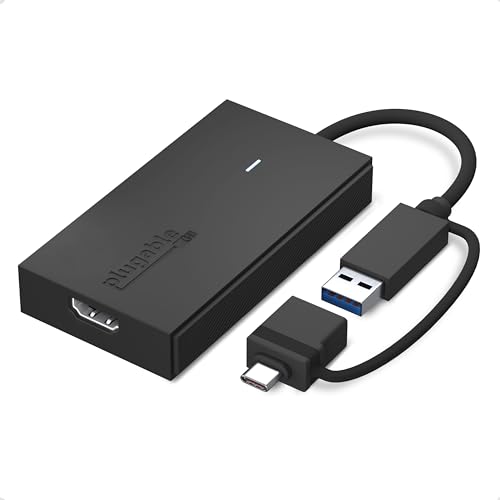
The Plugable USB-C to HDMI adapter provides flexible connectivity across USB-C or USB-A ports, enabling 2560×1440 @ 60Hz display output. This hybrid cable supports Windows, macOS, and ChromeOS, making it suitable for modern laptops and docking stations. It’s particularly useful for MacBooks and newer Windows machines that rely on USB-C for video output, offering a direct path to extended or mirrored displays without a separate dongle or power brick.
Buying Guide: Key Purchase Considerations
When choosing a USB graphics adapter, consider compatibility, maximum resolution, and the number of displays you plan to run. USB-A models tend to be more ubiquitous, but USB-C adapters often support higher resolutions and power delivery needs. DisplayLink-based adapters provide broad OS support and multi-monitor capabilities, yet some users prefer driver-free or native-driver solutions for simplicity. Performance matters: higher resolutions, faster refresh rates (60Hz vs 30Hz), and low latency are crucial for productivity and multimedia tasks. For professional use, verify 4K support, color accuracy, and whether the setup requires an external power source or is bus-powered. Also assess portability for travel workloads and whether you need mirrored displays or extended desktops for multitasking. Finally, ensure driver compatibility with your operating system version and hardware, such as Windows, macOS, Linux, or ChromeOS, to guarantee a smooth plug-and-play experience.
In choosing among the options above, users who need two external displays may favor the StarTech USB 3.0 to Dual HDMI Adapter for a compact dual-monitor solution, while those seeking higher resolutions might opt for the StarTech USB 3.0 to 4K DisplayPort adapter. For macOS-heavy or mixed-OS environments, Plugable’s DisplayLink-based offerings provide robust multi-monitor support, including up to six additional displays in some configurations. For quick, affordable presentations on a single extra screen, Groodo’s USB to VGA adapter and similar class options deliver reliable VGA extension without specialized hardware. Across all choices, ensure you meet your productivity goals, display requirements, and device compatibility before purchasing.