Looking for a reliable USB cable with two male ends? This guide highlights five top options that suit different setups, from hard drive enclosures to desktop workstations. The best picks emphasize compatibility, durability, and clear transfer speeds. Ideal buyers include IT hobbyists, PC builders, and office users who need straightforward, high-speed USB A-to-A connections without charging or direct computer-to-computer links.
| Product | Length | Speed | Best For |
|---|---|---|---|
| ANDHOT USB 6FT to USB A to A Cable | 6 ft | Up to 5 Gbps | Long reach, external drives, hubs |
| Tang USB 3.0 3Ft A to A Cable | 3 ft | Up to 5 Gbps | Compact desks, quick transfers |
| ANDHOT 3 Ft 2-Pack USB 3.0 A to A | 3 ft | Up to 5 Gbps | Small setup, two cables for different devices |
| ANDTOBO USB 3.0 A to A 3.3 Ft | 3.3 ft | Up to 5 Gbps | Extension needs, two-device connections |
| UorMe USB 2.0 A to A Cable | 6 ft | Up to 480 Mbps | USB 2.0 peripherals, budget setups |
ANDHOT USB 6FT to USB A to A Cable

Best for long-distance connections at desks or media centers. This braided USB 3.0 cord supports up to 5Gbps data transfer and features a durable aluminum connector with a two-shade braided nylon shield. It is designed for use with USB 3.0 and USB 2.0 peripherals, including external hard drives and USB hubs. Not a charger cable and cannot connect two computers directly.
Who it’s best for: users who need a sturdy, longer cable to reach from a PC to a distant enclosure or hub. Why selected: its length, durability, and 5Gbps performance make it suitable for data-heavy tasks without frequent replacements. Caution: Not suitable for video transmission or direct computer-to-computer use.
TANG USB 3.0 3Ft A to A Cable

This 3-foot USB 3.0 male-to-male cable is ideal for compact setups requiring high-speed data transfers. It delivers up to 5Gbps and remains backward compatible with USB 2.0 and 1.1. It is best for hard drive enclosures, DVD players, and other peripherals where space is tight. Note: It does not support charging or video transmission, and it cannot connect two computers directly.
Who it’s best for: users needing a compact, high-speed link for external drives or media devices. Why selected: the short length minimizes desk clutter while maintaining USB 3.0 performance. Caution: video transmission is not supported; ensure you’re not relying on it for charging.
ANDHOT 3 Ft 2-Pack USB 3.0 A to A Cable
Best for dual-device setups where you want two identical cables to avoid swapping. This 3-foot USB A to USB A cable provides up to 5Gbps data transfer and features a braided shield with an aluminum alloy connector. It supports USB 3.0 devices and is backward compatible with USB 2.0/1.1. Caution: like other A-to-A cables, it is not intended for connecting two computers directly.
Who it’s best for: users who frequently connect two different USB 3.0 devices in close proximity. Why selected: the two-pack offers convenience and consistency across devices. Caution: do not use for charging or direct PC-to-PC connections.
ANDTOBO USB 3.0 A to A 3.3 Ft Cable

Best for extension needs where a slightly longer reach is beneficial. This USB 3.0 A-to-A cable extends to 3.3 feet, offering 5Gbps data transfer and plug-and-play usability. It’s compatible with USB 3.0 devices and backward compatible with USB 2.0. It does not support direct computer-to-computer connections. Caution: extension length may be longer than necessary for small desks.
Who it’s best for: users needing a modest extension for a desktop hub, set-top box, or external drive. Why selected: a comfortable length that reduces cable crowding while preserving performance. Caution: avoid using for video transmission or high-widelity power delivery needs.
UorMe USB 2.0 A to A Cable
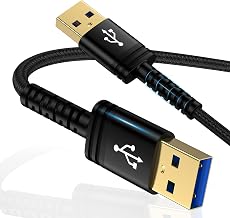
Best for budget-focused setups or legacy devices running USB 2.0. This 6-foot USB A-to-A cable delivers up to 480 Mbps, backward compatible with USB 1.1 and 1.0, and features a durable braided nylon sleeve. It’s a straightforward option when newer USB 3.0 features are not required. Caution: slower speeds compared to USB 3.0 cables mean longer transfer times for large files.
Who it’s best for: users with USB 2.0 peripherals or a tight budget who still need reliable data transfer. Why selected: balance of length, durability, and compatibility with older devices. Caution: plan for slower transfer rates if handling large data sets.
Buying Guide
What should you consider when choosing a USB cable with two male ends? Start with device compatibility. If you require high-speed performance for large file transfers, prioritize USB 3.0 (or newer) cables, and confirm the cable supports 5Gbps. For long reach, select longer lengths like 6 ft, but weigh desk space and cable management. If you’re linking two devices of the same USB standard, ensure both devices accept USB A to A connections and that the use case excludes direct computer-to-computer linking.
Durability matters. Cables with braided nylon shielding and sturdy connectors resist tangling and bending. Consider whether you need braiding on both ends for added protection, especially in busy environments like offices or labs. For compact desks, shorter cables reduce clutter; for media centers or workstations, longer cables improve flexibility.
Limitations to note include: several A-to-A cables do not support charging or video transmission, and not all models enable PC-to-PC connections. Always verify the cable’s advertised capabilities align with your intended use to avoid compatibility issues or data transfer problems.
Frequently Asked Questions
- Q: Can USB A to A cables connect two computers directly?
A: No. Most USB A to A cables are not designed for direct PC-to-PC connections and are intended for peripheral-to-host connections only. - Q: Do all these cables support USB 3.0 speeds?
A: Most listed cables support USB 3.0 speeds up to 5Gbps, but one entry is USB 2.0 and offers up to 480 Mbps. Check the product details for speed specs. - Q: Are these cables suitable for charging devices?
A: These cables are primarily data cables and many do not support charging. Verify charging support in the product features if needed. - Q: Is longer always better for USB data transfer?
A: Longer cables can introduce more resistance and potential signal loss in some cases. Choose the appropriate length for your setup and keep data integrity in mind. - Q: Do these cables work with USB hubs?
A: Yes, many are compatible with USB 3.0 hubs, but confirm the hub’s specifications and the devices you plan to connect. - Q: Are there compatibility notes for USB 2.0 vs USB 3.0 devices?
A: USB 3.0 devices are backward compatible with USB 2.0 ports, but performance will be limited to the capabilities of the connection.