The right USB-C wireless mouse can boost productivity across Windows, macOS, and Chrome OS. This guide highlights five top options that emphasize Type-C compatibility, quiet clicks, and reliable wireless performance. Each pick supports USB-C devices and offers practical features for everyday work, travel, and study. Read on to compare design, battery life, DPI, and connectivity to find your ideal match.
Product Summary
| Product | Brand | Connectivity | DPI |
|---|---|---|---|
| VssoPlor Type C Wireless Mouse | VssoPlor | USB-C receiver / USB | 1000/1600/2400 |
| cimetech Type C Wireless Mouse | cimetech | 2.4G USB-C receiver | 1000/1200/1600 |
| RaceGT USB C Wireless Mouse | RaceGT | USB-C receiver via nano; 2.4G | Not listed in specs |
| ProtoArc Bluetooth Wireless Mouse | ProtoArc | Bluetooth / USB-C / USB | 1000/1600/2400 |
| Halpilt Wireless Mouse Q23S | Halpilt | USB & Type-C dual mode | 1000/1200/1600 |
VssoPlor Type C Wireless Mouse
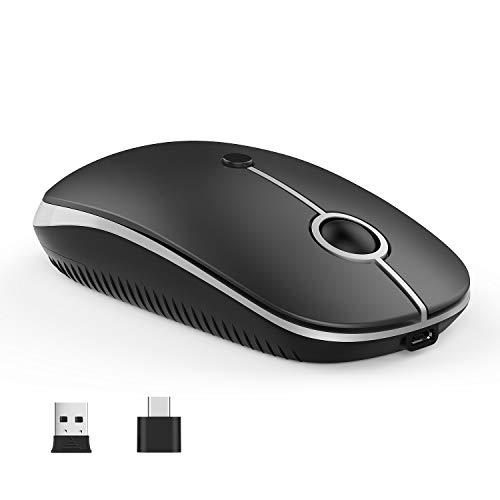
The VssoPlor Type C Wireless Mouse is designed for broad Type-C device compatibility, including MacBooks and Chromebooks. It features a built-in 300 mAh rechargeable battery and a micro-USB charging cable. Users can choose among three DPI settings (1000/1600/2400) for smoother cursor control on varied surfaces. The ergonomic, lightly frosted surface reduces fatigue during long sessions, while the quiet clicking helps maintain focus in shared spaces. The mouse supports both USB-C devices and traditional USB ports via a receiver, delivering flexible, cordless performance.
cimetech Type C Wireless Mouse

The cimetech Type C Wireless Mouse uses 2.4GHz wireless technology for stable, low-latency operation within up to 33 feet. A Type-C receiver stays stored in the battery compartment, ready for quick plug-and-play on compatible devices. It offers silent clicking and three DPI levels (1000/1200/1600) for adaptable precision. Ambidextrous design and a precision metal scroll wheel enhance usability for both left- and right-handed users, making it a versatile choice for work and travel.
RaceGT USB C Wireless Mouse

The RaceGT USB C Wireless Mouse emphasizes a plug-and-play experience with a nano receiver housed in the battery compartment. It delivers a reliable 2.4 GHz connection over a practical range of up to 15 meters, minimizing delays or dropouts. This model is designed for quiet operation to avoid disturbing colleagues, with the caveat that the forward and backward buttons may produce audible feedback. It provides a straightforward, compact solution for Mac, Windows, and other USB-C equipped devices.
ProtoArc Bluetooth Wireless Mouse

The ProtoArc EM15 Bluetooth/USB-C wireless mouse supports up to three devices simultaneously, with a dedicated Type-C and USB receiver stored in the back. It offers 1000/1600/2400 DPI for precise tracking and a rechargeable battery for ongoing use. This multi-connectivity design is ideal for users who alternate between a laptop, tablet, and desktop, enabling quick device switching at a touch of a button and reliable performance across platforms.
Halpilt Wireless Mouse Q23S

The Halpilt Q23S pairs USB and Type-C dual-mode compatibility. This plug-and-play design supports Type-C or USB-A interfaces and is compatible with Windows, macOS, Android, and other systems. A built-in rechargeable battery offers a practical 15–20 days of use on a full charge, with a 2-hour charging time. The mouse features three DPI levels (1000/1200/1600) for responsive cursor control, suitable for both small and larger screens, with smooth positioning across surfaces.
Buying Guide
Key considerations help determine which USB-C wireless mouse best fits your setup:
- Device compatibility: Prioritize models explicitly supporting Type-C devices, including MacBooks, Chromebooks, and USB-C laptops. Some mice also include a standard USB receiver for broader compatibility.
- Connectivity options: Look for dual modes (USB-C, Bluetooth, and 2.4 GHz) to cover different devices and environments. Consider whether you need a dongle-free setup or prefer a dedicated receiver.
- Battery life and charging: Rechargeable batteries reduce ongoing costs. Check charge times and expected usage between charges. Some mice ship with USB-C charging cables for easy topping up.
- Ergonomics and grip: Ambidextrous designs suit both hands, while contoured shapes support prolonged use. Consider surface texture and button layout if you work long hours.
- DPI range and tracking: A wider DPI range (e.g., 1000–2400) offers better control across 4K displays or high-resolution screens. Ensure the sensor performance matches your daily tasks.
- Sound and mechanical feel: Silent or quiet-click options minimize distractions in shared spaces, though forward/backward buttons may still produce sound on some models.
- Portability: For travel, choose compact, lightweight mice with durable construction and minimal required setup time.
Performance varies by environment. If you switch often between a Mac and Windows machine, a model with cross-compatibility (USB-C/USB/Bluetooth) and a reliable, low-latency connection will reduce setup friction. Battery life can influence whether you unplug and work remotely without frequent charges. Reading user reviews can reveal real-world reliability across different desk setups and surfaces.