Finding a reliable USB-C to HDMI cable or adapter is essential for anyone looking to expand their display options, whether for work, gaming, or streaming. The following selections focus on 4K@60Hz compatibility, durability, and plug-and-play usability across popular devices like MacBooks, iPads, Windows laptops, and Android phones. Each product prioritizes stable signal transmission, robust construction, and broad device compatibility to suit American households and offices.
Summary of chosen products
| Product | Brand | Key Benefit | Length |
|---|---|---|---|
| Acer USB C to HDMI Cable 6.6FT | Acer | 4K@60Hz, durable braided cable | 6.6 ft |
| WARRKY USB C to HDMI Cable 4K 60Hz | WARRKY | Anti-interference, gold-plated plugs | 6 ft |
| Anker USB C to HDMI Adapter | Anker | Reliable 4K@60Hz with true plug-and-play | Adapter |
| uni USB C to HDMI Cable 6ft | uni | Unidirectional USB-C to HDMI, durable build | 6 ft |
| JSAUX USB C to HDMI Cable 10ft | JSAUX | 4K@60Hz, long reach, robust shielding | 10 ft |
Acer USB C to HDMI Cable 6.6FT (4K@60Hz)

This USB-C to HDMI cable supports 4K@60Hz and is backward compatible with 1440p@60Hz and 1080p@120Hz. It transmits up to 3840×2160 for crisp images on 4K displays, suitable for high-definition monitors, TVs, and projectors. Note the device limitations: USB-C port must support DisplayPort Alternate Mode, and it does not support portable monitors or Ultra Wide monitors. The cable is plug-and-play with USB-C sources, requiring no drivers, with HDCP for smooth media streaming. The braided design enhances durability, and reinforced connectors reduce wear after frequent use. This cable is optimized for Thunderbolt 4/3 compatible devices including MacBook lines and select Android devices that output video through USB-C.
WARRKY USB C to HDMI Cable 4K 60Hz

WARRKY’s USB-C to HDMI cable delivers a 4K@60Hz experience with backward compatibility to 1440p/2K and 1080p variants. It emphasizes plug-and-play simplicity, with HDCP compliance for uninterrupted streaming. The gold-plated connectors reduce corrosion and ensure stable transmission, while the aluminum unibody and nylon braid offer a premium feel and durability. It is designed for simple, one-way transmission from USB-C hosts to HDMI displays, making it a strong option for users who want reliable performance without extra adapters or software.
Anker USB C to HDMI Adapter (4K@60Hz)

Anker’s USB-C to HDMI adapter turns a USB-C port into an HDMI output capable of 4K@60Hz, ideal for MacBook Pro, MacBook Air, iPad Pro, Pixelbook, XPS, Galaxy devices, and more. The design emphasizes the Anker advantage: reliable performance, broad compatibility, and a straightforward plug-and-play experience—no drivers required. This adapter is a compact solution for extending displays or mirroring content to HDMI-equipped TVs or monitors, suitable for presentations, streaming, or creative work. It is especially compatible with Thunderbolt 3/4 ports due to its robust data handling capabilities.
Acer USB C to HDMI Adapter 4K USB C Hub

This is a versatile 3-in-1 USB-C hub combining HDMI 4K@30Hz output with a PD charging port and a USB-A 3.0 port. It’s designed to mirror or extend your screen to HDMI displays and can mirror iPhone or iPad screens when applicable. The HDMI output is compatible with most HDTVs, monitors, and projectors and emphasizes a practical approach for both travel and home theater setups. Important notes include DP Alt Mode requirements for the USB-C port, and it does not include a dedicated HDMI female port, but serves as a compact multiport solution for everyday connectivity.
uni USB C to HDMI Cable 6ft
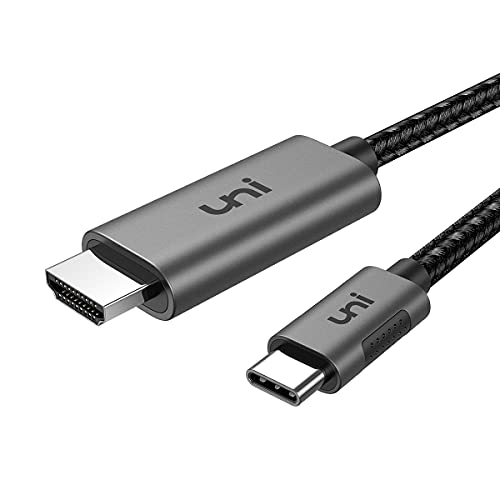
uni’s 6-foot USB-C to HDMI cable provides a straightforward, unidirectional connection from USB-C sources to HDMI displays. It supports 4K@60Hz in a single direction and is designed to be durable with a nylon braided jacket and a robust aluminum housing. The product highlights include a stable signal path and a focus on devices with video output functions. This makes it suitable for home entertainment setups, presentations, and classroom use. Note that it does not work in the reverse direction or with non-video-enabled devices.
uni USB C to HDMI Cable 4K, 6FT

This uni cable provides 4K at 30Hz to HDMI displays with USB-C to HDMI functionality. It’s designed to be plug-and-play with Thunderbolt 3/4 compatibility and aims to deliver reliable signal integrity for work or entertainment. The cable is compact and features an aluminum housing and a braided jacket to resist wear and tear. It is best suited for devices that output video via USB-C and for users who want a simple, direct connection to HDMI displays without additional dongles.
Anker HDMI Cable (4K@60Hz) with USB-C to HDMI Cord

Anker’s high-quality HDMI cable is designed to pair with USB-C to HDMI solutions, delivering 4K@60Hz with HDR for enhanced color and detail. Its nylon-braided exterior and advanced shielding minimize interference and signal loss, offering reliable performance for screen mirroring, gaming, or presentations. This option complements USB-C to HDMI adapters by providing a robust, long-lasting display cable that can connect directly to HDMI-equipped TVs or monitors when a dedicated HDMI port on the display is available.
Buying Guide: Key Considerations For USB-C To HDMI Purchases
When choosing a USB-C to HDMI solution, balance performance, compatibility, and durability. Consider the following factors:
- Resolution and refresh rate: Look for 4K@60Hz support to ensure sharp graphics and smooth video, particularly for modern laptops and high-definition displays.
- Unidirectional vs. bidirectional: Most cables are uni-directional (USB-C source to HDMI display). Confirm it matches your device’s output capabilities.
- DP Alt Mode compatibility: The USB-C port must support DisplayPort Alternate Mode for video output. Some devices may only support charging or data, not video.
- HDCP and licensing: HDCP compliance is important for streaming content from services like Netflix or Prime Video without interruptions.
- Build quality: Braided jackets, reinforced connectors, and heat-dissipation features help withstand daily use and travel.
- Length considerations: Longer cables provide flexibility but may introduce minimal latency or signal loss. Choose a length that suits your setup.
- Port compatibility: Ensure the adapter or cable works with your specific devices (MacBook, iPad, Android, Windows, etc.) and that it does not block other ports on crowded hubs.
- Additional features: Some products include multiport hubs (HDMI + USB-A) or PD charging pass-through. Determine whether you need charging while using the display.
In practice, users seeking a straightforward setup should prioritize cables with native 4K@60Hz output and solid shielding. For those who require flexible travel gear, longer 6–10 foot options offer convenience, while adapters without extra ports keep the design compact. Thunderbolt 3/4 compatibility can extend device support, but confirm the device supports video output to avoid compatibility issues.