USB-C docks unlock a cleaner workspace by expanding a single port into multiple video, data, and charging options. For American buyers, choosing the right dock depends on display needs, power delivery, and compatibility with your device. This article highlights five widely compatible options designed to power one desk with two to four displays, fast data transfer, and reliable charging. Use the quick reference table below to compare core specs at a glance.
| Product | Display Support | Ports | PD (Power Delivery) | Notes |
|---|---|---|---|---|
| HP USB-C Dock G5 | Up to 3 displays | USB-C, USB-A, Ethernet, video | Supports charging via USB-C | Universal compatibility |
| Lenovo USB-C Dual Display Travel Dock | Dual 4K, 1 external 100W charger option | HDMI, DP, USB, Ethernet | Up to 100W with included charger | Travel-friendly |
| VVB USB C Docking Station 14 in 1 | Dual 4K or triple displays | HDMI, DisplayPort, USB-A, USB-C, Ethernet, SD/TF | Power delivery up to 100W | Wide port assortment |
These options cover a range of needs—from compact travel docks to high-performance multi-display stations. Each product here is presented with its key strengths, helping you pick a dock that balances display capabilities, data speed, and charging efficiency for a productive workspace.
HP USB-C Dock G5 11-in-1 Overview

The HP USB-C Dock G5-11-in-1 is designed for broad compatibility across USB-C and Thunderbolt-enabled laptops. It aims to simplify workspace setups by enabling charging, networking, and data transfers through a single connection. Its universal compatibility makes it a versatile option for mixed-device environments, while the single-cable solution reduces desk clutter and tangling cords. The dock supports attaching up to three displays, providing flexible screen configurations for productivity, media editing, or collaboration. Overall, it is positioned as a practical hub for secure and remote management workflows.
Lenovo USB-C Dual Display Travel Dock

The Lenovo USB-C Dual Display Travel Dock focuses on dual 4K display capability with an integrated cable and universal compatibility. It includes a power adapter option that adds 100W PD, delivering substantial power to charging laptops while you work. The design emphasizes a clean, professional aesthetic and an emphasis on sustainability with recycled content in the chassis. This dock is suited for professionals who rely on multiple high-resolution displays and need dependable power delivery for a portable setup. It brings a balance of performance and portability for travel or hot-desking environments.
VVB USB C 14-in-1 Docking Station

The VVB 14-in-1 docking station extends a laptop’s USB-C port to a broad array of ports, including two HDMI outputs, a DisplayPort, USB-C PD, USB-A ports, SD/TF readers, and Gigabit Ethernet. It supports dual 4K displays or triple-monitor configurations depending on the output combination. Data transfer speeds reach up to 10Gbps on USB-C and USB-A ports, which makes it suitable for media professionals and analysts who move large files quickly. The dock’s wide port assortment makes it a versatile hub for varied workflows, though MacOS users should note that display outputs may mirror depending on the setup.
Lenovo ThinkPad USB-C Dock Gen 2

The ThinkPad USB-C Dock Gen 2 emphasizes centralizing peripherals with a single connection. It supports 4K video on a single display or multiple displays and offers features like Wake-on-LAN and PXE Boot for enterprise workflows. The dock uses DisplayPort 1.4 and HDMI 2.0 for high-resolution outputs, though the true video output may depend on the host system. This option is ideal for ThinkPad-centric environments or users who require robust management capabilities and reliable DisplayPort/HDMI output for professional usage.
Dell Pro Thunderbolt 4 Smart Dock SD25TB4
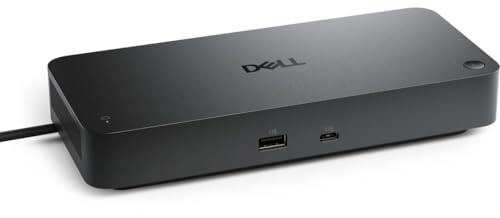
The Dell Pro Thunderbolt 4 Smart Dock SD25TB4 focuses on high-end multi-monitor setups with up to four 4K displays via HDMI 2.1 and DP 1.4, along with multiple Thunderbolt 4 connections. It emphasizes power delivery, providing up to 130W to Dell systems and 96W to others, which supports sustained performance for demanding workloads. The dock’s design targets professionals who require robust multi-display capabilities, fast data transfer, and reliable, enterprise-grade connectivity with integrated networking options.
HODO 8-in-1 USB-C Docking Station

The HODO 8-in-1 docking station provides a compact solution with multiple video outputs, including dual HDMI and a DisplayPort, plus a VGA option for legacy displays. It emphasizes versatility with USB 2.0 ports and a USB-C PD charging port up to 100W. Note that MacOS commonly mirrors external displays when using certain combinations, so users should plan display arrangements accordingly. This dock is well-suited for mixed-device environments seeking a budget-friendly, feature-rich hub for everyday tasks and light professional workloads.
Acer USB C Docking Station 9-in-1

The Acer 9-in-1 docking station is designed to deliver dual 4K capability with 2 HDMI outputs, a USB-C PD port, SD/Micro SD, and multiple USB-A ports. It supports 100W PD charging and includes clear notes about the USB-C port version needed for video output. The dock targets users who need strong display support, especially for creators and analysts who often run multiple programs or edit media across two 4K displays. Compatibility notes are essential for ensuring smooth integration with non-Acer machines.
Buying Guide
- Display configuration: Determine whether you need dual or triple/quad monitor support, and check whether the dock uses HDMI, DisplayPort, or both. Note whether 4K@60Hz is supported and how many outputs can drive at that resolution.
- Power delivery: Match the dock’s PD rating to your laptop’s charger requirements. Higher-wattage PD helps on power-hungry laptops, especially when running displays and peripherals simultaneously.
- Compatibility: Consider universal USB-C/Thunderbolt compatibility versus brand-specific ecosystems. If you use multiple brands, prioritize a dock with broad compatibility and clear MacOS/Windows notes.
- Data transfer speed: Look for USB-C 3.1 Gen 2 or USB 3.0/3.2 ports and gigabit Ethernet for reliable LAN performance. High-speed USB-A ports improve peripheral transfers and external storage use.
- Port mix and future-proofing: Assess whether you need SD cards, USB-C PD, 100W, or multiple USB-A ports. A dock with a wide port set reduces dongle clutter and keeps cables tidy.
- Build and sustainability: Consider chassis materials and recycled-content mentions if environmental impact matters. A sturdy dock reduces wear from frequent travel and setup changes.
- MacOS caveats: Some docks mirror displays on Mac systems when using certain output configurations. If you work on macOS, plan for mirroring scenarios or test configurations before purchase.
- Space and portability: Travel-friendly designs benefit remote work or hot-desking. Weigh the dock’s footprint against your desk space and the length of cables you’re willing to manage.
Choosing the best USB-C dock involves balancing display needs, charging requirements, and device compatibility. The options listed here span compact travel docks to robust multi-display hubs, enabling tailored setups for home offices, corporate environments, or on-the-go professionals. Always verify current specifications and compatibility with your exact laptop model before purchasing to ensure seamless performance across devices.