Choosing a USB-C docking station that supports dual monitors can streamline your workflow, reduce desk clutter, and keep your devices powered. This guide highlights five top options that balance video output, data transfer, power delivery, and compatibility across Windows, macOS, and mainstream laptops. Each product section includes key features to help you compare at a glance.
| Brand | Model | Video Outputs | Power Delivery | Notes |
|---|---|---|---|---|
| Anker | 8-in-1 USB C Hub Dock | 2x HDMI | 85W | Solid build, 4K@60Hz on one screen, Dual display mirroring on macOS |
| Acer | Premium 13-in-1 Dock | 2x HDMI + DP | 110W | Triple display support on Windows; strong expandability |
| Selore | USB C Docking Station Dual Monitor | 2x HDMI + VGA | 100W | Versatile 14-in-1 with extensive ports |
| LIONWEI | 13 in 1 Docking Station | 2x HDMI + DP | 100W | Triple display on Windows; 4K at 60Hz on each HDMI/DP |
| Baseus | 9 in 1 USB-C Hub | 2x HDMI | 85W | 120Hz capable single display, strong ethernet option |
Anker Laptop Docking Station Dual Monitor 8-in-1
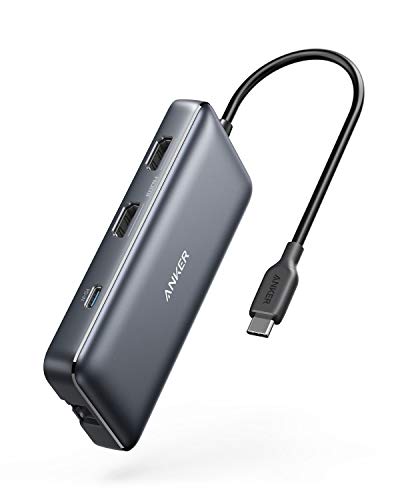
The Anker 8-in-1 USB C hub provides a robust expansion from a single USB-C port. It includes two HDMI outputs for dual-monitor setups, a Gbps Ethernet port, SD card reader, and multiple USB-A ports, all while delivering up to 85W Power Delivery to keep laptops charged during intense workloads. On macOS, users will experience identical display output across both external monitors when using dual HDMI connections, with 4K@60Hz on a single display and 4K@30Hz across two displays. This configuration makes it suitable for workstations, coding desks, or creative setups that rely on large, crisp screens. The device emphasizes compatibility with MacBook Pro and other popular laptops, ensuring a wide audience can deploy a multi-monitor desk with ease.
Acer Premium 13-in-1 Docking Station

This Acer docking station is built for multi-screen setups, offering two HDMI outputs and a DisplayPort, plus USB-C and USB-A ports for data and peripheral expansion. It includes a 110W power adapter that delivers up to 85W to a connected laptop, enabling sustained performance even with a triple-monitor arrangement on Windows via MST technology. This model is especially well-suited for users who frequently juggle charts, code, and large documents across three screens. Mac users should note that macOS typically mirrors displays rather than extending them across all screens. For those with Windows laptops, the triple 4K output capability can significantly boost productivity when paired with a capable GPU and DSCT-enabled hardware.
Selore USB C Docking Station Dual Monitor 14 in 1

The Selore dual-monitor hub combines two HDMI outputs with a VGA option, delivering a broad assortment of ports including USB-C and USB-A data connections, SD card readers, and a 100W PD charging port. It supports triple-display configurations on Windows with MST, while macOS can mirror multiple displays. Note that some USB ports are limited to data transfer and charging and do not handle video output. This flexibility makes the Selore unit attractive for multi-device setups where users need many peripherals alongside dual monitors, all powered from a single USB-C backbone.
LIONWEI 13-in-1 USB C Docking Station

This 13-in-1 dock emphasizes triple-display capability on Windows with both HDMI and DP outputs, offering 4K@60Hz on supported ports and 100W Power Delivery to charge laptops without sacrificing performance. It supports mirroring and extending across different displays, while macOS users should expect limited MST extension and potential SST-only configurations. The inclusion of a DisplayPort alongside HDMI ports broadens compatibility with a wide range of monitors, making it a versatile choice for users who rely on multiple screens and fast data transfer alongside the main video outputs.
Baseus Laptop Docking Station 9 in 1

Baseus combines a 120Hz-capable single HDMI output with a second HDMI option, enabling flexible display arrangements at high refresh rates on compatible monitors. The dock includes a Gigabit Ethernet port for reliable wired networking and a 100W PD charging port to support laptop charging during heavy workloads. With three USB-A ports and 2 USB-C ports, it covers essential data transfer and peripheral needs, while two SD card slots bolster media workflows. This model suits users who want a compact, all-in-one solution for dual-monitor workstations without sacrificing performance or expandability.
Buying Guide: Key Considerations When Choosing a USB-C Docking Station For Dual Monitors
- Display capability: Determine how many displays you need and ensure the dock supports dual or triple monitor setups with 4K or 60Hz resolution as required. Check whether MST (multi-stream transport) is supported by your laptop and operating system to enable extended desktop across multiple displays.
- Power delivery: Look for a dock that can deliver sufficient wattage to your laptop while docked, ideally matching or exceeding your laptop’s charger. This helps maintain performance during intensive tasks without shutdowns or throttling.
- Port selection: Consider a balance of video outputs (HDMI, DisplayPort, VGA), USB-A and USB-C ports, SD/microSD readers, and network connectivity. Ensure enough USB ports for peripherals and data devices, plus any external drives you plan to connect.
- Compatibility: Verify platform support (Windows, macOS, Chrome OS) and note any limitations on macOS regarding extended vs. mirrored displays. Check if the host USB-C port supports DP Alt Mode and Power Delivery required for your setup.
- Build and heat: For daily, long-duration use, choose a dock with solid construction and effective thermal design to prevent throttling during sustained workloads.
- Setup and drivers: Most docks are plug-and-play, but some advanced features may require drivers or firmware updates. Consider models with simple, driver-free operation for better reliability.
- Cable management and portability: If you move between desks or offices, pick a dock with a compact footprint and a cable arrangement that minimizes desk clutter.
In practice, the right USB-C docking station depends on your monitor count, preferred resolutions, and the host device’s capabilities. For Windows users aiming for triple 4K outputs, select a dock with MST support and a robust power adapter. Mac users should anticipate mirror-mode limitations on some models, particularly with more than two external displays. By weighing these considerations, you can pick a dual-monitor USB-C dock that aligns with your work style, monitor set, and power needs.