Discover top USB-A hubs that extend your computer’s ports, boost data transfer speeds, and provide reliable power options. This guide highlights five popular models from trusted brands, focusing on ease of use, port count, and charging capabilities to help you choose the right hub for laptops, desktops, and workstations.
| Product | Brand | Key Benefit | Ports |
|---|---|---|---|
| Acer USB Hub 4 Ports (2ft) | Acer | USB 3.0 speeds with power port for stability | 4 x USB 3.0 |
| Anker USB Hub 4 Ports (2ft) | Anker | High-speed data up to 5Gbps, wide compatibility | 4 x USB 3.0 |
| TP-Link UH720 | TP-Link | Powered 7-port expansion with smart charging | 7 x USB 3.0 + 2 smart charging |
| Wenter 11-Port USB Hub | WENTER | Many ports with a dedicated charging port | 10 USB 3.0 data + 1 charging |
| SABRENT HB-UM43 | SABRENT | Slim design with LED indicators and on/off switches | 4 x USB 3.0 |
Note: This article presents objective specifications to help compare hubs. Availability and features may vary by retailer and region.
Acer USB Hub 4 Ports — USB 3.0 Expansion

Acer’s 4-port USB 3.0 hub adds essential connectivity to laptops, desktops, and PCs. It supports up to 5Gbps data transfer, making it suitable for transferring large files quickly. A dedicated 5V USB-C power port helps maintain stable transmission when using power-hungry devices. The built-in GL3510 controller supports efficient thermal management and plug-and-play operation without drivers, allowing multiple devices to work simultaneously to boost productivity.
Anker USB Hub 4 Ports — Reliable 5Gbps
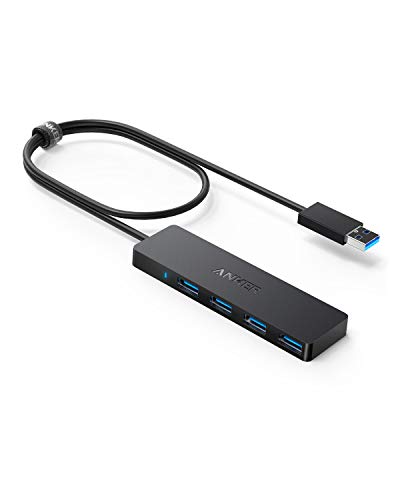
Anker’s 4-port USB 3.0 hub delivers up to 5Gbps data speeds, enabling rapid file transfers such as HD videos. It converts a single USB-A port into four, broadening the connection surface for peripherals like keyboards, mice, and storage devices. Note that this model is designed for data transfer and does not support charging devices through the hub, which helps manage power stability and avoids overloading the host port.
TP-Link UH720 — 7 Ports With Smart Charging

TP-Link’s powered hub offers seven USB 3.0 data ports plus two smart charging ports, enabling fast data transfer and efficient device charging. USB 3.0 transfers reach up to 5Gbps, while the smart charging ports identify connected devices and provide appropriate power to optimize charging times. The hub is designed for cross-platform use and can simplify a cluttered desk by centralized connectivity and power management.
Wenter 11-Port USB Hub — High Port Density

The Wenter hub combines 10 USB 3.0 data ports with a dedicated smart charging port, driven by a 12V/3A power adapter. Each data port supports up to 5Gbps, enabling rapid transfers for keyboards, mice, drives, printers, and other peripherals. Individual LED indicators show power status, and the smart charging port provides faster charging for tablets and phones without occupying the main data outlets.
SABRENT 4-Port USB 3.0 Hub — Compact Yet Capable

SabRENT’s compact 4-port hub focuses on straightforward expansion with individual LED power indicators and on/off switches for each port. It supports high-speed data transfer up to 5Gbps and offers a simple plug-and-play setup for Mac and PC users. The slim profile makes it suitable for portable use on desks with limited space or in travel setups where a lightweight solution is preferred.
UGREEN USB 3.0 Hub — Slim 4-Port Splitter

UGREEN’s 4-port USB-A hub expands a single USB-A port into four, ideal for keyboards, mice, USB drives, and printers. It supports USB 3.0 speeds up to 5Gbps and is plug-and-play across Windows, macOS, Linux, and Chrome OS. The compact form factor makes it a practical choice for laptops, mini PCs, or home theater PCs that need simple, reliable expansion without extra power requirements.
Buying Guide
Key purchase considerations help distinguish the right USB-A hub for your setup:
- Port count and layout: Determine how many ports you need and whether you want a mix of data ports and charging ports. Higher-port hubs are useful for crowded desks but may require more power management.
- Data transfer speed: Most USB 3.0 hubs offer up to 5Gbps. If you frequently transfer large files, prioritize hubs with efficient controllers and good cable/port quality to sustain peak speeds.
- Power and charging: Powered hubs (with their own adapter) support simultaneous charging and data transfer, reducing strain on your computer’s power supply. Consider whether you need dedicated charging ports for tablets or phones.
- Port supervision: Some hubs include individual on/off switches and LED indicators, helping you manage devices and monitor power usage without disconnecting cables.
- Compatibility and drivers: Most hubs are plug-and-play, but it’s wise to verify compatibility with your operating system (Windows, macOS, Linux) and any devices you frequently attach (external drives, PCIe enclosures, etc.).
- Build quality and cooling: Aluminum or metal housings tend to dissipate heat better, especially for powered hubs with many devices connected. Proper cooling helps maintain performance on long sessions.
- Cable length and form factor: If you travel or have a compact workspace, consider hubs with shorter cables and slim profiles to minimize clutter.
- Individual vs. shared power: Some hubs distribute power across ports, while others rely on a separate power adapter. Individual switches and LEDs can improve usability in multi-device setups.