Discover top USB-C and USB 3.0 audio interfaces that deliver clean preamps, low latency, and flexible I/O for voice, guitar, and podcasting. This guide highlights five models suited to different setups, from portable creators to small studios. Use this to compare best-for-use cases, connectivity, and the features that matter most for your workflow.
Buyer Snapshot
- Best for overall sound quality and portable production — Apogee Duet 3 Premium USB-C Audio Interface
- Best for extensive I/O and advanced monitoring — MOTU 828 28×32 USB3 Audio Interface
- Best for versatile mixing and low-latency recording — Antelope Audio USB Audio Interface with 32 Channel Mixing
- Best for budget-friendly, compact setups — XTUGA USB Audio Interface for PC
- Best for creators needing multi-device workflow — MAONO P2 Hybrid USB Audio Interface
Summary Table of Top Picks
| Product | Best For | Key Benefit | Connectivity |
|---|---|---|---|
| Apogee Duet 3 | Vocal/Instrument studios | Premium sound, portable | USB-C |
| MOTU 828 | Home studios with lots of I/O | Many inputs/outputs, clear metering | USB3 |
| Antelope Audio USB Interface | High-precision monitoring | 32 analog I/O, advanced clocking | USB/Thunderbolt |
| XTUGA Q-12 | On-the-go recording | Plug-and-play, low latency | USB |
| MAONO P2 | Multi-device creators | Hybrid connectivity, 24/192 | USB-C |
Apogee Duet 3 Premium USB-C Audio Interface
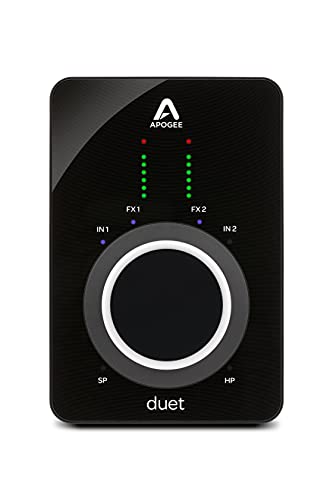
Best for: Vocalists, instrumentalists, podcasters, and streamers who want premium preamps, easy setup, and portable performance. The Duet 3 offers up to 65 dB of gain, 48V phantom power, and onboard DSP with the Symphony ECS Channel Strip for real-time tone shaping, plus Clearmountain’s Domain Native software for processing. Latency while recording is near zero, making it ideal for fast, accurate tracking in small studios or mobile setups.
Why chosen: It combines class-leading sound with a compact footprint and USB-C connectivity, appealing to users who prioritize sound quality and workflow simplicity. Best for Mac, Windows, and iOS environments.
Limitations: Higher price point and a smaller I/O set compared to larger interfaces; best used when premium sound matters more than sheer input count.
MOTU 828 28×32 USB3 Audio Interface

Best for: Home studios and small production rooms needing extensive I/O, detailed metering, and strong digital routing. This model builds on long-standing MOTU reliability with a bright TFT display for quick status checks and hardware control, plus 125 dB dynamic range from ESS Sabre32 DACs.
Why chosen: The 28×32 configuration supports complex projects, making it a better pick for users who require multiple simultaneous inputs and outputs for recording bands or multi-instrument setups.
Limitations: The footprint is larger than ultra-portable interfaces; setup and navigation may be more involved for beginners.]
Antelope Audio USB Audio Interface with 32 Channel Mixing

Best for: Studios and engineers seeking precise clocking and high-fidelity monitoring with flexible routing. It delivers 32×32 channels of analog I/O with excellent dynamic range and dedicated monitor outputs, plus Thunderbolt 3 compatibility for ultra-low latency streaming and mixing.
Why chosen: The focus on advanced clocking and wide channel count makes it a strong choice for professional setups where timing accuracy and expansion are priorities.
Limitations: Thunderbolt support adds a potential limitation for users on strictly USB-only systems; ensure compatibility with your computer before purchasing.
XTUGA USB Audio Interface for PC

Best for: Beginners and on-the-go creators who need plug-and-play setup, low latency, and reliable performance without extra gear. The Q-12 features 16-bit/48 kHz resolution and a direct USB connection to a computer, making it straightforward for daily use.
Why chosen: Its simplicity and affordability make it a practical entry point for podcasters and hobbyists who want to start recording quickly.
Limitations: 16-bit/48 kHz native resolution is lower than higher-end interfaces, which may be noticeable on critical music productions or professional voice work.
MAONO P2 Hybrid USB Audio Interface

Best for: Creators who need flexible workflow across devices, including Macs, PCs, iPhones, Androids, and cameras. The P2 offers dual USB ports with MFi-certified compatibility, plus 24-bit/192 kHz recording quality and a low-noise design with independent mute controls for reliable live sessions.
Why chosen: The hybrid USB connectivity enables simultaneous recording and streaming across multiple devices, making it a versatile option for mobile setups and studio work alike.
Limitations: The feature set is broad, which may be more than needed for very simple setups; check if the exact I/O suits your intended projects.
Buying Guide
What should you consider when choosing a USB 3 audio interface?
- : USB-C/USB 3.0 offers faster data transfer and lower latency. Ensure your computer and peripherals support the chosen interface.
- : Count inputs and outputs needed for microphones, guitars, keyboards, and monitors. More channels help with complex sessions but increase size and cost.
- Preamps And Dynamic Range: Look for reputable mic preamps and high dynamic range (dB) to capture quiet and loud signals cleanly.
- Latency And DSP: Onboard DSP and low-latency monitoring improve real-time performance, especially for recording and streaming.
- Software Compatibility: Check ASIO support for Windows and core audio compatibility for macOS/iOS. Bundled software can add value but isn’t essential.
- Portability: If you travel or perform live, prioritize compact form factors and bus-powered operation.
- Future Proofing: Consider scalable interfaces with expansion options or multi-device setups if your workflow may grow.
Frequently Asked Questions
- What is the difference between USB 3 and USB-C interfaces? USB-C is a connector type and can support USB 3 or higher speeds; USB 3 refers to data transfer rate. Many modern interfaces use USB-C for USB 3 performance.
- Do I need external power for these interfaces? Some are bus-powered via USB; others require external power for more inputs or higher headroom. Check the power requirements for your chosen model.
- Is 24-bit/192 kHz better for all projects? Higher resolution provides more dynamic range and detail, but the audible difference depends on your microphones, room, and listening environment.
- Which interface is best for beginners? A compact, easy-to-set-up model with good preamps and simple monitoring is ideal. XTUGA Q-12 or MAONO P2 fit that profile.
- Can these interfaces work with iOS devices? Some models offer iOS compatibility via USB-C or appropriate adapters; verify device support and driver requirements before buying.
- Do I need a mixer if I buy a USB audio interface? For most home setups, a mixer is not required. Interfaces handle routing and monitoring, while a mixer can add analog control if desired.