When you need more high-speed USB connections, a USB 3.0 PCIe expansion card is the practical answer. This guide highlights five well-rounded options for desktop PCs, suitable for creators, gamers, and power users who need reliable, fast USB access. Each product is evaluated for power handling, port configuration, and compatibility. This makes it easier to choose the right card without guesswork. The top picks cater to different setups—from compact PCIe x1 cards to multi-port hubs—so you can find the best fit for your build.
Summary of chosen products (best use case overview):
| Product | Brand | Best For | Key Benefit |
|---|---|---|---|
| ELUTENG PCIE USB 3.0 Card 7 Ports | ELUTENG | High port count, independent power per port | 7 ports with per-port power |
| FebSmart FS-U2S-Pro | FebSmart | 2-port, no extra power needed | Self-powered via motherboard, compact |
| YEELIYA PCIE USB 3.0 Expansion Card 7 Ports | YEELIYA | 7 ports including Type-C | Mixed ports for broad compatibility |
| StarTech.com 4 Port USB 3.0 PCIe Card | StarTech.com | Dedicated channels with optional extra power | 4x dedicated 5Gbps channels |
| FebSmart FS-U4-Pro | FebSmart | 4-port, self-powered, robust | 4 high-speed USB-A ports with self-power |
ELUTENG PCIE USB 3.0 Card 7 Ports

This card expands a PCIe slot with seven USB 3.0 Type-A ports. It uses a two-phase independent power module so each output port can operate without external power. It supports up to USB 3.0 speeds (up to 5Gbps) and can supply 5V 2A to connected devices. Since each port is isolated, power issues on one device won’t affect others. Best for: users needing multiple USB-A connections without crowding the motherboard’s USB headers. Caution: PS3/PS4 compatibility is not listed, so verify device compatibility before purchase.
Why it’s a strong fit:
- Independent port power helps maintain stability with multiple devices.
- High-speed USB 3.0 support for fast data transfers.
- NEC controller components aimed at stable operation.
FebSmart FS-U2S-Pro

FS-U2S-Pro provides two USB 3.0 ports via PCIe X1 with built-in self-powered technology. No external power cable is required, and each USB 3.0 port can deliver up to 5V/2A. It is based on the ASMedia ASM1042 controller, designed for broad compatibility across Windows, macOS, and Linux. Best for: users who want a simple two-port upgrade with reliable self-powered operation. Caution: Power allocation is shared between ports, so very power-hungry devices should be used with care.
Why it’s a good pick:
- No extra power supply needed, reducing cable clutter.
- Compatible with a wide range of systems and devices.
- 2 ports at 5Gbps for fast, everyday USB tasks.
YEELIYA PCIE USB 3.0 Expansion Card 7 Ports
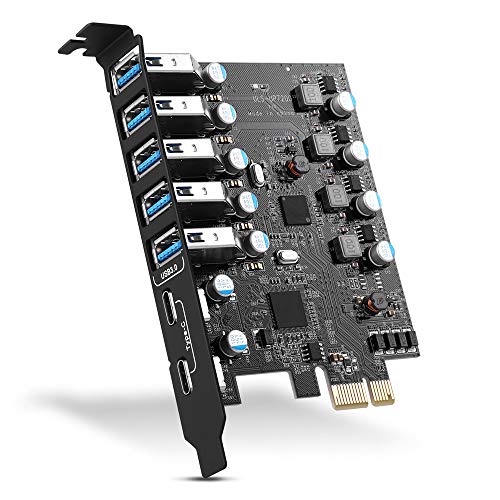
YEELIYA offers seven ports, including five Type-A and two USB-C connectors, expanding both traditional and newer devices. It supports up to 5Gbps across channels and is compatible with Windows, macOS, and Linux after drivers where required. Best for: users who need Type-C connections alongside USB-A, and broad OS compatibility. Caution: Driver installation may be required on older Windows versions.
Rationale for inclusion:
- 7-port configuration covers a wide range of peripherals.
- USB-C ports add modern compatibility for newer devices.
- Broad OS support enhances flexibility in mixed environments.
StarTech.com 4 Port USB 3.0 PCIe Card

StarTech’s card provides four dedicated USB 3.0 channels with up to 5 Gbps per channel. It supports optional LP4 or SATA power connectors for high-powered devices and enables expanding external drives, VR headsets, and more via PCIe. Best for: users who want strong per-channel bandwidth and the option to add extra power for high-demand peripherals. Caution: Power connectors are optional; ensure your devices’ power needs align with the chosen setup.
Why consider this:
- Dedicated channels help maintain predictable throughput.
- Power options improve compatibility with high-power devices.
- Versatile for a range of external USB peripherals.
7-Port USB 3.0 PCIe Expansion Card

This card adds seven USB 3.0 ports with UASP support and four dedicated channels, delivering up to 5Gbps per channel. It emphasizes compatibility across Windows, Linux, and macOS with plug-and-play on newer Windows versions. Best for: users needing a straightforward, high-port count expansion with efficient data transfer and multitasking support. Caution: Some older Windows variants may require driver installation.
Why this stands out:
- UASP support helps reduce CPU load during transfers.
- Dedicated channels improve multitasking performance.
- Broad OS compatibility for mixed systems.
YBBOTT PCI E USB 3.0 Card

YBBOTT’s card provides two external USB 3.0 ports plus an internal 20-pin header for front-panel USB 3.0 ports. It includes a built-in 5V 2A power supply and a SATA power interface for hot-swapping and stable operation. Best for: users upgrading front-panel USB ports while keeping a compact PCIe solution. Caution: With only two external ports, this card is best for essential peripherals rather than a large USB hub setup.
Buying Guide
What should I look for when choosing a USB 3.0 PCIe card?
- Port mix: Decide between USB-A only, or USB-A plus USB-C to cover newer devices.
- Power design: Independent per-port power helps with multiple devices; self-powered designs reduce motherboard load.
- Channel architecture: Cards with dedicated channels and UASP support can improve throughput and reduce CPU usage.
- System compatibility: Ensure the card is listed as compatible with your OS version and motherboard PCIe slots.
- Installation considerations: Some cards require drivers on older OS versions; newer systems often plug-and-play.
How many ports do I actually need?
For everyday peripherals (keyboard, mouse, printers), 4–7 ports provide ample space. If you work with large external drives or VR gear, prioritize higher per-port bandwidth and, if possible, extra power delivery per port.
Should I choose a self-powered or bus-powered card?
Self-powered cards draw power from an external supply, allowing more devices to run without draining motherboard power. Bus-powered cards rely on the PCIe motherboard or the PCIe slot for power and are suitable for lighter peripheral use.
Is USB-C important on a PCIe card?
USB-C can future-proof a build and support newer devices, including power delivery and higher power profiles on certain peripherals. If you frequently use USB-C accessories, favor a card with USB-C ports.
What about compatibility with older PCs?
Many PCIe USB 3.0 cards work with Windows, macOS, and Linux. Some older Windows versions may require drivers, while modern systems typically recognize the card automatically. Check the product’s OS notes for specifics.
How does UASP affect performance?
UASP (USB Attached SCSI Protocol) improves throughput and reduces CPU load, especially for high-speed transfers between SSDs and USB devices. If you transfer large files regularly, prioritize UASP-enabled cards.
Quick comparison at a glance
- Best for many ports with per-port power: ELUTENG 7-port
- Best for two-port, no extra power needed: FebSmart FS-U2S-Pro
- Best for USB-C plus USB-A mix: YEELIYA 7-port
- Best for dedicated channels with optional power: StarTech 4-port
- Best for compact front-panel expansion: YBBOTT with front-panel support
Frequently Asked Questions
- What is USB 3.0 PCIe card good for?
It adds high-speed USB ports to desktops, enabling faster transfers for external drives, VR gear, and peripherals. - Will these cards work in any PCIe slot?
Most are compatible with PCIe x1, x4, x8, or x16 slots, but always verify the slot type supported by the product. - Do I need drivers for Windows 10/11?
Many modern cards are plug-and-play on Windows 10/11, but older OS versions may require drivers. - Can I boot from a USB device using these cards?
In most cases, yes, but check the card’s documentation and BIOS settings for boot capabilities. - Is it important to choose a card with UASP?
For faster, more efficient transfers, especially with SSDs, prefer UASP-capable models. - Do these cards support PCIe power connectors?
Some cards offer optional LP4/SATA power connectors for high-power devices; others rely on motherboard power.