Looking for a reliable 1TB USB external hard drive that works with Windows, Mac, or gaming consoles? This guide highlights five solid options and explains who each is best for. These drives are ideal for students, remote workers, gamers, and home users needing portable, plug-and-play storage. Read on to compare compatibility, speed, and design, then choose the right drive for your setup. Below is a quick summary table of the top picks.
- Seagate Portable 1TB External Hard Drive HDD — Best for universal plug-and-play backup on PC, Mac, and consoles.
- Seagate 2TB Portable Hard Drive — Best for expanding storage with easy Windows/macOS support.
- Maxone 1TB Ultra Slim Portable External Hard Drive — Best for ultra-portable, rugged, metal design.
- YOTUO 1TB External Hard Drive with Multiport Hub — Best for multi-device users needing extra ports in one device.
- GAZELLE High-Speed 1TB Ultra Slim Portable Drive — Best for compact, dual-interface versatility.
Seagate Portable 1TB External Drive – USB 3.0

The Seagate Portable 1TB drive is a straightforward, plug-and-play option ideal for those who want fast setup with Windows or Mac without additional software. Its 1TB capacity is well-suited for everyday file backups, photo collections, and game libraries. Best for users who value simple drag-and-drop backups and broad device compatibility.
- Best for general use, including PCs, Macs, PlayStation, and Xbox systems.
- Connects via USB 3.0 for quick transfers; reformatting may be required for Mac users.
- Auto-recognition on first connection; no software required.
Caution: If you primarily use macOS, you may need to reformat the drive for full Time Machine compatibility.
Seagate 2TB Portable Hard Drive — USB 3.0
The 2TB Seagate Portable Hard Drive expands capacity for users who store large media libraries or backups. It’s designed for quick, drag-and-drop backups and works with Windows or macOS. This option is best for dual-drive households or users needing more space without sacrificing portability.
- Better for users with larger media collections or frequent backups.
- USB 3.0 interface enables faster transfers than USB 2.0.
- Automatic recognition on connection; no extra software required.
Limitation: 2TB model is larger than ultra-slim alternatives but still portable enough for travel and backup drives.
Maxone 1TB Ultra Slim Portable External Drive

Maxone offers a 1TB ultra-slim external hard drive with a robust aluminum shell. Its 0.4-inch profile makes it highly portable for travelers and students who value pocket-sized storage with reliable performance over USB 3.0. Best for those who prioritize portability and a sturdy metal build.
- Better for ultralight, on-the-go storage needs.
- Compatible with Windows 7/8/10; USB 3.0 for improved transfer speeds.
- All-aluminum design helps dissipate heat for cooler operation.
Caution: Ultra-slim design may have a lower shock tolerance than rugged, thicker drives; handle with care during travel.
YOTUO 1TB External Hard Drive + Multiport Hub
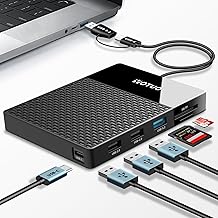
YOTUO combines 1TB storage with a built-in multiport hub, including USB-C, USB 3.2, USB 2.0, SD and TF card readers. This all-in-one device is ideal for users who need quick file access across multiple devices and quick transfer between cameras, laptops, and tablets. Best for multi-device ecosystems and media workflows.
- Best for users who need additional ports and card readers on a single device.
- Supports USB-C and USB 3.2 for compatible, fast data transfer.
- Dual interface versatility makes it easier to connect to diverse devices.
Limitation: The integrated hub can be more complex to use than a single-purpose drive, especially on devices with limited USB-C ports.
GAZELLE High-Speed 1TB Ultra Slim Drive

GAZELLE’s 1TB ultra-slim drive features dual interfaces (USB 3.0 and Type-C), offering broad compatibility with PCs, Macs, gaming consoles, tablets, and mobile devices. It’s designed for quick, portable storage with a modern, light design. Best for users who want broad compatibility in a compact package.
- Best for users who need both USB-C and USB-A connections in one drive.
- Ultra-slim form factor suits mobile use and travel.
- Plug-and-play on compatible devices without extra software.
Caution: Users should verify a device’s USB-C support for optimal speeds, as some older systems may default to USB 2.0 performance.
Buying Guide: 1TB USB External Drives
- What will you mainly back up? Consider whether you back up photos, documents, games, or video. If you store large video files, a higher-capacity drive like 2TB may be worth it.
- Portability vs. durability. Ultra-slim drives are highly portable, but may be less rugged. If you travel often, prioritize aluminum shells and shock resistance.
- Interface matters. USB 3.0/3.2 delivers fast transfers. USB-C guidance helps future-proof devices and balance compatibility with newer notebooks and mobiles.
- Operating system compatibility. Most drives work with Windows and macOS, but macOS users may need reformatting for Time Machine or another backup tool.
- Additional features. Some drives offer built-in hubs or card readers. If you regularly copy from cameras or tablets, those features can save time.
Quick Comparison Table
| Product | Best For | Key Benefit | Notes |
|---|---|---|---|
| Seagate Portable 1TB | General backup on PC/Mac | Plug-and-play, broad compatibility | Mac may require formatting |
| Seagate 2TB Portable | Large media libraries | More storage for less frequent trips | Compact, portable |
| Maxone 1TB Ultra Slim | Ultra-portable use | All-aluminum, very thin | Durability and heat dissipation |
| YOTUO 1TB with Hub | Multi-device workflows | Built-in USB-C, USB 3.2, SD/TF | Hub complexity may vary by device |
| GAZELLE 1TB Ultra Slim | Cross-device compatibility | Dual interface (C & USB 3.0) | Check USB-C compatibility |
FAQ
- What is the typical speed of USB external 1TB drives? Answer: Speeds vary by interface and drive, with USB 3.0/3.2 generally offering faster transfer rates than USB 2.0, depending on device capabilities.
- Do I need to reformat for Mac or Windows? Answer: Some drives require formatting to maximize compatibility with a given operating system, especially for Mac Time Machine.
- Is a larger drive like 2TB worth it over 1TB for backups? Answer: It depends on your data footprint. 2TB offers more space for media libraries and large file sets, reducing the need for frequent backups.
- Can these drives be used with gaming consoles? Answer: Yes, several drives list compatibility with PlayStation and Xbox consoles, enabling expanded game libraries.
- Are built-in hubs or readers necessary? Answer: They’re convenient for multi-device users, but not essential if you only need simple file storage.
- What safety considerations exist for portable drives? Answer: Use padded storage when traveling, avoid dropping or exposing to extreme temperatures, and back up important data to multiple locations when possible.