Answering the common buyer question: which universal laptop power supply best fits most brands and models while delivering reliable 90W performance? This guide highlights five strong options, explains who benefits most, and shows how to compare features like tip compatibility, input/output range, and safety notes. If you own a mix of Dell, HP, Acer, Lenovo, or Asus laptops, these adapters offer broad compatibility with multiple tips and voltages without chasing multiple dedicated chargers.
| Product | Brand | Output Range | Tips Included |
|---|---|---|---|
| 90W Universal AC Adapter Laptop Charger (with 16 Tips) | Belker | 15V–20V, up to 4.74A | 16 tips |
| SZGUDULO 90W Universal AC Adapter (16 Tips) | SZGUDULO | 15V–20V, up to 4.5A | 16 tips |
| ELECBRAIN 90W Universal AC Adapter (16 Connectors) | ELECBRAIN | 15V–20V, up to 4.5A | 16 tips |
| RicChic 90W Universal Laptop Charger (15 Tips) | RicChic | 12V–20V, up to 4.74A | 15 tips |
| ZOZO 90W AC Universal Laptop Charger | ZOZO | 15V–20V, up to 4.62A | 16 tips |
Note: All models listed support universal 90W outputs with multiple DC tips to fit common laptops. Not all units support USB-C laptops or devices exceeding 90W. Always confirm your model’s connector size and voltage before use.
Belker 90W Universal AC Adapter

The Belker charger offers worldwide input (100-240V) and multiple outputs, supporting 15V, 18.5V, 19V, 19.5V, and 20V with currents up to 4.74A. It ships with a broad set of tips intended for Dell, HP, Acer, Asus, Lenovo, IBM, Toshiba, Samsung, Sony, Fujitsu, and others. Best for buyers who want extensive model coverage and a single cord for most ultrabooks and Chromebooks. Not suitable for USB-C laptops.
Who this is best for: users with a mixed-brand laptop collection and laptops in the 90W range. Why selected: broad tip compatibility and voltage options simplify setup across multiple devices. Caution: verify the tip matches your exact model’s connector before power-on to avoid damage.
SZGUDULO 90W Universal AC Adapter

SZGUDULO delivers 16 optional tips and wide input/output (100-240V, 50-60Hz; 15V, 16V, 19V, 19.5V, 20V) with a maximum 90W rating. It’s designed for Dell, HP, Acer, Asus, Lenovo, IBM, Sony, Fujitsu, Gateway, and more. Best for: users who want a clearly documented tip set and a straightforward plug-and-play experience. Caution: not compatible with devices requiring more than 90W; ensure your model fits one of the 16 tips.
ELECBRAIN 90W Universal Adapter

ELECBRAIN’s charger includes 16 connector tips and automatic voltage adjustment to cover a wide range of HP, Dell, Lenovo, Acer, Asus, Toshiba, IBM, Sony, Fujitsu, Gateway, and other laptops. Output options span 15V–20V with currents up to 4.5A. Best for: those who value automatic voltage matching and one-hardware compatibility for multiple brands. Caution: confirm that your laptop tip is among the 16 included connectors to ensure compatibility.
RicChic 90W Universal Laptop Charger
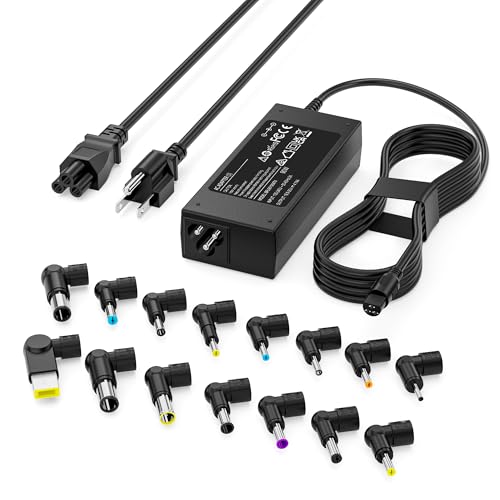
RicChic offers 15 connector tips and a 90W maximum output with voltages at 12V, 16V, 18.5V, 19V, 19.5V, and 20V. It’s positioned for HP, Dell, Asus, Acer, Lenovo, Sony, IBM, Gateway, Fujitsu, and more. Best for: users who want a price-competitive option with broad model support. Limitation: not designed for USB-C laptops; verify connector compatibility before purchase.
ZOZO 90W AC Universal Laptop Charger
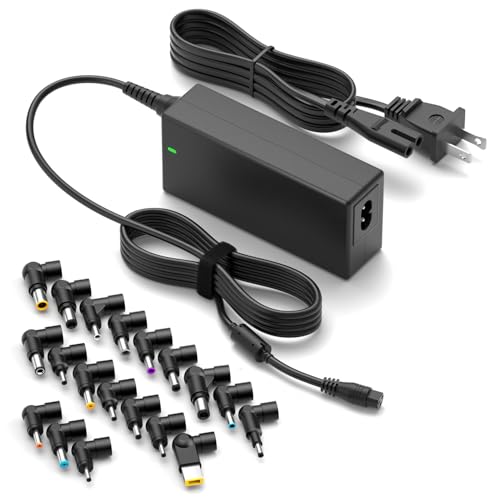
ZOZO provides a 90W universal charger with an output range of 15V–20V and multiple tips. It emphasizes plug-and-play use and includes guidance on compatibility for Asus, HP, Dell, Acer, Lenovo, Samsung, Sony, Fujitsu, Gateway, and Chromebook models. Best for: buyers who want a wide voltage range and abundant tip options. Caution: some models may require more precise tip selection—check compatibility before plugging in.
Wefomey Universal Power Supply

Wefomey’s adjustable output covers 3V–24V, with 72W total, and 14 DC tips plus a power splitter. It suits a variety of appliances beyond laptops, making it versatile for users who also power cameras or LED strips. Best for: buyers who want adjustable DC output and a broader set of connector options. Caution: a few users report needing precise voltage calibration to avoid device damage; always verify device requirements first.
Buying Guide: Key Considerations for Choosing a Universal 90W Laptop Charger
- Tip compatibility: How many tips are included, and do they cover your laptop model family? Look for 15–16 tips for broad coverage.
- Voltage range and current: Ensure the adapter supports 15V–20V and at least 4.5A for 90W devices; verify your laptop’s exact needs to avoid under- or over-volting.
- Safety and certification: Check for overcurrent, short-circuit, and thermal protections; choose reputable brands with clear specifications.
- Size and portability: If you travel often, consider a compact design with a robust tip storage method to prevent tip loss.
- Device-specific considerations: USB-C laptops typically require USB-C PD or dedicated power requirements; these 90W multi-tip units may not support USB-C-only devices.
- Product support and return policy: Read the seller’s guidance on tip compatibility and model confirmation to avoid mismatches.
Practical Comparison at a Glance
- Best for broad model coverage: Belker, SZGUDULO, ELECBRAIN, and ZOZO all provide many tips with wide voltage ranges.
- Better for precise guidance: SZGUDULO and RicChic emphasize compatibility lists and model examples to help buyers verify fit.
- Choose this if you need flexibility beyond laptops: Wefomey offers 3–24V adjustable output, useful for non-laptop devices as well.
Frequently Asked Questions
- Can I use a universal 90W charger with USB-C laptops? Some universal adapters do not support USB-C PD; check the product’s compatibility notes before use.
- What is the maximum wattage of these adapters? These options are designed for up to 90W; do not use them with devices that require more than 90W.
- How many tips should I expect to be included? Most models include 15–16 tips to cover a wide range of brands and models.
- Will these adaptors automatically adjust voltage? Many models feature automatic voltage adjustment or selection; verify the mode and method in the product details.
- Are these adapters safe for long-term use? Look for built-in protections (overcurrent, short-circuit, temperature regulation) and confirm manufacturer safety notes.
- What should I do if my model isn’t listed as compatible? Contact the seller with your laptop brand and model to confirm tip fit before purchasing.