Answering the question: which streaming device best fits your TV watching style? This guide highlights top options for American buyers, from budget-friendly sticks to premium set-top boxes. Each entry focuses on who it’s best for, what it excels at, and practical limitations. Use this as a quick reference to compare features, interfaces, and ecosystem advantages before you buy.
Overview at a glance:
- Roku Streaming Stick HD — Best for simple setups and clutter-free living rooms.
- ONN Android TV 4K — Best for Android TV fans and Google services integration.
- NVIDIA Shield Android TV Pro — Best for power users, AI upscaling, and expandability.
- Google TV Streamer 4K — Best for personalized recommendations and smart home control.
- Amazon Fire TV Stick 4K Max — Best for quick navigation, Alexa integration, and app variety.
Roku Streaming Stick HD — HD Streaming Device for TV with Roku Voice Remote

Best for: Casual viewers who want a simple, unobtrusive setup with easy remote control and broad app access. The Roku ecosystem emphasizes straightforward navigation and frequent free-to-watch content, making it ideal for households that value simplicity over advanced features.
Why selected: This stick is compact, powers from the TV, and minimizes clutter. It supports voice search to quickly find entertainment and works with a single remote for TV and streaming control. It’s a solid choice for guests, bedrooms, and secondary TVs where minimal setup matters.
Caution: It is an HD device, so it does not offer 4K or the latest HDR formats. If you want 4K or advanced gaming features, consider higher-end models.
ONN Android TV 4K UHD Streaming Device — 4K Android TV with Google Assistant
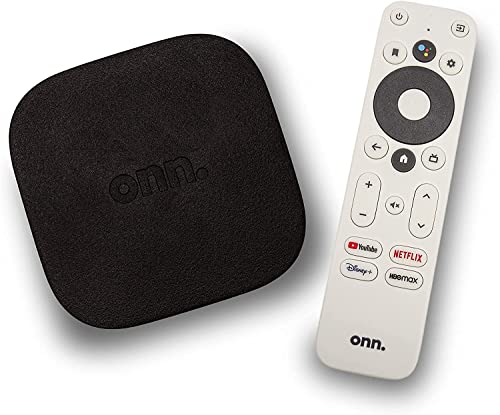
Best for: Viewers who want the flexibility of Android TV, access to the Google Play Store, and a robust app library with voice-enabled search. This is a strong pick for households already using Google services or those who value app breadth and 4K clarity.
Why selected: It delivers 4K Ultra HD resolution and Android TV’s app ecosystem, offering a wide range of streaming apps. The voice remote and Google Assistant make content discovery fast and hands-free, which improves daily use for family entertainment.
Caution: Performance and app availability can vary by region, and some users may prefer further expandability beyond what the base unit provides.
NVIDIA Shield Android TV Pro — 4K HDR Streaming Media Player

Best for: Power users who want top-tier performance, AI upscaling, and extensive storage and USB expansion. Ideal for home theaters, gamers, and users who rely on Plex and advanced media management.
Why selected: The Shield TV Pro leverages a premium Tegra X1+ chip for real-time upscaling, 3 GB RAM, and 16 GB storage, plus two USB 3.0 ports for peripherals and NAS. It supports Dolby Vision, Atmos, and robust connectivity for a high-end home theater setup.
Caution: It’s a feature-rich device that may be more than some buyers need; the interface can be more complex than entry-level units.
Google TV Streamer 4K — 4K Streaming with Voice Search Remote

Best for: Households that want highly personalized recommendations, integration with Google services, and a straightforward path to live TV and streaming apps. Great for teams using Google Assistant across devices.
Why selected: Google TV Streamer 4K prioritizes discoverability with tailored recommendations and a home screen that aggregates content across services. The voice search remote enables quick navigation and content control, enhancing daily viewing flexibility.
Caution: Requires compatible HDMI 2.1 cable (sold separately); some users may rely more on traditional remote control layouts than Google TV’s interface.
Amazon Fire TV Stick 4K Max — AI-Powered Search and Wi-Fi 6E
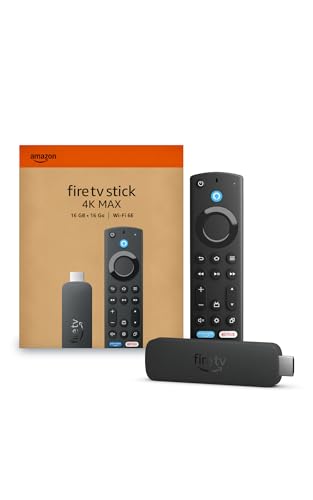
Best for: Viewers who want fast app starts, a broad content catalog, and strong Alexa integration. This device suits homes already using Amazon services and Alexa-enabled devices for a seamless ecosystem experience.
Why selected: The 2026 Fire TV experience emphasizes speed, smart content categorization, and personalized recommendations from Alexa+. It also supports cloud gaming through Xbox Game Pass, expanding entertainment options beyond streaming.
Caution: Some features rely on ongoing Amazon ecosystem integration; non-Amazon apps and services may feel secondary in this setup.
Amazon Fire TV Cube — Hands-Free Streaming with Alexa

Best for: Users who want hands-free control across the TV, soundbar, and receivers, plus fast, comprehensive search powered by Alexa. This is ideal for living rooms where voice control is central to daily use.
Why selected: The Fire TV Cube combines a powerful processor with built-in microphone and speakers for hands-free Alexa. It offers smart search capabilities and a quick path to finding content by actor, plot, or quote, which can streamline viewing choices.
Caution: It may be more than necessary for viewers who prefer a simpler, remote-driven interface or have limited demand for hands-free features.
Buying Guide
What should you consider when choosing a TV streaming device? Here are practical questions and guidance to help you decide:
- Resolution and picture quality: Do you want 4K HDR, or is HD sufficient for your TV and viewing habits? Devices like the ONN Android TV 4K and NVIDIA Shield Pro offer 4K HDR, while the Roku HD provides HD streaming.
- Ecosystem and search: Are you invested in Google, Amazon, or Roku ecosystems? Google TV and NVIDIA Shield emphasize Google services and app availability, while Fire TV centers around Alexa and Amazon services, and Roku focuses on easy navigation and broad app access.
- Remote and voice control: How important is hands-free control? Options range from the Shield Pro’s robust remote to Fire TV Cube’s comprehensive hands-free Alexa and to Roku’s simple remote with voice search.
- Expandable storage and ports: Do you need USB expansion, Plex server capabilities, or additional peripherals? The Shield Pro stands out with USB ports and Plex, while other sticks rely mostly on built-in storage and streaming apps.
- Setup location: Is the device meant for a bedroom, a secondary room, or the main entertainment center? Compact sticks like Roku HD and Roku 4K are ideal for tight spaces, while high-end boxes fit larger living rooms.
- Smart home integration: Will you control your TV experience via a smart assistant? Google TV and NVIDIA Shield offer strong Google Assistant integration, while Fire TV Cube leans into Alexa.
Quick comparison
| Device | Best For | Key Pros | Limitations |
|---|---|---|---|
| Roku Streaming Stick HD | Simple, clutter-free rooms | Easy setup, remote control for TV | HD only |
| ONN Android TV 4K | Android fans | 4K, Google Play Store access | Regional app variation |
| NVIDIA Shield Pro | Power users and media pros | 4K upscaling, USB expandability, Plex | Complex for casual users |
| Google TV Streamer 4K | Personalized content | Tailored recommendations, home control | HDMI 2.1 cable sold separately |
| Amazon Fire TV Stick 4K Max | Alexa-based ecosystem | Fast navigation, AI-powered search | Amazon-centric experience |
FAQ
- What is the difference between 4K and HD streaming devices? Answer: 4K devices output higher resolution and often support HDR formats, delivering crisper images on compatible TVs. HD devices are typically more affordable and sufficient for older TVs or casual viewing.
- Do these devices require a wall outlet? Answer: Some devices can be powered directly from the TV’s USB or HDMI port, while others may require an external power source for stability and performance.
- Can I control these devices with voice assistants? Answer: Yes. Most listed options offer voice search or full hands-free control via Google Assistant, Alexa, or Roku’s voice features, depending on the model.
- Which device is best for a Google-centric home? Answer: Google TV Streamer 4K or NVIDIA Shield Pro are strong choices due to native Google Assistant integration and Google Play access.
- Is gaming possible on these devices? Answer: Some models support cloud gaming or apps with gaming capabilities (e.g., Fire TV with Xbox Game Pass cloud gaming). Check each device’s supported services for details.
- Should I buy a streaming device for a secondary TV or bedroom? Answer: Yes. Compact sticks like Roku Streaming Stick HD or Roku Streaming Stick 4K are well-suited for secondary TVs due to small footprint and simple setup.